
PhysicsNeMo in practice
The PhysicsNeMo integration page assumes you already know what a Module, a .mdlus checkpoint, a datapipe or a DistributedManager is. This section does not. It explains NVIDIA PhysicsNeMo itself — what it is, what lives in each of its modules, and which piece of it a mesh library has to meet — so that you can tell, before writing anything, which part of a large library is relevant to your problem.
Everything here was read off the version meshio++'s adapter is exercised against, physicsnemo 2.2.0. Where an API is missing, renamed or unusable in that release, it says so; Versions and compatibility lists what changed from 2.1 and what is installed where this was written.
What PhysicsNeMo is
PhysicsNeMo is a PyTorch library for physics machine learning. It is not a solver, it does not discretize anything, and it has no opinion about your geometry. What it provides is the machinery around a physics-ML model:
- architectures for physics data (neural operators, graph networks, transformers over point clouds, diffusion models) —
physicsnemo.models; - a checkpoint format that travels with its own architecture, so a saved model reconstructs itself without your code —
physicsnemo.Module; - datapipes that turn simulation output into batched tensors —
physicsnemo.datapipes; - a mesh representation with calculus, generation and remeshing on it —
physicsnemo.mesh; - the parts that are not the model: distributed training, diffusion samplers, metrics, ONNX export, symbolic PDE residuals, active learning.
What it does not provide is the physics, and it does not provide the mesh either. Its mesh type holds simplices and nothing else, its readers expect files already shaped for training, and it has no notion of the forty-odd formats a real solve is written in. That gap is what meshio++ fills.
The mental model
Almost everything is one of four steps. Knowing which step you are in tells you which PhysicsNeMo module to look at, and which meshio++ surface feeds it.
| Step | You want | PhysicsNeMo | meshio++ |
|---|---|---|---|
| 1. Data out | Turn solves into training data | datapipes | write_dataset, DatasetManifest |
| 2. Train | Fit a model to it | models, optim, sym | graph_sample, feature_matrix, run_training |
| 3. Keep | Save something loadable later | Module, .mdlus | the run directory and its model card |
| 4. Deploy | Run it and get a mesh back | the model's forward | predict, writing <field>_pred into any format |
A surrogate that never leaves step 2 is a research result. Step 4 is where a prediction becomes a mesh again — with the units and normalization the model was trained under, written into a file some other tool can open.
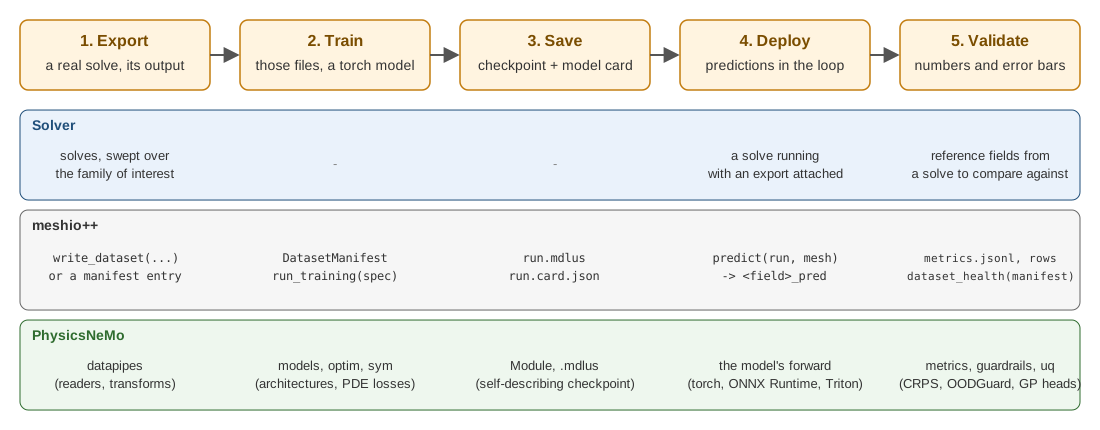
Figure 1: The five steps, and which side owns what at each of them. Step 5 wired back to step 1 is active learning.
Two words worth pinning down
Surrogate. A model that replaces an expensive computation with a cheap approximation of its output. Here: input fields or parameters go in, the field the solver would have produced comes out. It is not a solver — it does not iterate, it does not converge, and it is only as trustworthy as its training distribution. That last point is why Uncertainty and guardrails exists.
Neural operator. A model that learns a mapping between functions rather than between fixed-size vectors — trained at one resolution, evaluated at another. FNO is the canonical example. In practice it means the model takes a whole field as input and returns a whole field, instead of taking one point at a time.
How to read this section
Read in order if you are new; jump if you are not.
| Page | Read it when you want to know |
|---|---|
| Core and checkpoints | What a Module is, and what is actually inside a .mdlus file |
| Models | Which of the 25 architecture families fits your problem, as a decision chart |
| Layers and functionals | The blocks the models are made of, and the GPU operations you can call on mesh data with no model at all |
| Data and datapipes | How simulation output becomes batched tensors |
| Mesh and geometry | The mesh representation, its calculus, and generating geometry |
| Symbolic and physics | Putting a PDE in the loss, and the three ways to do it |
| Diffusion and deployment | Generative models, samplers, metrics, ONNX |
| Uncertainty and guardrails | Error bars, whether they are honest, and refusing inputs the model never saw |
| Active learning | The loop that lets the model choose its own solves |
| Training utilities and performance | CUDA graphs, AMP, profiling, checkpoints — and where the time actually goes |
| Distributed and scale | Running across ranks, and what is not possible on one GPU |
| Companion packages | physicsnemo-cfd, physicsnemo-curator, experimental, and every optional dependency |
| Versions and compatibility | The 2.2 pin, the extras, what changed from 2.1, how to upgrade safely |
Then go to PhysicsNeMo integration for what meshio++ actually implements, ML data handling for the tensors underneath it, and Dataset manifests for cataloguing the solves you train on.
Installing it
PhysicsNeMo and torch are optional for meshio++: it imports fine without them, and only the specific entry points that need them fail, with an actionable message. There is deliberately no [physicsnemo] pip extra — nvidia-physicsnemo hard-depends on a torch build meshio++ cannot pin for you.
pip install torch                # CPU or CUDA build, your choice
pip install nvidia-physicsnemo
Upstream documentation lives at docs.nvidia.com/physicsnemo. It is the reference for API signatures; this section is the map.