
Mesh Data Model
Mesh
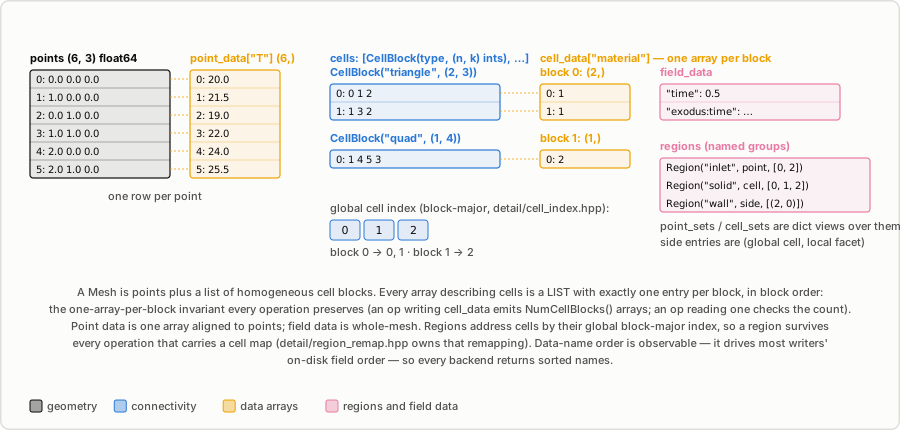
meshioplusplus.Mesh is the central object. All format readers produce one; all writers consume one.
class Mesh:
    points: np.ndarray            # shape (num_points, dim), float
    cells: list[CellBlock]
    point_data: dict[str, np.ndarray]         # shape (num_points, ...)
    cell_data: dict[str, list[np.ndarray]]    # one array per CellBlock
    field_data: dict[str, np.ndarray]         # scalar metadata (e.g. material ids)
    regions: list[Region]                     # named groups (see /regions)
    point_sets: dict[str, np.ndarray]         # compat view: the point regions
    cell_sets: dict[str, list[np.ndarray]]    # compat view: the cell regions
    gmsh_periodic: list | None                # Gmsh periodic section data
    info: any                                 # format-specific extra data
Constructor signature:
meshioplusplus.Mesh(
    points,
    cells,                    # list of CellBlock or (type, data) tuples, or a dict
    point_data=None,
    cell_data=None,
    field_data=None,
    point_sets=None,
    cell_sets=None,
    gmsh_periodic=None,
    info=None,
)
cells can also be passed as a dict {"triangle": array, ...} for backward compatibility; it is converted to a list internally.
CellBlock
Represents a homogeneous group of cells, all of the same element type.
class CellBlock:
    type: str               # meshio++ cell type name, e.g. "triangle", "tetra10"
    data: np.ndarray        # shape (num_cells, nodes_per_cell), int indices into points
    tags: list[str]         # optional labels
    dim: int                # topological dimension (0–3)
For polyhedron* types, data is a list of lists (variable number of faces per cell); it is not converted to a numpy array.
points
mesh.points is a 2-D numpy float array of shape (N, d) where d is 2 or 3. Points are always written as returned by readers. Some writers (e.g. VTK) require points to be a C-contiguous array; call np.ascontiguousarray(mesh.points) if converting between formats programmatically.
cell_data
cell_data maps a data name to a list of numpy arrays — one array per CellBlock in mesh.cells, in the same order:
mesh.cell_data = {
    "material": [
        np.array([1, 1]),   # data for cells block 0 (triangles)
        np.array([2]),      # data for cells block 1 (quad)
    ]
}
Symmetric tensors
A symmetric tensor stored as six components per point or cell uses the order xx yy zz xy yz zx, the order of VTK's six-component arrays and of CalculiX's STRESS/TOSTRAIN blocks. Readers keep the order the file uses rather than reordering it; the CalculiX reader is the one that documents it, and the ones that leave a six-component array untouched (GiD's Sxx Syy Szz Sxy Syz Sxz, XDMF's Tensor6) name their own.
Convenience properties
| Property | Returns |
|---|---|
mesh.cells_dict | dict[str, np.ndarray] — arrays concatenated across blocks of same type |
mesh.cell_data_dict | dict[str, dict[str, np.ndarray]] — same concatenation for cell data |
mesh.cell_sets_dict | dict[str, dict[str, np.ndarray]] — cell-set indices resolved per type |
meshioplusplus.topological_dimension is the module-level dict backing the "dimension" every operation that groups cells by dimension (decimate, gradient, partition's dual, normals, the SDF builder…) looks a cell type up in: {"vertex": 0, "line": 1, "triangle": 2, "tetra": 3, ...}, -1 for a type it does not carry.
Convenience methods
# Get all cells of a given type as one array
arr = mesh.get_cells_type("triangle")           # shape (N, 3)

# Get cell data for a specific cell type
arr = mesh.get_cell_data("material", "triangle")

# Copy
mesh2 = mesh.copy()

# Read / write (equivalent to meshioplusplus.read / meshioplusplus.write)
mesh = meshioplusplus.Mesh.read("file.msh")   # deprecated; use meshioplusplus.read()
mesh.write("out.vtk")
Named regions
Since v8.1.0 the named groups live in mesh.regions as Region objects, which the C++ core carries, every binding surface sees, and every operation either remaps or explicitly drops. point_sets and cell_sets are unchanged compat views over them, so existing code keeps working; a third kind, side sets (groups of cell facets), has no view equivalent and is reachable only through mesh.regions. See Named regions.
Converting sets ↔ data
Some formats only support sets (named groups), others only support integer arrays. meshio++ provides conversion helpers:
# Flatten point/cell sets into integer-valued data arrays
mesh.point_sets_to_data()           # adds data key joined from set names
mesh.cell_sets_to_data("groups")    # custom key name

# Split an integer data array back into named sets
mesh.point_data_to_sets("groups")
mesh.cell_data_to_sets("material")
The CLI meshioplusplus convert exposes --sets-to-int-data and --int-data-to-sets for the same operations.
gmsh_periodic
Only populated when reading Gmsh files that contain a $Periodic section. The value is a list of periodic link entries, each of the form:
[edim, (slave_tag, master_tag), affine_transform_or_None, [[slave_node, master_node], ...]]Roundtrips back into a Gmsh file correctly when passed through meshioplusplus.gmsh.write.