
SVG (.svg)
Scalable Vector Graphics output — a 2-D drawing of the mesh, written and read back, not a mesh format: the reader parses only the structure meshio++'s own writer emits. Flat 2D meshes draw directly; genuinely 3D meshes are rendered: the boundary skin of any volume cells is extracted (see extract_skin) and projected through an orthographic camera, painted back-to-front.
| Format name | svg |
| Extensions | .svg |
| Read / Write | ✓ (a 2-D drawing, planar) / ✓ |
| Extra dependencies | — |
Reading & writing
meshioplusplus.svg.read(path, strict=True) reads a drawing back (see Reading). Full write signature:
import meshioplusplus

meshioplusplus.svg.write(
    "out.svg", mesh,
    float_fmt=".3f",
    stroke_width=None,
    image_width=100,
    fill="#c8c5bd",
    stroke="#000080",
    azimuth=45.0,
    elevation=35.264389682754654,
    roll=0.0,
    color_by=None,
    component=None,
    cmap="viridis",
    vmin=None,
    vmax=None,
    nan_color="#808080",
    colorbar=False,
)float_fmt— coordinate number format.stroke_width— edge stroke width; ifNone(default), auto-computed as 1% of the mesh's on-canvas width.image_width— output SVG width in user units, default100(notNone) — deliberately non-trivial because some SVG viewers (e.g.eog) mis-render images whose natural width is close to1unit.fill/stroke— cell fill and edge colours, defaulted to match ParaView's default rendering colours (per an inline source comment).azimuth/elevation/roll— orthographic camera angles in degrees, used only for genuinely 3D input. The view direction is(cos el·cos az, cos el·sin az, sin el)with z as the up reference;rollrotates the image in-screen. The defaults (45,atan(1/√2) ≈ 35.264°) look down the(1,1,1)diagonal — the classic CAD isometric view.color_by…colorbar— data-driven colouring, see below. Withcolor_byunset (the default) the output is byte-identical to previous releases.
Reading
meshioplusplus.svg.read(path, points_only=False, arrays=None, strict=True) (and read_svg in C++, mio_read in the flat bindings) is the exact inverse of the writer and nothing more. A drawing is not a mesh, so anything else in the file, such as another tool's drawing or a hand edit, is a ReadError naming the construct, never a guess.
- Cells. A closed path of 3 vertices is a
triangle, of 4 aquad, of more apolygon; an open 2-vertex path is aline. Consecutive cells of one type and size form one block, so a flat write comes back block for block. - Points are welded on the exact text of their coordinates, in order of first appearance, so corners the writer printed identically come back shared (
0and0.0are two points). Nothing in an SVG says two paths share a vertex, so a mesh's numbering and unused points are not recovered. - Model units. The writer flips y about
max_y + min_yand scales the drawing toimage_width. The marker comment records that scale and the flip (scale=S offset=OX,OY,%.17g), and the reader restoresx / S + OXandOY - y / S, to the 3 decimalsfloat_fmtkept. Without a marker (strict=False) the scale is 1 and the flip is undone from theviewBox. zis 0. A 3-D mesh was drawn projected, and what comes back is that picture. The read warns once, either "planar drawing, z = 0 assumed" or "projected from 3-D (azimuth, elevation, roll), depth lost".- Fills. A path's
fill="#rrggbb"comes back as the cell arraysvg:fill(int32, shape(n, 3),-1 -1 -1for a cell with no fill such as a line), present only when some path has one. It is the colour, never the data it was coloured from: a colour map does not invert. The colour bar (<rect>and<text>) is skipped. - Refused:
<polygon>, anytransform, a curve (C,S,Q,T,A), a relative command (lowercase),HandV, several subpaths, coordinates repeated after one command, any element butsvg,style,path,rectandtext, and namespace prefixes. - The marker. A file without the marker comment is refused, because only meshio++'s own drawings are read back;
strict=False(ReadOptions::mLenient,mio_read_opts.lenient,--lenienton the native CLI) reads it as a plain drawing with a warning. Files written by a release before the marker lack it too.points_onlyandarraysdropsvg:fill. - The C++ reader and the Python twin return identical meshes (
tests/python/test_svg.pyreads every file through both and compares them), and a refusal in one is a refusal in the other. They differ only on a file that is not well-formed XML (invalid UTF-8, a repeated attribute), which the C++ core's pugixml tolerates and the Python twin's expat refuses.
Data-driven colouring
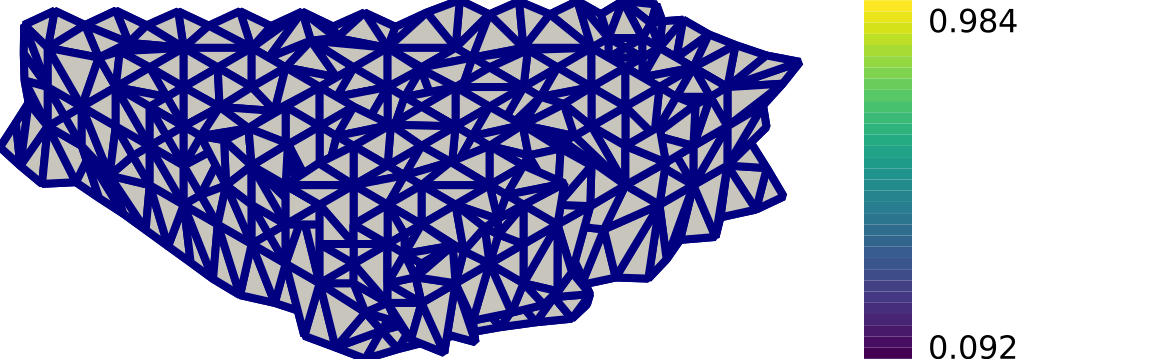
color_by names a point_data or cell_data array; each drawn face then gets its own fill attribute (overriding the document-level path { fill: … } rule) instead of the flat fill colour.
meshioplusplus.svg.write(
    "quality.svg",
    meshioplusplus.attach_quality(mesh),
    color_by="quality:scaled_jacobian",
    cmap="viridis",
    colorbar=True,
)
- Point vs cell. The name is looked up in
point_datafirst, thencell_data; present in neither is an error naming what is available. Point data colours a face by the mean of its corner values; cell data by its owning cell's value. - Volume meshes. On the projected path the drawn faces are skin facets, not input cells. When colouring by cell data the skin is therefore extracted with provenance (the
surface:parent_cellarray fromextract_surface), so each facet gets the value of the volume cell it actually bounds. A 2D surface mesh needs no indirection — its faces are its cells. componentpicks one component of a multi-component array; without it a multi-component row reduces to its magnitude. A 1-D scalar array stays scalar.cmapis one of the built-in colormaps —viridis,coolwarm,turbo,magma,inferno,plasma,grey,synthwave(a neon palette that is not perceptually uniform; see the theme), and a reversed_rvariant of each — baked into the core as 256-entry lookup tables. No extra dependency: matplotlib is needed only to regenerate the tables (tools/gen_colormaps.py), never to use them.vmin/vmaxset the mapped range. Left unset, the range is the finite minimum and maximum among the drawn faces — so the visible figure spans the whole colorbar. Note this differs from ParaView, which ranges over the whole array including cells that are never drawn. Values outside the range are clamped.vmin > vmaxis an error;vmin == vmax(which an all-constant array produces) maps everything to the middle of the colormap rather than dividing by zero.nan_coloris used verbatim, without going through the colormap, for any face whose value is NaN or infinite. Such values are also excluded from the auto range.colorbarappends a 32-swatch vertical gradient withvmin/vmaxlabels to the right of the figure. It widens only theviewBox— the scaling factor, the stroke width and every mesh coordinate are computed from the unmodified width, so turning it on moves nothing already on the canvas. The swatches are<rect>, not<path>, so the document-levelpathrule does not stroke them.
3D input
A mesh whose points have a non-zero z extent takes the 3D rendering path: if it contains supported volume cells, extract_skin(mesh, linearize=True) runs first (higher-order faces collapse to corner triangles/quads); a 3D shell mesh (only surface cells) is projected as-is (triangle6/quad8/quad9 are corner-linearized). Faces are then sorted back-to-front by view-space centroid depth (painter's algorithm, stable sort) and emitted with the same <path> templates as the flat path. There is no backface culling and no shading in v1 (a fixed fill colour; shading is future work). Faces that intersect, or overlap in depth, can be drawn in the wrong order by the painter's algorithm; for a picture that resolves visibility per pixel, with shading and edge overlays, use the software rasterizer (snapshot, render_image), which takes the same color_by options.
File structure
A single <svg> root holding a comment (the marker, below), the <style>, then one <path> element per drawable cell (not <polygon>) — chosen deliberately: the comment in the source notes that svgo (a common SVG optimizer) converts <polygon>s to <path>s but drops style information when it does so, so meshio++ emits paths directly to sidestep that.
The marker is an XML comment right after the opening tag: the provenance tag Written by meshio++ v…, one line Drawing: planar scale=S offset=OX,OY (or Drawing: projected azimuth=A elevation=E roll=R scale=S offset=OX,OY for a projected 3-D mesh), then whatever else the provenance block carries. It is there under every provenance mode, and C++ and Python write it byte for byte.
Path d templates (space-separated coordinate pairs, float_fmt-formatted):
| cell type | path template |
|---|---|
line | M x0 y0L x1 y1 (open, no closing Z) |
triangle | M x0 y0L x1 y1L x2 y2Z |
quad | M x0 y0L x1 y1L x2 y2L x3 y3Z |
If points.shape[1] == 3 and every z coordinate is ~0 (atol=1e-14), the mesh is treated as flat 2D and drawn exactly as in previous releases (byte-identical); otherwise the 3D projected path above applies. The y-coordinate is flipped (max_y + min_y - y) to convert from the mesh/math convention (y-up) to SVG's screen convention (y-down) — in the 3D path the flip applies to the projected coordinates.
Cell types
line, triangle, quad (plus, on the 3D path, corner-linearized triangle6/quad8/quad9 and the volume types accepted by extract_skin). Any other cell block present in the mesh is dropped, following the warn-and-skip convention most other meshio++ writers use — one warning per write naming every skipped type, not a warning per block.
Data mapping
No data array is written to the file. One array can be read to drive the face colours via color_by (see above); everything else — and all of field_data — is ignored, so only geometry and connectivity affect an uncoloured figure.
Quirks & limitations
- No diagonal/winding correction on
quadcells — a "crossed" (non-convex, bowtie) node ordering renders incorrectly with no error raised. - Unsupported cells are dropped from the output with a warning naming them.
- The painter's algorithm sorts whole faces by centroid depth — mutually intersecting faces (which a closed skin never has) can stack in the wrong order; there is no per-pixel depth test.
- Reading is limited to meshio++'s own drawings, as planar meshes: see Reading.
- Colouring is a Python + C++-direct + CLI feature. The C API, Fortran and WebAssembly surfaces reach this writer through the shared registry, whose
(path, mesh)writer entries structurally cannot carry parameters, so they always emit the fixed default styling — a documented gap of the same kind as the point/cell-set gaps indiff/merge/split. - Only one array can drive the colours; there is no multi-field or per-block colouring.
- The colorbar's labels are the range endpoints only — there are no intermediate ticks.
Notes
- Backed by the C++ core (
write_svg) with a pure-Python fallback:meshioplusplus.svg.writeuses the C++ writer for real file paths and falls back to Python for file-object/buffer targets or on any error. Registered in the shared dispatch registry, so it is also reachable from the WASM, C API, and Fortran flat bindings (fixed default styling, the default isometric camera and no colouring — per-call options are exposed only through the Pythonwrite, the direct C++ call, and the CLI). - The C++ writer and the pure-Python reference are byte-identical, on the flat path, the projected 3D path and the coloured path alike.
tests/python/test_svg.pyasserts exactread_bytes()equality across a matrix of colouring options and additionally pins the provenance mapping, the corner averaging, the auto range, clamping,nan_colorand the colorbar's append-only geometry.tests/cpp/test_svg_tikz.cppcovers the C++ writer directly, including the goldenfill="#440154"spelling and the four invalid-option errors. - Colouring shares its resolution layer with the TikZ writer:
src/cpp/include/meshioplusplus/detail/face_color.hppand its twinsrc/python/meshioplusplus/_facecolor.py, over the colormap tables indetail/colormap.{hpp,cpp}/_colormap.py.