
CLI Reference
The meshioplusplus command-line tool is installed alongside the Python package.
meshioplusplus --version
meshioplusplus --help
meshioplusplus <subcommand> --help
The same verbs are also available as a standalone native C++ binary that needs no Python interpreter and no pybind11 extension — see Native CLI (C API) for how to build it (build/configure.sh --cli --build), or download a ready-to-run, statically-linked build for Linux/macOS/Windows from the GitHub Releases page. It has no Python fallback for formats whose C++ reader raises. Named sets are regions in the core: info prints them, diff compares them, and single-mesh convert -s/-d converts point/cell sets↔scalar integer data. Neither conversion flag combines with selective reads or sequences; use the pipeline SetsToData / DataToSets steps instead. Everything below otherwise applies identically to both, except for the verbs each section marks Python only: the grid-* family, subsample, proximity-graph, predict, guard-fit/guard-check and dataset have no native binary counterpart (the native binary does have a surface alias for extract-surface, not documented as its own section since it behaves identically).
meshioplusplus convert
Convert a mesh file from one format to another.
meshioplusplus convert [options] INFILE OUTFILE| Option | Short | Description |
|---|---|---|
--input-format FORMAT | -i | Force input format (skip extension detection) |
--output-format FORMAT | -o | Force output format |
--ascii | -a | Write ASCII variant (default: binary where available) |
--appended | Write a .vtu's arrays as raw binary in one <AppendedData> section, no base64 (see VTU); any other output format is an error (a series output such as .pvd/.pvtu/.pvtp included, since its pieces are not named vtu), and it is mutually exclusive with --ascii | |
--float-format FMT | -f | Float format string for ASCII output (default: .16e) |
--sets-to-int-data | -s | Convert point/cell sets to integer data arrays |
--int-data-to-sets | -d | Convert integer data arrays to point/cell sets |
--json | Print a JSON summary of what was written (see JSON output) |
CAD geometry — a Kratos CAD JSON, STEP or IGES input converted to a .cad.json output carries its B-rep (the NURBS faces, trimming loops and edges) rather than its sampling, in both CLIs: meshioplusplus convert part.step part.cad.json turns a CAD model into Kratos IGA geometry (STEP and IGES reading needs the OpenCASCADE backend).
Transient sequences — treat a set of files, or the steps inside one file, as one dataset (see sequences):
| Option | Description |
|---|---|
--input FILE | An extra input file, appended after INFILE; repeatable |
--times T1,T2,... | Explicit per-step times; the count must match |
--time-from WHICH | auto (default), file, filename or index |
--sequence | Force sequence handling |
--no-sequence | Force single-file handling (for a filename containing * or {step}) |
meshioplusplus convert 'out_*.vtu' series.xdmf          # fan-in (quote the glob!)
meshioplusplus convert series.xdmf 'step_{step}.vtu'    # fan-out
meshioplusplus convert a.vtu --input b.vtu out.xdmf     # pre-expanded argv
Quote the pattern. A shell expands out_*.vtu before the CLI sees it, so the unquoted form arrives as a dozen positionals and fails on the argument count; use --input when something else has already expanded the glob.
Ordering is natural-numeric, so out_10.vtu follows out_9.vtu. A multi-step input aimed at a single-step output is an error naming {step} and --time-step, never a silent write of step 0 — pass --time-step=N when you genuinely want one step.
Data-driven colouring (SVG/TikZ/glTF output only):
| Option | Description |
|---|---|
--color-by NAME | point_data or cell_data array to colour the faces by |
--component I | Component of a multi-component array (default: its magnitude) |
--cmap NAME | viridis (default), coolwarm, turbo, magma, inferno, plasma, grey or synthwave (an original neon palette for the synthwave theme, not perceptually uniform), or a reversed _r variant of any |
--vmin V / --vmax V | Colour range (default: the drawn faces' finite range) |
--nan-color C | Colour for NaN/infinite values (default: #808080 / gray) |
--colorbar | Append a gradient bar with min/max labels (SVG/TikZ only) |
Point data colours a face by the mean of its corner values, cell data by its owning cell's value — for a volume mesh, found through the skin's surface:parent_cell provenance. For glTF output the array is baked into the linear COLOR_0 vertex colour of the exported surface — point data per vertex, cell data per triangle — and the material becomes unlit; see glTF. --color-by with any other output format is an error, as is any of the modifier flags without --color-by. See the SVG and TikZ format pages for the full semantics.
glTF output options (.glb/.gltf only; either is an error for any other output format):
| Option | Description |
|---|---|
--split-angle DEG | Duplicate vertices where the surface creases by more than DEG degrees, 0 to 180 (default 30) |
--up-axis {auto,x,y,z} | The source axis that points up (default auto: y for a flat mesh, else z) |
Examples:
meshioplusplus convert mesh.msh mesh.vtu
meshioplusplus convert -i gmsh -o vtk mesh.msh mesh.vtk
meshioplusplus convert --ascii mesh.msh mesh.vtu
meshioplusplus convert --sets-to-int-data mesh.inp mesh.xdmf
meshioplusplus convert mesh.msh skin.stl   # volume mesh -> boundary-skin STL

# colour a vector figure by a field
meshioplusplus convert mesh.vtu figure.svg --color-by temperature --colorbar
meshioplusplus convert mesh.vtu figure.tikz --color-by damage --cmap coolwarm \
    --vmin 0 --vmax 1

# a web-native surface (glTF), coloured by a field
meshioplusplus convert result.vtu result.glb --color-by temperature --cmap turbo
meshioplusplus convert part.vtu part.glb --split-angle 45 --up-axis z
Converting a 3D volume mesh to STL, PLY or glTF writes its extracted boundary skin (the writers' default — see Skin extraction); converting to SVG or TikZ renders it with the default isometric camera.
JSON output
Every verb that prints a report takes --json: info (with or without --fast), quality, check, diff, convert, stats, regions, data info, data integrate, pipeline, feature-edges, segment, fit-primitives, tessellate, region-adjacency, find-interface, contact-pairs, split-interface, hausdorff, periodic, agglomerate and resample, and the Python-only guard-check, grid-spectrum and dataset list. The output is always strict JSON — a non-finite number is null, never a bare NaN — and both CLIs print the same shape for every verb they share: the same keys, strings, integers, booleans and nulls, and floats that round-trip (tests/python/test_cli_json.py holds the shared reports to it). The shapes are the Python API's own reports:
| Verb | JSON |
|---|---|
info --fast | read_metadata's dict: num_points, point_dim, num_cells, cell_blocks (type, num_cells, nodes_per_cell, ragged), the three *_data_names, format, time_values, regions, provenance, provenance_recognised, fell_back_to_full_read, and bbox_min/bbox_max when the header gives them |
info | the same counts and names from a full read, plus consistent and num_unused_points (null when inconsistent) |
quality | compute_quality's dict without the per-cell arrays |
check | check_quality's dict: passed, the counts and checks |
diff | diff's report plus equal (the exit-code decision); the Python CLI adds its sets section |
convert | input, output, num_points, num_cells, cell_blocks, the data names and num_regions; for a sequence, mode, num_steps and num_files |
agglomerate | cells_in, cells_out, num_faces_merged and num_rejected |
resample | method, num_steps and the target times |
segment | num_patches, num_merged, num_feature_edges, num_boundary_edges and num_non_manifold_edges |
fit-primitives | num_patches, one count per type (num_plane … num_torus) and num_unfitted |
iga-refine, iga-sample | operation, model (nurbs or brep), num_patches, num_points, num_cells and cell_blocks |
iga-evaluate | num_points, space_dim, points, fields (components, values), and with --derivatives 1 derivatives and normals; for a B-rep face inside; arrays flattened row-major |
tessellate | Tessellation.schema without version: levels, curved, the source and output counts, stencil_width and the watertight facet counts |
to-cad | valid, tolerance, the volumes and their ratio, max_deviation, the faces by type (num_bspline, num_fillet and num_helical among them, and of those num_variable_fillet, num_blend and num_rounded_thread), num_vertex_blend and num_chamfer (v17.2.0) and, of the fillets and threads, num_conic_blend, num_tapered_thread and num_variable_pitch_thread, num_faceted_faces, num_patches, num_demoted, the exact and approximated edges, num_solids and num_split_patches |
region-adjacency | facets and measure |
find-interface | pair counts, area, maximum gap, unmatched counts and both Side-entry lists |
contact-pairs | num_pairs, the pair table and unmatched slave-point ids |
split-interface | duplicated-point and cohesive-cell counts |
The exit codes are unchanged by --json.
meshioplusplus info
Print a summary of a mesh file.
meshioplusplus info [options] INFILE| Option | Short | Description |
|---|---|---|
--input-format FORMAT | -i | Force input format |
--fast | Summarize from the file header instead of loading it | |
--json | Print the summary as JSON (see JSON output) |
Output includes: number of points, cell blocks and their types/counts, point/cell/side sets (see Named regions), point/cell data names, field data names. It also warns if cells reference nonexistent points or if there are unused points.
Example:
meshioplusplus info mesh.mshmeshioplusplus quality
Print a per-cell mesh quality report (min/mean/max and counts of inverted/degenerate cells).
meshioplusplus quality [options] INFILE| Option | Short | Description |
|---|---|---|
--input-format FORMAT | -i | Force input format |
--output FILE | -o | Also write the metrics into FILE as cell_data |
--json | Print the report as JSON |
Examples:
meshioplusplus quality part.vtu
meshioplusplus quality part.vtu -o part_quality.vtu
meshioplusplus check
The quality gate: score every cell and test thresholds on the per-cell values. Exits 0 when every check passes, 1 when one fails, 2 when the check could not run (an unreadable file, a malformed specification).
meshioplusplus check [options] INFILE| Option | Short | Description |
|---|---|---|
--require SPEC | -r | Thresholds, e.g. "scaled_jacobian >= 0.2; aspect_ratio <= 5 @ 1%" (repeatable) |
--gate FILE | Read thresholds from FILE, one clause per line, # comments | |
--max-inverted N | The most inverted cells allowed; negative disables (default 0) | |
--max-degenerate N | The most degenerate cells allowed; negative disables (default 0) | |
--json | Print every check as JSON | |
--input-format FORMAT | -i | Force input format |
Example — a CI step:
meshioplusplus check part.vtu -r "scaled_jacobian >= 0.2" -r "aspect_ratio <= 5 @ 1%" \
    || { echo "mesh failed its quality gate"; exit 1; }
meshioplusplus extract-surface
Extract the boundary surface/edges of a mesh (volume → faces, 2D surface → edges) and write it out.
meshioplusplus extract-surface [options] INFILE OUTFILE| Option | Short | Description |
|---|---|---|
--input-format FORMAT | -i | Force input format |
--output-format FORMAT | -o | Force output format |
--parent-ids | -p | Record each facet's parent cell id as cell_data |
Examples:
meshioplusplus extract-surface part.vtu surface.stl
meshioplusplus extract-surface --parent-ids part.vtu surface.vtu
The native binary also accepts surface as an alias for this verb; the Python CLI does not.
meshioplusplus reorder
Renumber a mesh's nodes/elements to reduce matrix bandwidth (RCM) or improve cache locality (Morton / Hilbert), as a pure permutation.
meshioplusplus reorder [options] INFILE OUTFILE| Option | Short | Description |
|---|---|---|
--method METHOD | -m | rcm (default), morton, or hilbert |
--report | -r | Print the connectivity bandwidth before and after |
--input-format FORMAT | -i | Force input format |
--output-format FORMAT | -o | Force output format |
Examples:
meshioplusplus reorder part.vtu reordered.vtu
meshioplusplus reorder part.vtu reordered.vtu --method hilbert
meshioplusplus reorder part.vtu reordered.vtu --method rcm --report
Interface and contact commands
region-adjacency writes conforming shared facets for named Cell regions (or cell blocks when fewer than two Cell regions exist). find-interface matches boundary facets by shared node ids or geometric proximity; contact-pairs projects a Point region to master facets and prints a CSV table unless --json is requested; split-interface duplicates point fans along an existing Side region or explicit Side-entry pairs. See Interfaces and contact for matching, index and cohesive-element conventions.
meshioplusplus region-adjacency parts.vtu shared.vtu --regions upper,lower --json
meshioplusplus find-interface parts.vtu interface.vtu --region-a upper --region-b lower --mode proximity --gap-tolerance 0.01 --json
meshioplusplus contact-pairs slave.vtu master.vtu --slave-region nodes --master-region skin --output pairs.csv
meshioplusplus split-interface parts.vtu split.vtu --side-region crack --add-cohesive --json
meshioplusplus split-interface parts.vtu split.vtu --side-entries '[[4,2],[7,0]]'
find-interface and contact-pairs accept separate input files; their region selectors are Cell regions for facets and a Point region for slave nodes, respectively. region-adjacency --regions accepts comma-separated names (repeat the option to append groups; the Python CLI also accepts space-separated names). In split-interface, side-entry cell ids are zero-based global cell ids and local-facet ordinals are zero-based.
meshioplusplus diff
Compare two meshes and report whether they are equivalent within a tolerance. The exit code is nonzero when the meshes differ and zero when they are equal, so it drops straight into CI / shell scripts / Makefiles.
meshioplusplus diff [options] INFILE_A INFILE_B| Option | Short | Description |
|---|---|---|
--atol ATOL | Absolute tolerance in `abs_err <= atol + rtol* | |
--rtol RTOL | Relative tolerance (default 1e-9) | |
--unordered | Match points by spatial proximity (tolerant to a shuffled node order) | |
--exact | Only a bitwise-identical result passes (tolerated drift exits nonzero) | |
--quiet | -q | Print nothing; communicate equality only via the exit code |
--json | Print the report as JSON, plus equal | |
--input-format-a FORMAT | Force the format of the first file | |
--input-format-b FORMAT | Force the format of the second file |
Examples:
meshioplusplus diff a.vtu b.vtu
meshioplusplus diff a.vtu b.vtu --atol 1e-8 --rtol 1e-6
meshioplusplus diff a.msh b.vtu --unordered
meshioplusplus diff expected.vtu actual.vtu --quiet || echo "regression!"
meshioplusplus merge
Merge two or more mesh files into one.
meshioplusplus merge [options] FILE... OUTFILETakes two or more input meshes followed by the output file.
| Option | Short | Description |
|---|---|---|
--input-format FORMAT | -i | Force input format (applied to every input) |
--output-format FORMAT | -o | Force output format |
--weld | Merge coincident nodes within --atol | |
--atol ATOL | Coincidence tolerance for --weld (default 1e-8) | |
--data-policy POLICY | intersection (default, keep only data keys present in every input) or fill (keep every key, filling missing rows with NaN) | |
--drop-duplicate-cells | With --weld, drop cells that become identical after welding | |
--no-source-tag | Do not add the per-cell source_mesh_id tag | |
--quiet | -q | Do not print the merge summary |
Prints a summary of points/cells in and out (and points welded, with --weld) unless --quiet is given.
Examples:
meshioplusplus merge a.vtu b.vtu merged.vtu
meshioplusplus merge a.vtu b.vtu c.vtu merged.vtu --weld --atol 1e-6
meshioplusplus merge a.vtu b.vtu merged.vtu --data-policy fill
meshioplusplus transform
Apply an affine transform to a mesh's point coordinates (see transform).
meshioplusplus transform [options] INFILE OUTFILE| Option | Description |
|---|---|
--translate x,y,z | Translation |
--scale sx,sy,sz | Per-axis scale (or a single scalar for uniform) |
--rotate axis,deg | Rotation; axis is x/y/z or nx,ny,nz (angle in degrees) |
--matrix m00,...,m33 | A row-major 4×4 affine matrix (16 values) |
--scale-units FACTOR | Uniform unit-scale factor (e.g. 0.001) |
--rotate-data | Also rotate vector/tensor point_data by the transform |
--input-format / --output-format (-i/-o) | Force input/output format |
Give exactly one transform source. Values starting with - need the = form (--translate=-1,0,0).
Examples:
meshioplusplus transform in.vtu out.vtu --translate 1,2,3
meshioplusplus transform in.vtu out.vtu --rotate z,90
meshioplusplus transform in.vtu out.vtu --scale-units 0.001
meshioplusplus clean
Weld / prune / de-dup a mesh in one pass (see clean).
meshioplusplus clean [options] INFILE OUTFILE| Option | Description |
|---|---|
--weld | Fuse coincident points within --atol |
--atol ATOL | Weld tolerance (default 1e-8) |
--remove-orphans | Drop unused points |
--drop-degenerate | Drop degenerate cells |
--drop-duplicates | Drop exact-duplicate cells |
--input-format / --output-format (-i/-o) | Force input/output format |
With no step flags, the default set runs (remove-orphans + drop-degenerate + drop-duplicates, no weld). A removal summary is printed.
Examples:
meshioplusplus clean in.vtu out.vtu
meshioplusplus clean in.vtu out.vtu --weld --atol 1e-6
meshioplusplus crop
Extract part of a mesh — inside a bounding box, inside a half-space, or the cells a cell_data comparison selects (see crop).
meshioplusplus crop [options] INFILE OUTFILE| Option | Description |
|---|---|
--bbox xmin,ymin,zmin,xmax,ymax,zmax | Axis-aligned bounding box |
--plane px,py,pz,nx,ny,nz | Half-space (point + normal), keep (p−point)·normal ≥ 0 |
--where 'NAME OP VALUE' | A scalar cell_data predicate, OP one of <, <=, >, >=, ==, !=. A non-finite cell value never matches |
--mode all|any | Keep a cell if ALL (default) or ANY node is inside. --bbox/--plane only |
--record-ids | Attach original point/cell ids as data arrays |
--input-format / --output-format (-i/-o) | Force input/output format |
Give exactly one of --bbox/--plane/--where. Negative values need the = form (--bbox=-1,-1,-1,1,1,1). --mode alongside --where is an error rather than being ignored: a per-cell value has nothing for an all/any rule to reduce.
Examples:
meshioplusplus crop in.vtu out.vtu --bbox 0,0,0,1,1,1
meshioplusplus crop in.vtu out.vtu --plane 0.5,0,0,1,0,0 --mode any
meshioplusplus crop in.vtu out.vtu --where 'quality:scaled_jacobian < 0.3'

# inside a surface, composed:
meshioplusplus sdf shell.stl field.vtu --resolution 64,64,64 --location center
meshioplusplus crop field.vtu inside.vtu --where 'sdf:distance < 0'
meshioplusplus slice
Compute the planar cross-section of a mesh — the intersection with a plane, one dimension below the cut cells (a volume mesh → a triangle/quad surface, a 2D surface → a line mesh). See slice.
meshioplusplus slice [options] INFILE OUTFILE| Option | Description |
|---|---|
--origin x,y,z | A point on the cutting plane (default 0,0,0) |
--normal x,y,z | The plane normal (default 0,0,1; non-zero) |
--record-parent-ids | Attach slice:parent_cell (the input cell each section cell was cut from) |
--input-format / --output-format (-i/-o) | Force input/output format |
Negative components need the = form (--normal=0,0,-1). Unlike crop, which keeps whole cells on one side, slice computes the intersection itself.
Examples:
meshioplusplus slice in.vtu section.vtu --origin 0,0,0.5 --normal 0,0,1
meshioplusplus slice part.msh section.vtu --normal=0,0,-1 --record-parent-ids
meshioplusplus isosurface
Compute the level set(s) of a scalar point_data field — the data-driven sibling of slice, and like it one dimension below the cut cells (a volume mesh → a triangle/quad surface, a 2D surface → a line contour). See isosurface.
meshioplusplus isosurface [options] INFILE OUTFILE| Option | Description |
|---|---|
--array NAME | The point_data array to contour (required) |
--values v1,v2,… | The isovalues (required); sorted ascending, duplicates dropped |
--component I | Component of a multi-component array; the row magnitude by default |
--record-parent-ids | Attach iso:parent_cell (the input cell each contour cell was cut from) |
--input-format / --output-format (-i/-o) | Force input/output format |
Negative isovalues need the = form (--values=-1.5). A cell_data name is rejected: cell data is piecewise constant and has no level set — convert it with meshioplusplus data to-point first. Every contour cell is tagged with iso:value (Float64) and iso:index (Int64, the ordinal — the integer tag split --by region --tag … needs).
Examples:
meshioplusplus isosurface part.vtu shell.vtu --array T --values 350
meshioplusplus isosurface part.vtu shells.vtu --array T --values 300,350,400
meshioplusplus isosurface part.vtu shell.vtu --array v --values=-1.5 --component 2

# one file per contour, via the integer ordinal tag
meshioplusplus split shells.vtu 'contour_{key}.vtu' --by region --tag iso:index
meshioplusplus split
Partition a mesh into several files by type, region, named Cell regions, or connected component (see split).
meshioplusplus split [options] INFILE OUTPATTERNOUTPATTERN must contain {key}, replaced by each piece's key.
| Option | Description |
|---|---|
--by type|region|regions|component | Split criterion (default type) |
--tag NAME | For --by region: the integer cell_data name to split on (unused by regions) |
--input-format / --output-format (-i/-o) | Force input/output format |
Prints how many pieces were produced and their sizes. --by regions (plural) is one piece per named Cell region and is not a partition — a cell in several regions lands in several pieces, and Point/Side regions produce no piece at all. Run meshioplusplus regions first to see what a mesh's regions are.
Examples:
meshioplusplus split in.vtu 'out_{key}.vtu' --by type
meshioplusplus split in.vtu 'out_{key}.vtu' --by component
meshioplusplus split in.inp 'part_{key}.vtu' --by regions
meshioplusplus regions
List a mesh's named regions — name, kind, dimension, tag, and entry count (not the entries themselves).
meshioplusplus regions [options] INFILE [OUTFILE]| Option | Description |
|---|---|
--input-format (-i) | Force input format |
--output-format (-o) | Force output format (with edits) |
--json | Emit the regions as JSON |
--union OUT=A,B[,...] | Add OUT, the union of regions A, B, ... |
--intersection OUT=A,B[,...] | Add OUT, the entries in every one of them |
--difference OUT=A,B[,...] | Add OUT, the entries of A in none of the others |
--rename OLD=NEW | Rename a region |
--retag NAME=TAG[:DIM] | Set a region's tag (and dimension); NAME=:DIM keeps the tag |
--delete NAME | Remove a region |
--drop-inputs | The set operations remove their input regions |
With any edit flag it edits the regions instead of listing them: the edits apply in command-line order to the mesh read from INFILE, the result is written to OUTFILE, and the resulting region list is printed. A region name may be prefixed point:, cell: or side: to pick one of several regions sharing a name; a name that still matches several, or none, is an error.
Goes through the same cheap path info --fast/read_metadata use rather than a full read: whenever the summary already comes from an in-memory mesh (every format lacking a native metadata path, plus Exodus, which always falls back), regions cost nothing extra to report; the native metadata paths of VTU/VTP/XDMF (since v16.27.0) and Gmsh 4.1 read them from their headers and array sizes.
Example:
meshioplusplus regions bracket.inp
# <meshio++ mesh regions> (2)
#   fixed (point, 12 entries, tag=1)
# solid (cell, 340 entries, dim=3, tag=2)meshioplusplus regions model.msh bc.msh --union inlet=inlet_a,inlet_b \
--difference wall=skin,inlet,outlet --retag side:wall=10 --delete scratchmeshioplusplus stats
Print geometric statistics of a mesh (see stats).
meshioplusplus stats [options] INFILE| Option | Description |
|---|---|
--json | Emit the statistics as JSON |
--input-format (-i) | Force input format |
Prints the bounding box, extent, centroid, per-cell-type counts, total area, signed/unsigned volume, and inverted-cell count. This complements info (which is topological) with geometric measures.
Examples:
meshioplusplus stats mesh.vtu
meshioplusplus stats mesh.vtu --json
meshioplusplus convert-cells
Convert a mesh's element representation (see convert_cells). Distinct from convert, which changes the file format.
meshioplusplus convert-cells [options] INFILE OUTFILE| Option | Description |
|---|---|
--mode linearize|simplexify|elevate | Conversion to perform (default linearize) |
--record-parent-ids | Attach convert:parent_cell cell_data of the source cell indices |
--input-format / --output-format (-i/-o) | Force input/output format |
linearize drops higher-order nodes (tetra10 → tetra) and prunes the points that become unreferenced; simplexify decomposes cells into simplices of the same dimension (hexahedron → 6 tetra); elevate promotes linear cells to serendipity quadratic (triangle → triangle6), adding a node per unique edge. A polyhedron block under simplexify, and quad9/hexahedron27 under elevate, are errors.
Examples:
meshioplusplus convert-cells in.msh out.vtu --mode linearize
meshioplusplus convert-cells in.msh out.vtu --mode simplexify --record-parent-ids
meshioplusplus convert-cells in.msh out.vtu --mode elevate
meshioplusplus tessellate
Isoparametric subdivision of a mesh's five higher-order cell types onto a refinement lattice, so a curved cell becomes a set of ordinary linear ones a downstream tool can render or mesh further (see curved tessellation).
meshioplusplus tessellate [options] INFILE OUTFILE| Option | Description |
|---|---|
--levels N | Divisions per axis of the reference lattice (default 2) |
--no-curved | Disable curved-cell handling entirely (a full no-op) |
--no-fields | Do not interpolate point_data/cell_data onto the output |
--record-stencil | Also attach tessellate:stencil/weights as real point_data (expensive; needed to reconstruct a Tessellation after a file round trip) |
--json | Print the report as JSON instead of the summary |
--quiet (-q) | Suppress the summary output |
--input-format / --output-format (-i/-o) | Force input/output format |
A provenance map (Tessellation.gather/.scatter/.aggregate) moves data between the tessellated mesh and its source; the summary reports num_curved_source_cells/num_pass_through_source_cells and whether the output is watertight. --json prints the full report, the same keys from both CLIs: levels, curved, num_source_points, num_source_cells, num_curved_source_cells, num_pass_through_source_cells, num_points, num_cells, stencil_width and a watertight object with num_boundary_facets, num_interior_facets and num_facets_with_bad_count (zero for a conforming tessellation) — Tessellation.schema without its version.
Examples:
meshioplusplus tessellate curved.msh flat.vtu
meshioplusplus tessellate curved.msh flat.vtu --levels 4 --record-stencil
meshioplusplus tessellate curved.msh flat.vtu --json
meshioplusplus subdivide
Polyhedrally refine a mesh: split every eligible 3D cell into one polyhedral child per face, connected to a new interior point (see subdivide). Distinct from refine, which is built on fixed same-type templates and raises by name on a polyhedron.
meshioplusplus subdivide [options] INFILE OUTFILE| Option | Description |
|---|---|
--record-parent-ids | Attach subdivide:parent_cell cell_data of the source cell indices |
--input-format / --output-format (-i/-o) | Force input/output format |
No per-type template table is needed: tabulated types (reduced to corners for a quadratic variant) and existing polyhedron blocks are handled uniformly. Automatically conforming — no closure flag, unlike refine. Non-3D blocks and the full-Lagrange family (no face table) pass through unchanged.
Example:
meshioplusplus subdivide bracket.msh bracket_subdivided.vtu --record-parent-idsmeshioplusplus agglomerate
Polyhedrally coarsen a mesh: merge groups of cells into single larger polyhedral cells via greedy seed-and-grow over the shared-face dual (see agglomerate). Distinct from decimate, whose fixed-template QEM edge collapse has no analogue for merging arbitrary polyhedral cells.
meshioplusplus agglomerate [options] INFILE OUTFILE| Option | Description |
|---|---|
--target-group-size N | Approximate member cells per output group (default 8) |
--merge-coplanar-faces | Fuse the coplanar faces two groups (or a group and the boundary) share into one polygon |
--coplanar-angle DEG | Largest normal deviation still coplanar (default 1) |
--min-sphericity S | Refuse an absorption that would drop a group's sphericity below S (default 0, off) |
--json | Print cells_in, cells_out, num_faces_merged and num_rejected as JSON |
--input-format / --output-format (-i/-o) | Force input/output format |
Non-volume blocks pass through unchanged; points are never pruned or renumbered (clean --remove-orphans is the follow-up for a minimal point set). Conserves volume exactly. --target-group-size 1 groups every cell by itself.
Example:
meshioplusplus agglomerate fine.vtu coarse.vtu --target-group-size 8
meshioplusplus agglomerate fine.vtu coarse.vtu --merge-coplanar-faces --min-sphericity 0.7 --json
meshioplusplus resample
Resample a transient sequence onto new times, holding at most two source steps in memory (see Resampling onto new times).
meshioplusplus resample [options] INPUT OUTPUT (--times SPEC | --times-from PATTERN)INPUT is a quoted glob ('out_*.vtu') or the first file, with --input for each further one. OUTPUT is a {step}/{index} pattern (one file per target time) or a series file of a format that carries time.
| Option | Description |
|---|---|
--times SPEC | The target times: START:STOP:STEP (STOP included) or a comma list T1,T2,... |
--times-from PATTERN | Take the target times from another sequence (a quoted glob), resolved with the same --time-from |
--method M | linear (default; blend the bracketing steps), nearest or previous |
--clamp | A target outside the source range takes the end step instead of failing |
--blend-points | Blend the point coordinates too (a moving mesh) |
--time-from SRC | Where the source times come from: auto (default), file, filename or index |
--input FILE | An extra input file, appended after INPUT; repeatable |
--input-format (-i) | Force the input format |
--json | Print method, num_steps and the target times as JSON |
Examples:
meshioplusplus resample 'run/out_*.vtu' 'uniform/u_{index}.vtu' --times 0:2:0.1
meshioplusplus resample 'fine/out_*.vtu' fine_on_coarse.xdmf --times-from 'coarse/out_*.vtu'
meshioplusplus refine
Refine a mesh, subdividing cells into same-type children — every cell, or a selected subset with a conforming closure (see refine).
meshioplusplus refine [options] INFILE OUTFILE| Option | Description |
|---|---|
--levels N | How many times to subdivide (default 1) |
--record-parent-ids | Attach refine:parent_cell cell_data of the original cell indices |
--cells i,j,k | Refine only these global (block-major) cells |
--region NAME | Refine a named region (a cell region selects its cells, a point region every cell touching it; a side region is an error) |
--where "EXPR" | Refine the cells satisfying a threshold on a scalar cell_data array, e.g. "quality:scaled_jacobian < 0.3" |
--closure redgreen|propagate|balanced | How to resolve hanging nodes (default redgreen) |
--record-levels | Attach refine:level cell_data of each cell's refinement depth |
--record-hierarchy | Attach refine:cell_id/refine:parent_id cell_data — the persistent parent/child hierarchy a multigrid caller resolves across the sequence of meshes it keeps; also forces refine:entity to be attached even when the closure leaves no hanging node |
--input-format / --output-format (-i/-o) | Force input/output format |
At most one of --cells, --region and --where may be given; with none, every cell is refined. --closure redgreen keeps the extra refinement local — a single refined quadrilateral costs one row of a structured grid, a hexahedron one dual sheet. --closure propagate is defined for every cell type but reaches the whole edge-connected component, so on a connected mesh it is the uniform refinement. --closure balanced does not close at all: it keeps the hanging nodes and only enforces 2:1 balance, so the output is not conforming (the constrained nodes are listed in refine:hanging) but the cost is bounded by the selection — one cell of a 4×4×4 block costs 7 extra cells, against 61 and 448.
One level splits a triangle/quad into 4 and a tetra/wedge/hexahedron into 8, inserting nodes at edge, quad-face and body midpoints. Those nodes are shared between neighbouring cells, so the result has no hanging nodes, and point_data is interpolated onto them. Higher-order cells, pyramid, and ragged polygon/polyhedron blocks have no same-type subdivision and are errors — convert-cells --mode linearize (or --mode simplexify) first.
Note the cell count grows as 4^levels (2D) or 8^levels (3D), so --levels 3 is already a 512× increase on a volume mesh.
Examples:
meshioplusplus refine in.msh out.vtu
meshioplusplus refine in.msh out.vtu --levels 2
meshioplusplus refine coarse.vtu fine.vtu --levels 2 --record-parent-ids
meshioplusplus refine coarse.vtu graded.vtu --cells 12,13,44 --record-levels
meshioplusplus refine coarse.vtu graded.vtu --where "quality:scaled_jacobian < 0.3"
meshioplusplus refine coarse.vtu fine.vtu --cells 12,13 --record-hierarchy
meshioplusplus undo-green
Restore a transitional (green) cell back to its coarse parent, read verbatim from the COARSE mesh — the standard "restore and re-split from scratch" rule for a selective refinement pass over a region a prior pass already closed up (see green-element undo). A two-mesh verb, like interpolate.
meshioplusplus undo-green [options] COARSE FINE OUTFILE| Option | Description |
|---|---|
--quiet (-q) | Suppress the undo summary |
--input-format / --output-format (-i/-o) | Force input (both files) / output format |
FINE must be the output of a prior refine COARSE FINE --record-hierarchy --record-levels call (both flags — --record-hierarchy alone does not imply --record-levels); it fails by name otherwise, or when a refine:parent_id cannot be resolved against COARSE's id space. The six reserved refine:* arrays are dropped from the output. Only a single-pass (--levels 1) hierarchy is supported.
Examples:
meshioplusplus refine coarse.vtu fine.vtu --cells 12,13 --record-hierarchy --record-levels
meshioplusplus undo-green coarse.vtu fine.vtu restored.vtu
meshioplusplus refine restored.vtu regraded.vtu --cells 44,58 --record-hierarchy --record-levels
meshioplusplus decimate
Reduce a surface mesh's face count by quadric-error-metric edge collapse — the resolution-reducing inverse of refine (see decimation).
meshioplusplus decimate [options] INFILE OUTFILE| Option | Description |
|---|---|
--ratio R | Fraction of the (triangulated) faces to KEEP, in (0, 1] |
--target-faces N | Absolute face count to stop at (within one collapse) |
--max-error E | Collapse only while the cheapest quadric error is at most E |
--placement P | optimal (default), midpoint, or endpoint |
--no-preserve-boundary | Allow boundary vertices to collapse (the outline may change) |
--no-preserve-features | Allow sharp corners/creases to collapse |
--feature-angle A | Degrees between face normals above which a vertex is a feature (default 30) |
--quiet (-q) | Do not print the collapse summary |
--input-format / --output-format (-i/-o) | Force input/output format |
Exactly one of --ratio, --target-faces and --max-error must be given. Surface meshes only: quad/polygon blocks are triangulated first (the output is all-triangle), and a volume mesh is an error — run extract-surface first. Boundary and feature vertices are pinned by default, and the link condition plus a normal-flip guard reject any collapse that would change topology or fold the surface.
Examples:
meshioplusplus decimate scan.stl coarse.stl --ratio 0.25
meshioplusplus decimate skin.vtu coarse.vtu --target-faces 5000
meshioplusplus decimate skin.vtu coarse.vtu --max-error 1e-6 --placement midpoint
meshioplusplus decimate open_patch.vtu out.vtu --ratio 0.1 --no-preserve-features -q
meshioplusplus decimate-volume
Reduce a tetrahedral mesh's cell count by quadric-error-metric tet-edge collapse — the volume-mesh sibling of decimate, a separate verb rather than a mode on it (see volume decimation).
meshioplusplus decimate-volume [options] INFILE OUTFILE| Option | Description |
|---|---|
--ratio R | Fraction of the tets to KEEP, in (0, 1] |
--target-cells N | Absolute tet count to stop at (within one collapse) |
--max-error E | Collapse only while the cheapest boundary-touching quadric error is at most E |
--placement P | optimal (default), midpoint, or endpoint |
--preserve-boundary | Pin every boundary vertex outright, reproducing decimate's own default instead of letting boundary vertices participate |
--no-preserve-features | Allow sharp boundary corners/creases to collapse |
--feature-angle A | Degrees between boundary-triangle normals above which a vertex is a feature (default 30) |
--quiet (-q) | Do not print the collapse summary |
--input-format / --output-format (-i/-o) | Force input/output format |
Exactly one of --ratio, --target-cells and --max-error must be given. Tet meshes only: a non-tetra 3D block is an error — run convert-cells --mode simplexify first. Note --preserve-boundary is opt-in here, the mirror image of decimate's opt-out --no-preserve-boundary — boundary vertices participate in decimation by real quadric error by default. Validity guards reject any collapse that would change topology, invert a tet, or (for boundary-touching collapses) fold the outer surface.
Examples:
meshioplusplus decimate-volume solid.vtu coarse.vtu --ratio 0.25
meshioplusplus decimate-volume solid.vtu coarse.vtu --target-cells 5000
meshioplusplus decimate-volume solid.vtu coarse.vtu --max-error 1e-6 --placement midpoint
meshioplusplus decimate-volume solid.vtu coarse.vtu --ratio 0.1 --preserve-boundary -q
meshioplusplus remesh
Replace a surface mesh's own triangulation with a new, near-uniformly-sized, well-shaped one at a caller-chosen vertex count, by approximated centroidal Voronoi diagram (ACVD) clustering (see remeshing).
meshioplusplus remesh [options] INFILE OUTFILE| Option | Description |
|---|---|
--num-clusters N | Target output vertex count (required) |
--subdivide N | Uniform refine passes applied before clustering; -1 (default) auto-picks from --subsample-ratio |
--subsample-ratio R | Target items per cluster driving the auto-subdivide pick (default 10) |
--max-subdivide N | Cap on the auto-picked subdivide count (default 4) |
--iterations N | Energy-minimisation sweeps (default 10) |
--repair-passes N | Max repair passes for disconnected/non-manifold clusters (default 3) |
--metric isotropic|quadric|anisotropic | Clustering metric (default isotropic) |
--gradation G | Curvature-weighting exponent; 0 (default) disables curvature weighting entirely |
--no-preserve-boundary | Let boundary-adjacent triangles drop from the dual instead of emitting a boundary line block |
--max-anisotropy A | metric anisotropic only: cap on a vertex's principal-curvature-length ratio (default 4) |
--quiet (-q) | Do not print the clustering summary |
--input-format / --output-format (-i/-o) | Force input/output format |
The output is a brand-new mesh with new points and new connectivity — there is no point/cell map, and point_data/cell_data/named regions are dropped (field_data passes through); transfer a field with interpolate/conservative-interpolate afterwards. --metric anisotropic shapes clusters with a per-vertex curvature tensor rather than isotropic distance, so elongated features (a fillet, a pipe, a rib) get elongated elements; --max-anisotropy is an error under any other --metric.
Examples:
meshioplusplus remesh bracket.stl out.vtu --num-clusters 5000
meshioplusplus remesh bracket.stl out.vtu --num-clusters 5000 --metric quadric
meshioplusplus remesh bracket.stl out.vtu --num-clusters 5000 --metric anisotropic --max-anisotropy 4
meshioplusplus remesh bracket.stl out.vtu --num-clusters 2000 --gradation 1.5 --no-preserve-boundary -q
meshioplusplus remesh-volume
Retetrahedralize a volume mesh (or a closed surface) at a caller-chosen resolution by isosurface stuffing over a body-centered cubic (BCC) lattice — the volumetric sibling of remesh (see volumetric remeshing). Unlike remesh, this accepts a volume mesh directly; its boundary is extracted internally.
meshioplusplus remesh-volume [options] INFILE OUTFILE| Option | Description |
|---|---|
--resolution nx,ny,nz | Cell counts of the root lattice (exactly one of --resolution/--cell-size) |
--cell-size S | Cubic cell size of the root lattice |
--bounds xlo,ylo,zlo,xhi,yhi,zhi | Explicit bounds; the mesh's own bounding box by default (negatives need the --bounds= form) |
--padding P | Grow the box by this on every side, in world units |
--padding-relative R | Grow the box by this fraction of its diagonal (default 0.1) |
--max-cells N | Refuse to generate a root lattice above this many cells |
--max-tets N | Refuse an output with more tets than this (checked after cutting; unlike --max-cells, has no "lifts the limit" value) |
--warp-fraction F | Fraction of a lattice vertex's shortest incident edge within which it may be warped onto the surface; 0 disables warping (default 0.35; negatives need the --warp-fraction= form) |
--sign pseudonormal|winding-number | How lattice vertices are classified inside/outside |
--watertight-check off|warn|error | What to do about a non-watertight input surface (default warn) |
--quiet (-q) | Do not print the run summary |
--input-format / --output-format (-i/-o) | Force input/output format |
The output is a brand-new single-tetra-block mesh with new points and new connectivity — there is no point/cell map, and point_data/cell_data/named regions are dropped (field_data passes through); transfer a field with interpolate/conservative-interpolate afterwards. Warping (--warp-fraction) trades a small, measured chance of non-manifold boundary edges (reported as non-manifold edges in the summary) for substantially better boundary tet quality; --warp-fraction 0 gives an exactly watertight but lower-quality boundary. See the measured tradeoff.
Examples:
meshioplusplus remesh-volume part.vtu out.vtu --cell-size 0.5
meshioplusplus remesh-volume part.vtu out.vtu --resolution 64,64,64 --warp-fraction 0.2
meshioplusplus remesh-volume surface.stl out.vtu --cell-size 0.3 --watertight-check error
meshioplusplus optimize-volume
ODT-remesh a tetrahedral mesh: raise its worst element quality by relocating vertices AND flipping connectivity (2-3/3-2, predicate-free) — the genuine "ODT remeshing" sibling of remesh-volume (which generates a fresh lattice mesh) and of smooth --method odt (which only moves points on fixed connectivity). See ODT remeshing.
meshioplusplus optimize-volume [options] INFILE OUTFILE| Option | Description |
|---|---|
--max-iterations N | optimisation sweeps (relocation + flips); stops early at a fixed point (default: 10) |
--no-relocate | skip the ODT vertex-relocation half (flips only) |
--no-flip | skip the topological-flip half (reduces to ODT smoothing) |
--no-preserve-boundary | allow boundary vertices to move during relocation (may drift off the surface) |
--min-improvement E | strict scaled-Jacobian gain a flip must deliver to be accepted (default: 1e-6) |
--quiet, -q | suppress the summary |
The point set is invariant, so point_data/field_data and named Point regions carry through; cell_data and Cell/Side regions are dropped (a flip has no cell correspondence). With --no-preserve-boundary off (the default) the boundary surface is exactly preserved. Tet-only: a non-tetra block errors pointing at convert-cells --mode simplexify.
Examples:
meshioplusplus optimize-volume volume.vtu optimized.vtu
meshioplusplus optimize-volume volume.vtu optimized.vtu --max-iterations 20
meshioplusplus curvature
Per-vertex mean and Gaussian curvature of a surface, by the angle defect and the cotangent Laplace-Beltrami operator (see curvature).
meshioplusplus curvature [options] INFILE OUTFILE| Option | Description |
|---|---|
--no-mean | Do not attach curvature:mean |
--no-gaussian | Do not attach curvature:gaussian |
--dual-area mixed-voronoi|barycentric | Dual area each curvature is divided by (default mixed-voronoi) |
--include-boundary | Compute a biased value at boundary vertices instead of leaving them NaN |
--record-area | Also attach curvature:area, the dual area each curvature was divided by |
--record-principal | Also attach curvature:principal, the (n, 2) pair k1 >= k2 |
--region NAME | Restrict to this named cell region (default: every surface cell) |
--quiet (-q) | Suppress the summary output |
--input-format / --output-format (-i/-o) | Force input/output format |
Runs over no input array at all, like quality/stats. The summary reports the total angle defect against its Gauss-Bonnet expectation (2*pi*chi, 4*pi for a closed genus-0 surface), the boundary/isolated/degenerate counts, and the input's surface quality.
Examples:
meshioplusplus curvature scan.stl scan_k.vtu
meshioplusplus curvature part.vtu part_k.vtu --record-principal --include-boundary
meshioplusplus normals
Attach the point and cell normals of a surface, optionally splitting vertices at creases so every point carries exactly one normal (see normals).
meshioplusplus normals [options] INFILE OUTFILE| Option | Description |
|---|---|
--cell | Also attach the cell normals |
--no-point | Do not attach the point normals |
--weight angle|area | How incident faces are weighted into a point normal (default angle) |
--split-angle DEG | Duplicate points where the surface creases by more than DEG degrees, 0 to 180 (default: no split) |
--record-parent-ids | Attach normals:parent_point, the input point each output point came from |
--region NAME | Restrict to this named cell region (default: every surface cell) |
--quiet (-q) | Suppress the summary output |
--input-format / --output-format (-i/-o) | Force input/output format |
The arrays are named normals, so writing to .pcd or .xyz emits the normal columns. Points added by a split are appended after the original points and cells keep their numbering. The operation never reorients: the summary reports the input's edge defects, and a nonzero inconsistent-edge count means some normals average faces that disagree about which side is out — run repair first. A volume block is refused by name pointing at extract-surface.
Examples:
meshioplusplus normals scan.stl scan_n.vtu
meshioplusplus normals part.vtu part_split.vtu --split-angle 30 --cell
meshioplusplus normals part.vtu cloud.xyz --record-parent-ids
meshioplusplus feature-edges
Write the sharp, open, non-manifold and inconsistently wound edges of a surface — or of a volume mesh's skin — as a mesh of line cells (see feature edges).
meshioplusplus feature-edges [options] INFILE OUTFILE| Option | Description |
|---|---|
--angle DEG | Largest dihedral angle still treated as smooth, 0 to 180 (default 30) |
--no-feature / --no-boundary / --no-non-manifold / --no-inconsistent | Do not report that category |
--region NAME | Restrict to this named cell region |
--json | Emit the edge count and per-category counts as JSON |
--quiet (-q) | Suppress the summary output |
--input-format / --output-format (-i/-o) | Force input/output format |
The output keeps the input's points and carries cell data feature:kind (1 feature, 2 boundary, 3 non-manifold, 4 inconsistent) and feature:angle.
meshioplusplus feature-edges part.stl part_edges.vtp --angle 45meshioplusplus segment
Split a surface into smooth patches bounded by its feature edges, written as cell data segment:patch, field data segment:adjacency and one cell region per patch (see segment).
meshioplusplus segment [options] INFILE OUTFILE| Option | Description |
|---|---|
-i/--input-format, -o/--output-format | Explicit formats |
--angle DEG | Largest dihedral angle still crossed, [0, 180] (default 30) |
--normal-tolerance DEG | Largest angle between a cell's normal and its patch seed's (default off) |
--curvature-tolerance K | Largest curvature-estimate difference from the patch mean, 1/length (default off) |
--min-patch-cells N | Merge smaller patches into a neighbour (default 1) |
--region NAME | Restrict to a named cell region |
--prefix NAME | Patch regions are named NAME:k (default patch) |
--json, -q/--quiet | Machine-readable counts, or no summary |
meshioplusplus segment part.stl part_patches.vtu --curvature-tolerance 1.0 --min-patch-cells 20meshioplusplus fit-primitives
Fit a plane, sphere, cylinder, cone or torus to each patch and write the input with fit:* cell data and fit:patch_* field data (see fit primitives).
meshioplusplus fit-primitives [options] INFILE OUTFILE| Option | Description |
|---|---|
-i/--input-format, -o/--output-format | Explicit formats |
--patch-data NAME | Integer cell-data patch label (default segment:patch); '' fits the whole surface |
--tolerance T | Acceptance tolerance on the orthogonal distance (default 1e-3) |
--absolute | T is a length, not a fraction of each patch's bounding-box diagonal |
--min-inlier-fraction F | Share of points that must lie within tolerance (default 0.9) |
--types LIST | Comma-separated candidates from plane,sphere,cylinder,cone,torus (default all) |
--max-iterations N | Levenberg-Marquardt cap per fit (default 50) |
--json, -q/--quiet | Machine-readable counts, or no summary |
meshioplusplus fit-primitives part_patches.vtu part_fits.vtu --tolerance 2e-3 --jsonmeshioplusplus iga-refine
Refine every patch of a NURBS model exactly (degree elevation, then knot insertion) and write the refined model sampled; an MFEM NURBS mesh (-o mfem) or CAD JSON output keeps the refined patches (see isogeometric layer). The input is an MFEM NURBS mesh, CAD JSON, STEP or IGES.
meshioplusplus iga-refine [options] INFILE OUTFILE| Option | Description |
|---|---|
-i/--input-format, -o/--output-format | Explicit formats (an MFEM mesh needs -o mfem; .mesh alone means Medit) |
-s/--subdivisions N[,M[,L]] | Parts every knot span is split into, per direction (default 1; an MFEM model refines every direction alike) |
-e/--elevate N[,M[,L]] | Degrees to add, per direction, before the knots are inserted (default 0) |
--sample-subdivisions N | Cells per knot span of the sampling (default 0, automatic) |
--trim-samples N, --no-edges, --no-trim | B-rep sampling: trim curve samples per span (default 16), skip the edge curves, keep cells outside the trimming loops |
--json, -q/--quiet | Machine-readable summary, or no summary |
meshioplusplus iga-refine pipe.mesh fine.mesh -o mfem --subdivisions 2 --elevate 1
meshioplusplus iga-refine plate.cad.json fine.cad.json -s 2,3 -e 0,1
meshioplusplus iga-sample
Sample a NURBS model into Lagrange cells (see isogeometric layer). Takes iga-refine's input, format, sampling and summary options, with -s/--subdivisions N the cells per knot span and direction (default 0, automatic).
meshioplusplus iga-sample plate.cad.json plate.vtu -s 8meshioplusplus iga-evaluate
Evaluate a patch (a B-rep's face) at parametric coordinates and print the result as JSON (see isogeometric layer).
meshioplusplus iga-evaluate [options] INFILE| Option | Description |
|---|---|
-i/--input-format | Explicit input format |
-p/--param u[,v[,w]] | A parametric point, one number per direction of the patch; repeat for more points |
--patch N | The patch (face), 0-based (default 0) |
--derivatives 0|1 | 1 adds the first derivatives and the surface normals |
--trim-samples N | B-rep: points per knot span a trimming curve is sampled at (default 16) |
meshioplusplus iga-evaluate plate.cad.json -p 0.5,0.5 -p 2,2 --derivatives 1meshioplusplus to-cad
Turn the fitted patches of a closed skin into a CAD solid with analytic faces (and rolling-ball fillet and blend, helical thread and freeform B-spline faces for what no primitive explains) and write it as STEP (see fit CAD). Needs a build with -DMESHIOPLUSPLUS_WITH_OCCT=ON; elsewhere both CLIs fail naming the flag, and the release binaries are such a build. A skin without segment:patch or the fit:patch_* table is segmented and fitted first. Exits with 2 when the solid fails OpenCASCADE's B-rep check.
meshioplusplus to-cad [options] INFILE OUTFILE.step| Option | Description |
|---|---|
-i/--input-format | Explicit input format |
--curvature-tolerance C | segment's curvature test, for an unsegmented skin (default off) |
--min-patch-cells N | segment's smallest patch, for an unsegmented skin (default 1; a noisy scan wants tens) |
--fit-tolerance T | fit_primitives' relative tolerance, for an unfitted skin (default 1e-3) |
--tolerance T | The largest distance a face may lie from the skin (default three times the largest accepted patch tolerance) |
--no-exact-edges | Approximate every edge between analytic faces with a B-spline |
--types LIST | Fitted types kept as analytic faces, from plane,sphere,cylinder,cone,torus (default all) |
--mesh-deflection D | Chordal deflection of the re-meshed solid (default a quarter of the tolerance) |
--max-demotion-rounds N | Rounds of demoting failed faces before every patch is faceted (default 8) |
--no-freeform | Keep the patches no primitive explains faceted instead of fitting B-spline faces |
--freeform-degree P | Highest degree of a freeform face, 3–8 (default 3) |
--freeform-max-control N | Largest freeform sample grid per direction, 4–1024 (default 64) |
--no-freeform-split | Leave a freeform patch that folds over every flattening faceted instead of splitting it into pieces |
--no-fillets | Do not try a patch between two fitted faces as a rolling-ball fillet or blend |
--no-threads | Do not try a patch as a helical thread face |
--mesh-out FILE | Also write the re-meshed solid |
--cad-json FILE | Also write the solid as Kratos CAD JSON (its faces as trimmed NURBS) |
--json, -q/--quiet | Machine-readable report, or no summary |
meshioplusplus to-cad part.stl part.step --curvature-tolerance 1 --min-patch-cells 20 --fit-tolerance 2e-3meshioplusplus snapshot
Draw a mesh with the software rasterizer: in this terminal, or into a .png, .txt, .ansi, .html or .cast file. It needs no display, GPU or browser, so it works over SSH, in a container and in a CI log, in the native release binaries as well as the Python CLI. The two CLIs take the same flags and write the same bytes.
meshioplusplus snapshot [options] INFILE OUTFILEOUTFILE is - for this terminal; otherwise its extension picks the form.
| Option | Description |
|---|---|
--width N / --height N | PNG size in pixels (default 800 x 600) |
--cols N / --rows N | Text size in cells (this terminal's, less one row, for -; otherwise 100 x 40) |
--encoding NAME | halfblock (default), quadrant, sextant, braille, ascii, or the graphics protocols kitty, iterm2, sixel |
--color-depth NAME | auto (from NO_COLOR, COLORTERM, TERM; the default for -), truecolor (the default for files), 256, 16 or mono |
--cell-aspect R | Height over width of a terminal cell (default 2, or the terminal's own when it reports its pixel size) |
--tmux | Wrap a graphics protocol for tmux passthrough; one is refused inside tmux without it |
--no-notes | Do not print the colour range and scale bar under a text picture |
--view NAME | iso, +x, -x, +y, -y, +z, -z: the side the camera sits on |
--azimuth DEG / --elevation DEG / --roll DEG | The camera direction (default: isometric); exclusive with --view |
--perspective / --fov DEG | A pinhole camera, and its vertical field of view (default 30) |
--zoom R / --pan-x R / --pan-y R | Magnify the fitted view; shift it by a fraction of the frame |
--shading NAME | none, flat (default) or smooth; --one-sided, --ambient R (default 0.25), --split-angle DEG (default 30) |
--edges NAME | none (default), all element edges, or the feature edges (--feature-angle DEG) |
--edge-color / --fill / --line-color / --background | #rrggbb, #rrggbbaa or none (transparent) |
--point-radius R | Disc radius of drawn points, in pixels |
--supersample N | 1 (default), 2 or 4 samples per pixel along each axis |
--axes / --scale-bar | Draw the world axes; a scale bar (orthographic only) |
--color-by NAME | Colour by a point or cell data array; with --component, --cmap, --vmin, --vmax, --nan-color, --colorbar as for convert |
--expr TEXT / --reduce NAME | Colour by a data_calc expression, or by mises/hydrostatic/principal of the --color-by tensor array |
--clip LOW,HIGH / --symmetric | Bound the automatic range by percentiles (either end may be empty); make it symmetric about zero |
--scale NAME / --scale-threshold T | linear (default), log or symlog, the last linear within T of zero |
--categorical / --color-regions / --category-edges | Colour integer data, or the named cell regions, from a fixed palette with a key; draw the edges where categories meet |
--isolines N / --iso-levels A,B,... / --iso-color | Contour lines of the point array --color-by |
--vectors NAME / --vector-count N / --vector-length L / --vector-color | Arrows for a vector point array |
--streamlines NAME / --stream-seeds N / --stream-length L / --stream-color | Streamlines of a vector point array: about N seeds (default 40) spread at equal area or volume, each line at most L model diagonals (default 0.5) in each direction, over the mesh's own cells; on a volume they run inside it, so add a --cutaway |
--warp NAME / --warp-scale S / --warp-outline / --outline-color | Move the points by a displacement array; draw the undeformed outline |
--diagnostic NAME / --quality-metric M | quality, inverted, degenerate, orientation, free-edges or edge-length |
--cutaway PLANE / --cutaway-tint | Clip a half-space away (twice at most): PX,PY,PZ,NX,NY,NZ (a point and the normal of the side kept) or AXIS:OFFSET, AXIS one of +x -x +y -y +z -z (+x:0.5 keeps x ≥ 0.5); the back faces then in view are drawn in the tint (default #e88034) |
--theme synthwave / --grid-floor | An optional 1980s look: a banded sunset behind the model, neon defaults and the synthwave colormap; a perspective grid under it (see the theme) |
--bloom / --fringe / --scanlines | Post-processes on the final frame, in that order, with or without a theme |
--png-compress 1..9 | Compress a PNG through zlib (default: stored blocks, the same bytes everywhere) |
--cast-frames N / --cast-fps R / --cast-degrees DEG | An asciicast orbit: frame count (36), rate (12), sweep (360) |
--input-format (-i) | Force the input format |
meshioplusplus snapshot part.vtu -                                   # in this terminal
meshioplusplus snapshot part.vtu part.png --edges feature --axes
meshioplusplus snapshot result.vtu - --color-by temperature --colorbar --cmap turbo --encoding braille
meshioplusplus snapshot part.vtu orbit.cast --cast-frames 72 # asciinema play orbit.cast--cmap, --vmin, --vmax, --nan-color, --colorbar and --symmetric also apply to --expr and to the quality and edge-length diagnostics; without any of those they are refused by name. See terminal rendering for each option.
Without Polyscope (always, in the release binaries) screenshot draws its PNG through the same rasterizer, and view points at snapshot.
meshioplusplus tui
Orbit, zoom and pan a mesh inside this terminal, with no display, GPU or browser: the interactive viewer around the software rasterizer. It needs a terminal on standard input and output, and refuses by name otherwise (use snapshot for one frame to a file or a pipe).
meshioplusplus tui [options] INFILE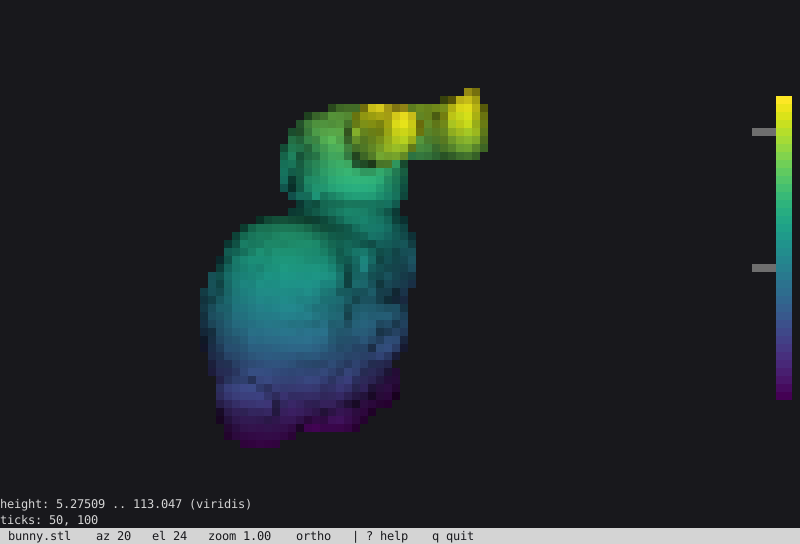
Drag to orbit, the wheel or + - to zoom, the arrow keys to pan, 1…7 for the named views, p perspective, e edges, s shading, a b c axes, scale bar and colour bar, a click to probe a cell (i pins it), x y z to cut the model away at the middle (, . slide the plane), [ ] to step a series, : for a command line that takes the flags of snapshot, r reset, ? help, q quit. The terminal is restored however it ends; a signal ends it with exit code 128 plus the signal number.
It takes every render option of snapshot (the camera, shading, edges, colouring and field options listed there; the frame size is the terminal's), and:
| Option | Description |
|---|---|
--encoding NAME | halfblock (default), quadrant, sextant, braille, ascii, or kitty, iterm2, sixel (these redraw the whole image on every change) |
--color-depth NAME | auto (from NO_COLOR, COLORTERM, TERM; the default), truecolor, 256, 16 or mono |
--cell-aspect R | Height over width of a terminal cell (default: the terminal's own when it reports its pixel size, else 2) |
--tmux | Wrap a graphics protocol for tmux passthrough; one is refused inside tmux without it |
INFILE... | Several files, or a quoted glob ('out_*.vtu'), make a time series: [ ] step, space plays |
--compare FILE / --diff / --separate-ranges | Draw a second mesh beside the first under one camera and one colour range; --diff draws |B − A| of the --color-by point array instead of B |
--follow / --follow-interval MS / --settle MS | Watch the series (or the file) for a new step and show it once its file has stopped changing for --settle ms (default 300) |
--fps R | Steps per second when playing (default 4) |
--session FILE | Read a session if the file exists and write it when the viewer ends |
--replay FILE | Play a recorded input stream on a --cols by --rows screen (default 100 x 40) and print what the viewer writes, instead of using the terminal |
--music / --music-out FILE.wav | Play a generated synthwave loop on an external player (silent in CI and over SSH unless --music-over-ssh); or write it to a file for your own player. m mutes, < > change the volume (the soundtrack) |
--volume V / --tempo BPM / --music-seed N / --music-key K | The loop's loudness (0.05 to 0.9, default 0.3), tempo (60 to 140, default 100), variation and tonic (C…B or 0 to 11) |
--pulse / --reduced-motion | With a theme: step the grid on every beat of --tempo (--music implies it); never, whatever else is asked (also REDUCED_MOTION in the environment) |
--input-format (-i) | Force the input format |
meshioplusplus tui part.vtu
meshioplusplus tui part.vtu --theme synthwave --grid-floor --bloom --music
meshioplusplus tui result.vtu --color-by temperature --colorbar --cmap magma --edges feature
meshioplusplus tui part.vtu --encoding braille --color-depth 256
The Python CLI has the same verb, and meshioplusplus view --backend terminal (Python and native) runs it.
meshioplusplus hausdorff
Print the Hausdorff distance between the surfaces of two meshes — how far apart they are at their worst (see Hausdorff distance).
meshioplusplus hausdorff [options] INFILE_A INFILE_B| Option | Description |
|---|---|
--face-samples S | Also sample the centroids of the S*S sub-triangles of every triangle (default 0: vertices only, a lower bound) |
--region-a NAME / --region-b NAME | Restrict a side to this named cell region of surface cells |
--input-format-a FMT / --input-format-b FMT | Force a side's input format |
--max D | Exit with status 1 when the distance exceeds D |
--json | Emit the report as JSON (with --max, also max and passed) |
meshioplusplus hausdorff part.stl part_decimated.stl --face-samples 4 --max 1e-3meshioplusplus periodic
Match the nodes of two regions that an affine transform maps onto each other — the node pairs of a periodic boundary condition (see periodic node pairs).
meshioplusplus periodic [options] INFILE --slave NAME --master NAME| Option | Description |
|---|---|
--slave NAME / --master NAME | The region whose nodes are mapped, and the one they map onto |
--translate DX,DY,DZ | Slave-to-master translation |
--rotate AXIS,DEG | Rotation by DEG degrees about AXIS (x, y, z, or AX,AY,AZ), applied before --translate |
--origin X,Y,Z | The point the rotation turns about (default: the origin) |
--matrix M00,...,M33 | A row-major 4x4 affine matrix, overriding --translate/--rotate |
--atol TOL | Match tolerance (default 1e-8) |
--allow-incomplete | Report unmatched slave nodes instead of failing |
--output FILE (-o) | Write the pairs as slave,master CSV rows (0-based ids) |
--json | Emit the pairs as JSON |
--input-format (-i) | Force input format |
Numbers are comma-separated; write a value with a leading minus as --translate=-2,0,0.
meshioplusplus periodic channel.msh --slave inlet --master outlet --translate 2,0,0 -o pairs.csv
meshioplusplus periodic rotor.msh --slave cut_a --master cut_b --rotate z,60 --json
meshioplusplus repair
Fix a surface's orientation, holes and pinched vertices — the three defects clean does not touch (see surface repair).
meshioplusplus repair [options] INFILE OUTFILE| Option | Description |
|---|---|
--no-fix-orientation | Do not rewind triangles so neighbours across a manifold edge agree |
--no-orient-outward | Do not flip closed components whose signed volume is negative |
--no-fill-holes | Do not fan-fill boundary loops |
--no-split-non-manifold | Do not duplicate bowtie (pinched) vertices |
--max-hole-edges N | Longest boundary loop still filled; <= 0 means no limit (default 10) |
--weld-tolerance T | Weld coincident points within this distance first, through clean (default 0, off) |
--record-provenance | Attach repair:parent_point (point) and repair:hole (cell) |
--quiet (-q) | Suppress the summary output |
--input-format / --output-format (-i/-o) | Force input/output format |
The passes run in the order weld → triangulate → split bowties → orient → fill holes → orient outward, and the summary reports both the input's and the output's defect counts, so what was fixed and what remains are both visible. Orientation uses the topological half-edge rule — two triangles sharing an edge agree iff they traverse it in opposite directions — which is exact where a normal-angle test mis-orients across a sharp crease. Output is all-triangle at the surface with blocks 1:1 with the input, lower-dimensional blocks carried verbatim, and fill triangles in one trailing triangle block. Non-manifold edges are counted, never split.
Examples:
meshioplusplus repair scan.stl fixed.vtu
meshioplusplus repair scan.stl fixed.vtu --max-hole-edges 0
meshioplusplus repair scan.stl fixed.vtu --weld-tolerance 1e-9
meshioplusplus repair in.vtu out.vtu --no-fill-holes --record-provenance
meshioplusplus shrinkwrap
Project a mesh's points onto a target triangle surface (see shrinkwrap).
meshioplusplus shrinkwrap [options] INFILE TARGET OUTFILE| Option | Description |
|---|---|
--offset=X | Signed offset along the hit feature's unit pseudonormal (a negative value needs the --offset= form) |
--max-distance D | Leave points farther than this from the target alone; <= 0 means unlimited |
--weights NAME | Scalar point_data array on the source: integer/bool selects, float blends (unclamped) |
--target-region NAME | Restrict the target to this named cell region |
--normal-weight angle|area | Vertex-pseudonormal weighting of the target (default angle) |
--record-distance | Attach shrinkwrap:distance (NaN where not queried) |
--record-closest-cell | Attach shrinkwrap:closest_cell (-1 where not queried) |
--quiet (-q) | Suppress the summary output |
--target-format | Force the target's format |
--input-format / --output-format (-i/-o) | Force input/output format |
One projection, not an iteration: there is no self-intersection or inversion guard. Every point of the source moves whatever cells it carries — a volume mesh's interior points too — and only the target must be a surface. The offset goes along the hit feature's pseudonormal, which at a crease is the bisector rather than either face's normal.
Examples:
meshioplusplus shrinkwrap template.vtu scan.stl wrapped.vtu
meshioplusplus shrinkwrap template.vtu scan.stl wrapped.vtu --offset=0.5
meshioplusplus shrinkwrap template.vtu scan.stl wrapped.vtu --max-distance 2.0
meshioplusplus shrinkwrap template.vtu scan.stl out.vtu --weights mask --record-distance
meshioplusplus sobolev-deform
Filter a raw displacement field through the mesh's own P1 operators, then move the points by it (see Sobolev deformation).
meshioplusplus sobolev-deform [options] INFILE OUTFILE| Option | Description |
|---|---|
--array NAME | Required. The point_data array holding the raw displacement, (n, dim) |
--length-scale L | Required. The smoothing length in mesh units; 0 applies the raw field at the free points |
--fixed-points-array NAME | An integer/bool point_data array whose nonzero entries pin their point |
--fix-boundary | Also pin every point on a boundary facet of the top-dimensional cells |
--record-filtered | Attach sobolev:displacement, the filtered field |
--max-iterations N | Conjugate-gradient iteration cap (default 128) |
--tolerance T | Relative residual tolerance (default 1e-10) |
--quiet (-q) | Suppress the summary output |
--input-format / --output-format (-i/-o) | Force input/output format |
Solves (M + l^2 K) u = M d and sets x' = x + u — a screened-Poisson low-pass filter whose cutoff wavelength is the length scale. Every block at the mesh's top topological dimension must be a linear simplex (line, triangle, tetra); lower-dimensional blocks ride along. Nothing is pinned by default, so a constant displacement is preserved exactly in zero iterations. Non-convergence is reported rather than raised, with the last iterate returned.
Examples:
meshioplusplus sobolev-deform in.vtu out.vtu --array d --length-scale 0.5
meshioplusplus sobolev-deform in.vtu out.vtu --array d --length-scale 0.5 --fix-boundary
meshioplusplus sobolev-deform in.vtu out.vtu --array d --length-scale 1.0 --record-filtered
meshioplusplus smooth
Relax point coordinates toward their edge-neighbour centroids to improve element shape (see smoothing).
meshioplusplus smooth [options] INFILE OUTFILE| Option | Description |
|---|---|
--method taubin|laplacian|odt | Smoothing operator (default taubin, which does not shrink; laplacian is stronger per pass but shrinks; odt is optimal-Delaunay-triangulation smoothing, tet-only and C++-core only, moving each free interior vertex toward the volume-weighted average of its incident tets' circumcenters) |
--iterations N | How many iterations to run; for taubin one iteration is two passes (default 10) |
--lambda L | Relaxation factor of the smoothing pass, in (0, 1); the default depends on --method (0.5 laplacian, 0.33 taubin, 0.9 odt) |
--mu=M | taubin only: un-shrinking factor, must satisfy mu < -lambda < 0 (default -0.34; the negative value needs the --mu= form); silently ignored by laplacian and odt |
--no-fix-boundary | Let boundary nodes move too (they are pinned by default) |
--no-preserve-features | Do not pin feature nodes (sharp corners/creases are kept by default) |
--feature-angle A | Angle in degrees between boundary facet normals above which their shared nodes are pinned as features (default 30) |
--no-guard-inversion | Do not reject moves that would invert an incident cell |
--quiet (-q) | Suppress the summary output |
--input-format / --output-format (-i/-o) | Force input/output format |
Only the point coordinates move: connectivity, cell_data, field_data and point_data values come through unchanged, the point and cell counts are unchanged, and the points array keeps its input dtype. Neighbours are the nodes joined by an actual cell edge, so a structured hex block is a fixed point. Nodes of blocks whose edge topology is unknown — the higher-order family, the VTK-Lagrange types, custom — are pinned rather than guessed at. Unless suppressed, the summary reports the number of nodes moved, the largest net displacement, and how many moves the inversion guard rejected.
Examples:
meshioplusplus smooth noisy.vtu smooth.vtu
meshioplusplus smooth noisy.vtu smooth.vtu --iterations 40
meshioplusplus smooth in.msh out.vtu --method laplacian --lambda 0.4
meshioplusplus smooth in.msh out.vtu --mu=-0.4 --feature-angle 45
meshioplusplus smooth in.msh out.vtu --no-fix-boundary --no-guard-inversion -q
meshioplusplus smooth tangled.vtu out.vtu --method odt --iterations 10
meshioplusplus interpolate
Sample data arrays from a SOURCE mesh onto a TARGET mesh (see interpolation). The output is a copy of the target — geometry, connectivity and its own data preserved exactly — with the requested source arrays sampled onto it.
meshioplusplus interpolate [options] SOURCE TARGET OUTFILE| Option | Description |
|---|---|
--method nearest|barycentric | Nearest source point (default; dtype-preserving) or linear interpolation in a simplexified source (exact on a linear field; Float64) |
--arrays a,b | Comma-separated source array names to transfer (default: every source point_data array; cell_data transfers only when named) |
--extrapolate | barycentric only: give a target point outside the source domain the nearest source point's value instead of the default value |
--default-value=V | barycentric only: fill value for target points outside the source domain (default 0; negative values need the --default-value= form) |
--on-conflict error|overwrite|suffix | What to do when a transferred name already exists on the target (default error; suffix writes to NAME_interp) |
--quiet (-q) | Suppress the transfer summary |
--input-format / --output-format (-i/-o) | Force input (both files) / output format |
Source point_data is sampled at the target's points, source cell_data at the target's cell centroids — always by nearest source-cell centroid, whatever the method. Under barycentric the source is simplexified first, so on a quad/hex source the result is the simplex-linear interpolant, and triangle sources are evaluated in the xy-plane (use nearest for a curved surface embedded in 3D).
Examples:
meshioplusplus interpolate coarse.vtu fine.vtu out.vtu
meshioplusplus interpolate coarse.vtu fine.vtu out.vtu --method barycentric
meshioplusplus interpolate a.msh b.msh out.vtu --arrays T,v --on-conflict suffix
meshioplusplus interpolate a.msh b.msh out.vtu --method barycentric --extrapolate
meshioplusplus partition
Decompose a mesh into N balanced parts for domain decomposition (see partitioning) — the count-driven complement to split.
meshioplusplus partition [options] INFILE OUTPATTERNOUTPATTERN must contain {part} (e.g. out_{part}.vtu), expanded once per piece — or be a .pvtu/.pvtp path (or name --output-format pvtu|pvtp) with no {part}, which writes one parallel index over every part plus one piece file each (see PVTU); a {part} token wins over an index extension. With --labels-only it is a single plain path.
| Option | Description |
|---|---|
--nparts N (-n) | Number of parts (required, >= 1) |
--method M | sfc (Hilbert curve cut, always available), kahip (KaHIP kaffpa; needs a KaHIP-enabled build, fails by name otherwise), or auto (default: kahip when available, else sfc) |
--imbalance F | KaHIP only: allowed imbalance fraction in (0, 1) (default 0.03) |
--mode M | KaHIP only: fast / eco / strong (default eco) |
--seed N | KaHIP only: random seed (deterministic per seed; default 0) |
--weights NAME | Scalar cell_data array of per-cell weights to balance instead of the cell count |
--record-ids | Attach partition:original_point_id / partition:original_cell_id arrays to every piece |
--labels-only | Write the input once with the Int64 partition:part cell_data attached instead of writing pieces |
--ghost-layers N | Grow each piece by N shared-node BFS layers of other parts' cells (a halo), tagged partition:ghost (0 = owned). Written to a .pvtu/.pvtp output they become vtkGhostType cells and points and the index's GhostLevel |
--input-format / --output-format (-i/-o) | Force input/output format |
Every piece keeps the input's cell-block structure 1:1 (empty blocks included, unlike split), so the pieces recombine into the input — each cell lands in exactly one piece.
Examples:
meshioplusplus partition domain.msh 'domain_{part}.vtu' --nparts 4
meshioplusplus partition domain.msh 'domain_{part}.vtu' -n 16 --method kahip --mode strong
meshioplusplus partition domain.msh labelled.vtu --nparts 4 --labels-only
meshioplusplus partition domain.msh 'p_{part}.vtu' -n 8 --weights cost --record-ids
meshioplusplus partition domain.msh domain.pvtu -n 4 --ghost-layers 1   # one index over four parts, halo kept as vtkGhostType
meshioplusplus data
A nested group of eleven verbs operating on a mesh's point_data / cell_data / field_data arrays (see data operations). The geometry is never modified by any of them — points, connectivity, block order and block types come through bit-identical.
meshioplusplus data <subcommand> [options]| Subcommand | Description |
|---|---|
info | Summarize every data array (see data summary) |
rename | Rename data arrays (see array management) |
drop | Drop data arrays by name |
keep | Keep only the named data arrays |
to-cell | Average point_data onto the cells (see averaging) |
to-point | Average cell_data onto the points |
calc | Derive an array from an expression (see expressions) |
clamp | Clamp values into a range (see conditioning) |
normalize | Rescale values to a target range |
invariants | von Mises / principal / hydrostatic / deviatoric of a tensor array (see tensor invariants) |
gradient | Differentiate a point_data field (see field derivatives) |
hessian | Second derivative of a scalar point_data field (see second derivatives) |
estimate-error | ZZ recovery-based error indicator, plus marking (see error estimation) |
integrate | Cell-measure-weighted total/mean over cells, per region (see field integration) |
export | Export the arrays to Parquet (see interoperability) |
export-dataset | Export a set of meshes as one mesh_id-keyed dataset (see ML data handling) |
export-cae | Export a set of meshes as one .npz per case in the CAE sample layout PhysicsNeMo's DoMINO/Transolver datapipes read |
Every verb takes --input-format (-i), and every verb but info and integrate takes an OUTFILE and --output-format (-o) — the mesh is never modified by either of those two, so there is nothing to write. export and export-dataset are the exceptions on the output side: they write Parquet / zarr / hdf5, so they take no --output-format (export-dataset has --format parquet|zarr|hdf5 instead, plus --mesh-id stem|index, and its input is several paths, one quoted glob, or one multi-step file — the sequence source language). All three are Python CLI only; export and export-dataset need the matching optional extra, while export-cae needs none — it is pure numpy.
export-cae takes the same sequence source (several paths, one quoted glob, or one multi-step file) plus a target directory, and writes case_{index}.npz into it. --surface-fields/--volume-fields name and order the columns of the two concatenated field blocks (default: every numeric array, sorted); --global NAME=VALUE and --global-reference NAME=VALUE are repeatable case parameters and --global-order fixes their stacking order, which DoMINO is sensitive to. One mesh is alive at a time.
meshioplusplus data export-cae 'run_*.vtu' dataset/ \
    --surface-fields p --global stream_velocity=30 --global-order stream_velocity
data gradient, data hessian, data estimate-error and data integrate are mesh operations
Every other verb in this group belongs to the data_* family, which by definition never touches geometry. gradient consumes and produces data arrays but reads geometry and topology (face areas, cell volumes, cell adjacency), so it lives in the mesh-operations layer; hessian is gradient's companion one order further, a composition of two gradient calls; estimate-error composes gradient itself; integrate reads the same cell measures to weight its totals. All four are grouped here because that is where a user looks for them. See field derivatives, second derivatives, error estimation and field integration.
data export is not a mesh conversion
It writes point_data / cell_data to Parquet for analytics (pandas, polars, DuckDB) and does not round-trip geometry — Parquet is deliberately not in the format registry, so meshioplusplus convert mesh.vtu out.parquet does not work. It needs pip install meshioplusplus[arrow], and it exists in the Python CLI only: the native binary has no counterpart.
Colons in names
Data names routinely contain colons (gmsh:physical). data rename therefore splits its OLD:NEW value on the last colon — --point gmsh:physical:tag renames gmsh:physical to tag. data calc splits NAME = EXPR on the first =. drop/keep take a comma-separated name list with no prefix, so colons there are unambiguous. The Python CLI and the native binary implement identical rules.
data info
| Option | Description |
|---|---|
--json | Emit the summary as JSON |
Prints location, name, dtype, component count, entry count, min/max/mean and NaN/inf counts for every array. Read-only.
data rename / drop / keep
| Option | Description |
|---|---|
--point, --cell, --field | OLD:NEW for rename (repeatable); a comma-separated name list for drop/keep |
--ignore-missing | Skip names that do not exist instead of failing (drop/keep) |
For keep, a location that is not named at all is left untouched; naming it with an empty list drops everything there.
data to-cell / to-point
| Option | Description |
|---|---|
--keys | Comma-separated names to convert (default: all at the source location) |
--target-suffix | Append this to each output name (default: keep the same name) |
--weighted | to-point only: weight by cell measure (area/volume) instead of counting cells equally |
The output is always float64 — the mean of an integer field is not an integer.
data calc
| Option | Description |
|---|---|
--point, --cell, --field | NAME = EXPRESSION (repeatable) |
--overwrite | Allow replacing an array that already exists |
The expression grammar accepts + - * /, unary minus, parentheses, numeric literals, array names, and abs/sqrt/min/max/norm — nothing else is evaluated.
data export
| Option | Description |
|---|---|
--location | point (default) or cell |
data clamp / normalize
| Option | Description |
|---|---|
--point, --cell, --field | Comma-separated names (default: all at that location) |
--min, --max | clamp only: the bounds (both required) |
--to LO,HI | normalize only: target range (default 0,1) |
--zero-mean | normalize only: standardize to zero mean / unit std instead |
--magnitude | Condition by row magnitude instead of per component |
--nan | ignore (default), replace or fail |
--nan-value | Replacement used with --nan replace |
--suffix | Store as NAME+SUFFIX instead of replacing in place |
data invariants
| Option | Description |
|---|---|
--point, --cell | Comma-separated names (default: every 6- or 9-component array at that location); exactly one of the two is required |
--outputs | Comma-separated mises/principal/hydrostatic/deviatoric (default: all four) |
--prefix | Prepended to every output array's name |
--suffix | Appended after the invariant's own name segment |
--no-overwrite | Fail instead of silently overwriting an existing array of the target name |
data gradient
| Option | Description |
|---|---|
--array NAME | The point_data array to differentiate (required) |
--op | gradient (default), divergence or curl |
--method | green-gauss (default) or least-squares |
--location | cell (default) or point |
--output NAME | Output array name (default <array>:<op>) |
--component I | Differentiate only this component (gradient only; default all) |
--overwrite | Replace an existing array of the output name instead of failing |
--quiet, -q | Suppress the summary |
Naming a cell_data array is an error pointing at data to-point: a piecewise constant field has no derivative. Divergence and curl need a 2- or 3-component field. Cells that cannot be differentiated are reported as cells skipped (NaN); least-squares cells with a degenerate neighbourhood fall back to Green-Gauss and are reported separately. See field derivatives for the exactness guarantees and caveats.
data hessian
| Option | Description |
|---|---|
--array NAME | The scalar point_data array to differentiate twice (required) |
--method | green-gauss (default) or least-squares, forwarded to both internal gradient passes |
--location | cell (default) or point |
--output NAME | Output array name (default <array>:hessian) |
--overwrite | Replace an existing array of the output name instead of failing |
--quiet, -q | Suppress the summary |
The Hessian (second derivative) of a scalar point_data field — gradient's companion one order further, a composition of two gradient calls, not a new kernel. Naming a cell_data array is an error pointing at data to-point, for the same reason data gradient rejects one; a multi-component array is an error naming the per-component workaround (Hessian is scalar-only). Cells that cannot be evaluated are reported as cells skipped (NaN). See second derivatives for the exactness guarantees and the curvature-driven refinement composition.
data estimate-error
| Option | Description |
|---|---|
--array NAME | The point_data array to estimate the error of (required) |
--method | zz (default; the only estimator family today) |
--marking | none (default), absolute, fraction or dorfler |
--marking-value V | Meaning depends on --marking: an absolute threshold, a fraction in (0, 1] of cells, or the Dörfler bulk fraction theta in (0, 1] (ignored for none) |
--output NAME | Indicator array name (default error:zz) |
--marked NAME | Marking array name (default error:marked; ignored when --marking none) |
--overwrite | Replace an existing array of an output name instead of failing |
--quiet, -q | Suppress the summary |
The Zienkiewicz-Zhu recovery-based error indicator of a point_data field: a composition of gradient and the point↔cell averaging round trip, not a new kernel. Naming a cell_data array is an error pointing at data to-point, for the same reason data gradient rejects one. Cells that cannot be evaluated are reported as cells skipped (NaN) and read NaN in error:zz, 0 in error:marked. With --marking not none, a second cell_data array is attached so refine's own --where selector needs no change at all — the intended use is meshioplusplus refine estimated.vtu adapted.vtu --where "error:marked > 0.5". See error estimation for the composition, the marking policies and the byte-identity tolerance.
data integrate
| Option | Description |
|---|---|
--array NAME | cell_data array to integrate (repeatable; default all cell_data arrays) |
--json | Emit the report as JSON |
Cell-measure-weighted total and mean of one or more cell_data arrays — gradient's integration counterpart. Every sum is weighted by the cell's own length/area/volume; a cell whose measure is not computable, or a component whose value is non-finite, is excluded from that component's numerator and denominator, never given a fallback weight of 1. Reported for the whole mesh and independently for every named Cell region — a cell in two regions contributes fully to both, one in none contributes to neither. Naming a point_data array is an error pointing at data to-cell. Read-only, like data info: there is no OUTFILE. See field integration.
Examples:
meshioplusplus data info mesh.vtu
meshioplusplus data info mesh.vtu --json

meshioplusplus data gradient in.vtu out.vtu --array T
meshioplusplus data gradient in.vtu out.vtu --array u --op curl --location point
meshioplusplus data gradient in.vtu out.vtu --array T --method least-squares --output dT

meshioplusplus data hessian in.vtu out.vtu --array T
meshioplusplus data hessian in.vtu out.vtu --array T --location point

meshioplusplus data estimate-error in.vtu out.vtu --array T
meshioplusplus data estimate-error in.vtu out.vtu --array T --marking dorfler --marking-value 0.6

meshioplusplus data integrate mesh.vtu --array density
meshioplusplus data integrate mesh.vtu --array density --array pressure --json

meshioplusplus data rename in.vtu out.vtu --point T:temperature
meshioplusplus data drop   in.vtu out.vtu --point a,b --cell c
meshioplusplus data keep   in.vtu out.vtu --point T,p --cell mat

meshioplusplus data to-cell  in.vtu out.vtu --keys T,p --target-suffix _c
meshioplusplus data to-point in.vtu out.vtu --keys stress --weighted

meshioplusplus data calc in.vtu out.vtu --point "speed = norm(velocity)"
meshioplusplus data calc in.vtu out.vtu --cell  "dp = p_new - p_old"

meshioplusplus data clamp     in.vtu out.vtu --point T --min 0 --max 100
meshioplusplus data normalize in.vtu out.vtu --cell damage --to 0,1
meshioplusplus data normalize in.vtu out.vtu --point T --zero-mean

meshioplusplus data export in.vtu points.parquet
meshioplusplus data export in.vtu cells.parquet --location cell
meshioplusplus dataset
The second nested group: curate a hand-editable dataset manifest — the JSON cataloguing many cases (each possibly a time series) with splits, tags, groups and notes. Python CLI only, like data export. Every mutating verb is load → mutate → save against the same file a text editor uses, so hand edits made between two CLI calls survive; sources given on the command line are stored relative to the manifest's directory (absolute paths stay absolute), keeping the manifest portable.
meshioplusplus dataset <subcommand> [options]| verb | does |
|---|---|
add MANIFEST SOURCE... | add a case — one quoted glob, one file, or several paths; --id (default: the stem), --format, --times T,T, --time-from, --sort, plus curation --split/--tag (repeatable)/--group/--notes/--meta K=V (repeatable; V parses as JSON when it can). The source is expanded once so an empty glob fails now, by name (--no-validate skips). Creates the manifest file if absent. --target SOURCE (repeatable) records a paired coarse/fine series, with its own --target-format/--target-times/--target-time-from/--target-sort; the two must have the same steps at the same instants, checked here. Omit it for the ordinary self-supervised case ; --thumbnail PNG records a picture of the case, --render-thumbnail draws one |
list MANIFEST | entries filtered by --split/--tag/--group; --resolve expands each plan (checks files exist, reads no mesh); --json emits the entries (plus Resolved plans) as JSON |
split MANIFEST | --set S on --id (repeatable) or --all; or --assign train=0.8,valid=0.1,test=0.1 over every entry — deterministic (--seed), --by-group keeps entries sharing a Group together |
tag MANIFEST | --add T,T / --remove T,T on --id (repeatable) or --all |
annotate MANIFEST --id ID | set --notes, --group, merge --meta K=V, drop --del-meta K |
thumbnail MANIFEST | a picture of the cases on --id (repeatable) or --all: draws step --step (default 0) with the software rasterizer at --width×--height (default 256×192; --color-by, --cmap, --view, --shading) to --path (one id; default thumbnails/<id>.png beside the manifest), or records an existing picture with --set PNG (one id), or --clears it |
meshioplusplus dataset add m.json 'runs/c42/out_*.vtu' --split train --meta Re=100
meshioplusplus dataset add m.json a.vtu b.vtu --id pair --tag coarse
meshioplusplus dataset add m.json 'coarse/*.vtu' --target 'fine/*.vtu' --id sr
meshioplusplus dataset split m.json --assign train=0.8,valid=0.1,test=0.1 --seed 0
meshioplusplus dataset list m.json --split train --resolve
meshioplusplus dataset annotate m.json --id pair --notes "restarted at t=0.3"
meshioplusplus dataset add m.json 'runs/c43/out_*.vtu' --render-thumbnail
meshioplusplus dataset thumbnail m.json --all --color-by pressure --cmap coolwarm
meshioplusplus pipeline
Run a whole settings pipeline: read Input.Path, apply the Operations chain, write Output.Path — one settings.json instead of N verb invocations with intermediate files.
meshioplusplus pipeline settings.json
meshioplusplus pipeline settings.json --input other.msh --output out.vtu
meshioplusplus pipeline settings.json --json          # machine-readable report
meshioplusplus pipeline settings.json --quiet
A document whose Input is a Pattern/Paths, or whose Output.Path carries {step}/{index}, runs the chain per step over a whole transient dataset — see sequences. The verb routes it automatically; a plain single-file document takes the unchanged path.
--input/--outputoverride the two paths in the settings file (the document itself is untouched).- The report lists each step with its counters (
step 3: Clean (PointsWelded=12, ...)) plus any warnings;--jsonprints the same as JSON. - Parsing is strict: an unknown op, an unknown key, or an
Outputoption the format cannot honour is an error naming the offender. - The exit code is nonzero on any error, so the verb composes with
make/CI.
The verb exists in both CLIs. The Python CLI runs the pure-Python engine (and so inherits the per-format Python fallbacks); the native CLI needs a build with the JSON parser (-DMESHIOPLUSPLUS_WITH_JSON=ON, the default when the src/cpp/third_party/json submodule is checked out — release binaries carry it) and otherwise reports the flag by name. See the settings pipeline for the schema and the full op table.
meshioplusplus compress
Compress the data in a mesh file (formats that support compression, e.g. VTU). A .pcd file is rewritten in place as DATA binary_compressed (LZF) at the file's own coordinate precision; decompress turns it back into DATA binary, and ascii/binary rewrite it as those encodings, in both CLIs.
meshioplusplus compress [options] INFILE| Option | Short | Description |
|---|---|---|
--input-format FORMAT | -i | Force input format |
meshioplusplus decompress
Decompress the data in a mesh file.
meshioplusplus decompress [options] INFILE| Option | Short | Description |
|---|---|---|
--input-format FORMAT | -i | Force input format |
meshioplusplus ascii
Convert a mesh file to its ASCII representation (in-place). A CalculiX .frd is rewritten in the long ASCII layout; like every in-place verb it keeps only the first increment of a multi-step file.
meshioplusplus ascii [options] INFILE| Option | Short | Description |
|---|---|---|
--input-format FORMAT | -i | Force input format |
meshioplusplus binary
Convert a mesh file to its binary representation (in-place). A CalculiX .frd is rewritten in the binary layout ccx writes for *NODE OUTPUT (float64 points, float32 results; see CalculiX results), keeping only the first increment of a multi-step file.
meshioplusplus binary [options] INFILE| Option | Short | Description |
|---|---|---|
--input-format FORMAT | -i | Force input format |
Format names
The --input-format and --output-format options accept any of the registered format names. The full list is shown by meshioplusplus convert --help. Common values:
abaqus, abaqus_fil, ansys, ansys_rst, ansys_rst_cyclic, ansysinp, avsucd, cgns, code_aster, dolfin-xml, elmer, exodus, febio, femap, flac3d, gmsh, gmsh22, h5m, hmf, libmesh, lsdyna, lsdyna_binout, lsdyna_d3plot, marc, marc_t19, mdpa, med, medit, mfem, mphbin, mphtxt, nastran, nastran_op2, neuroglancer, netgen, obj, off, patran, pcd, permas, ply, pvd, pvtp, pvtu, radioss, radioss_anim, radioss_th, stl, su2, svg, szplt (needs TecIO), tecplot, tetgen, ugrid, vtk, vtk42, vtk51, vtkhdf, vtu, vtx (needs ADIOS2), wkt, xdmf, xplt, xyz, z88
An input with no recognised extension is sniffed by content, a .mesh file whose first line names an MFEM mesh is read as mfem rather than Medit (v16.5.0), Z88's fixed file names (z88i1.txt, z88structure.txt, z88o2.txt, z88o3.txt) are z88 rather than xyz, as input and as output (v16.7.0), a .dat file that opens as an MSC Marc input deck is read as marc rather than Tecplot (v16.8.0), a file named d3plot is LS-DYNA's state database, lsdyna_d3plot, and its numbered members (d3plot01...) are refused with the base file's name (v16.9.0), a file named like crashA001 (a stem, A and three or more digits) is an OpenRadioss animation file, radioss_anim, whose run is a sequence (convert 'crashA*' crash.vtkhdf, v16.11.0), a file named binout (or binout0000…) is LS-DYNA's lsdyna_binout and one named like crashT01 an OpenRadioss time-history file, radioss_th (both v16.12.0, both also found by content; radioss_th is also written, from the radioss_th:* field data, to an output named like that or given -o radioss_th, and convert 'in_*.vtu' runT01 of a sequence writes one output per step; nastran_op2 is written too, to a .op2 file, and convert 'in_*.vtu' run.op2 of a sequence writes one file with a block per step; lsdyna_binout is written to an output named binout or given -o lsdyna_binout, and a sequence writes one file with an output folder per step; abaqus_fil is written to a .fil file, and a sequence writes the model once and an increment per step), and a directory by the files it holds (v16.2.0): an Elmer mesh directory, an OpenFOAM case or a DOLFINx VTX .bp directory (v16.13.0) needs no -i (meshioplusplus convert box box.vtu). An output is never sniffed: since v16.17.0, resolving a write goes through resolve_write_format, a name-and-extension-only function, so a .dat output is always tecplot (never marc, even though a .dat input can read as one) and a Marc deck needs -o marc explicitly; writing a directory format to an extension-less path needs -o the same way (meshioplusplus convert box.msh box -o elmer). Naming a read-only format as the output says so directly ("can be read but not written"), rather than failing as an unknown format. The ascii, binary, compress and decompress verbs take the format from the extension alone, so they do not accept a directory.
Selective reads and fast summaries
info --fast summarizes a file from its header instead of loading it, and convert can narrow what it reads:
meshioplusplus info --fast big.vtu
meshioplusplus convert --points-only in.vtu out.vtu     # geometry, no data arrays
meshioplusplus convert --arrays u,p in.vtu out.vtu      # only these data arrays
meshioplusplus convert --time-step=-1 run.exo last.vtu  # the last step of a time series
--points-only keeps connectivity — it narrows data, not topology. arrays with an empty list keeps no arrays; omitting the flag keeps every array.
--time-step=N picks one step of a multi-step file: 0 (the default) is the first, negative counts from the end. A negative value needs the --time-step=-1 form, as with the other negative-valued options. Out of range is an error naming the available count, never a silent clamp; info --fast prints Time steps: N [...] when a file records more than one. Honoured by formats carrying a time series (currently exodus); a format whose reader has no time concept refuses rather than quietly returning the first step.
--drop-ghosts (both CLIs) removes the ghost cells (halo) of a partitioned .pvtu, .pvtp or .pvd — every cell with a vtkGhostType bit set, and the points only they used — so a partition written with partition --ghost-layers reads back as the original mesh; every other reader ignores it, and by default ghost cells are kept.
--piece=N keeps one piece of a partitioned file (VTKHDF partitions or composite blocks, the pieces of a .pvtu/.pvtp, or one part of a .pvd step) instead of the merged mesh: 0 is the first, negative counts from the end (--piece=-1). Out of range is an error naming the piece count, and a format with no pieces refuses rather than quietly merging. compress/decompress deliberately do not handle vtkhdf: they rewrite in place from one merged read, which would drop every step but the first from a transient file — use convert to a new file instead.
--lenient (native CLI only) downgrades "this reader cannot represent construct X" errors to a warning plus a skip — currently MDPA's Table, Geometries, Mesh and Constraints blocks, which nearly every production .mdpa carries, and the missing meshio++ marker of an .svg or .tikz drawing. It is not "ignore all errors": a malformed row, a bad node reference or a duplicate node id still fail, because continuing past those returns a mesh that is quietly wrong rather than merely incomplete. The Python CLI has no such flag, deliberately: its MDPA reader is the pure-Python reference, which already accepts every construct the flag covers.
Formats without a header-only path are read in full and info --fast says so explicitly (no header-only path for this format; the file was read in full) rather than implying a saving that did not happen. See Selective reads.
--points-only/--arrays are rejected alongside -s/-d, which convert exactly the data arrays that were skipped.
Compression codecs
meshioplusplus compress --codec lz4 mesh.vtu--codec zlib|lz4|zstd selects the VTK XML block codec for .vtu/.vtp. zlib is the default; lz4 stays ParaView-readable, zstd is a meshio++ extension that ParaView cannot read. The flag is rejected for formats with no block codec rather than silently ignored. See Compression codecs.
Both CLIs — the Python one and the native meshioplusplus binary — accept these identically.
view / screenshot — the native viewer
meshioplusplus view part.msh
meshioplusplus view part.msh --kind surface --color-by material
meshioplusplus screenshot part.msh out.png --size 1600x1200
Options: --input-format/-i, --kind {auto,surface,volume,curve,points}, --color-by NAME, --name NAME; view adds --backend {auto,polyscope,terminal} (auto is Polyscope when the build has it, else the terminal viewer when standard input and output are terminals); screenshot adds --size WIDTHxHEIGHT and --transparent.
These mirror the Python CLI's verbs, but in the native binary they are only functional in a build configured with Polyscope:
git submodule update --init --recursive     # Polyscope vendors its own submodules
build/configure.sh --cli --with-polyscope --build
They are listed in --help in every build; without the flag view reports it (and points at snapshot, which draws in a terminal with no viewer), and screenshot draws its PNG with the same software rasterizer instead of failing, noting that on stderr. The prebuilt release binaries do not include the viewer — they are deliberately dependency-free single files, and Polyscope needs OpenGL, GLFW and X11 — so they use snapshot. Use the Python CLI (pip install meshioplusplus[viewer]) or the browser viewer if you want an interactive window without building from source.
voxelize
meshioplusplus voxelize bunny.stl shell.vtu --resolution 64,64,64 --fill surface
meshioplusplus voxelize bunny.stl solid.vtu --cell-size 0.5 --fill inside| flag | meaning |
|---|---|
--resolution nx,ny,nz | cell counts; give exactly one of this and --cell-size |
--cell-size S | cubic cell size |
--bounds=xlo,...,zhi | explicit bounds; the mesh's own by default (negatives need the = form) |
--padding / --padding-relative | grow the box on every side |
--fill all|surface|inside | which cells to keep |
--sign pseudonormal|winding-number | how --fill=inside decides what is inside |
--attach-occupancy | attach the voxel:occupancy array |
--max-cells N | refuse above this many cells (default ~256³) |
See doc/voxelize.md and doc/sdf.md.
grid-sample, grid-scatter, grid-resample, grid-spectrum
(Python only — no native equivalent.) The mesh-to-grid data path a convolutional or superresolution model needs.
meshioplusplus grid-sample   case.vtu grid.vti --resolution 64,64,64
meshioplusplus grid-resample grid.vti fine.vti --factor 2
meshioplusplus grid-scatter  fine.vti case.vtu predicted.vtu
meshioplusplus grid-spectrum grid.vti --field T --json
Write grids as .vti: it stores the lattice as origin/spacing/extent and regenerates the points arithmetically, so the grid is recovered exactly on the way back in. A grid written to .vtu is a lossy round trip for this purpose and reading one back as a grid fails by name.
| flag | verb | meaning |
|---|---|---|
--resolution nx,ny,nz / --cell-size S | sample | the lattice; exactly one, the same six-field vocabulary as voxelize and sdf |
--bounds=xlo,...,zhi | sample | explicit bounds. For a coarse/fine pair take the box from the fine mesh, so every fine node is inside the coarse grid |
--padding / --padding-relative | sample | grow the box on every side |
--fields a,b | all | which point data to carry; every array by default |
--extrapolate | sample | give a grid point outside the mesh its nearest value instead of the fill |
--fill-value=V | sample | what an outside point gets (nan makes the fill visible downstream) |
--factor N / --resolution nx,ny,nz | resample | integer upscale, or explicit counts, over the same box; exactly one |
--on-conflict error|overwrite|suffix | scatter | when the target already has an array of that name |
--field NAME | spectrum | required; a multi-component array's components are summed |
--max-bins N / --json | spectrum | truncate the printed table / emit JSON |
grid-sample reports the coverage, the fraction of grid points inside the mesh — a grid around a concave domain is mostly fill, and a model trained on it learns the fill. cell_data is refused in both directions: convert it with data to-point first.
subsample
(Python only — no native equivalent.) Reduce a mesh to a point cloud of exactly --count points, so a large surface fits a transformer's token budget.
meshioplusplus subsample wing.stl wing_4096.vtp --count 4096                 # farthest-point sampling
meshioplusplus subsample wing.stl wing_4096.vtp --count 4096 --method grid   # O(N + count^2), for big clouds
meshioplusplus subsample wing.stl tip.vtp --count 512 --bounds=0.8,-1,-1,1,1,1 --record-ids| flag | meaning |
|---|---|
--count N | required; how many points to keep |
--method farthest|grid|random | exact farthest-point sampling (O(N*count), the most uniform coverage), lattice representatives then farthest-point sampling (O(N + count^2), the scalable choice above a few hundred thousand points), or a uniform draw |
--start N / --start random | the first selected point for farthest/grid; random draws it from --seed |
--seed S | drives random, and --start random |
--bounds=xlo,...,zhi | only points inside this box are candidates |
--record-ids | attach budget:original_point_id, each point's index in the source |
The output keeps the selected points, their point_data and Point regions, and gets a vertex block so every format can hold it; cells, cell_data and Cell/Side regions are dropped with a warning naming what went. See point-cloud budgets.
See doc/grids.md.
proximity-graph
(Python only — no native CLI verb; the underlying pair search itself runs in the C++ core since v16.18.0, see proximity graphs.) Build a graph from geometry rather than connectivity: the neighbourhoods a particle method needs, where the interaction radius and not a shared element is what links two points.
meshioplusplus proximity-graph particles.vtu graph.vtu --radius 0.015
meshioplusplus proximity-graph particles.vtu graph.vtu --knn 16
meshioplusplus proximity-graph particles.vtu graph.vtu --radius 0.015 --box 2.0 # periodic| flag | meaning |
|---|---|
--radius R | link every pair closer than R; one of --radius/--knn is required |
--knn K | link each point to its K nearest, then symmetrize (near-constant degree) |
--box L / --box Lx,Ly,Lz | a periodic box: pairs are linked by their minimum image, and a radius past half the smallest side is refused |
--kind node|cell | vertices are mesh points (default) or block-major cell centroids |
The graph is written as line cells over those positions with a degree point array, and the summary prints the vertex and edge counts, the degree spread and how many vertices came out isolated — the numbers that say whether the radius was well chosen. See proximity graphs.
predict
(Python only — no native equivalent.) Run a trained PhysicsNeMo checkpoint on one mesh file — no manifest, no split, no entry.
meshioplusplus predict runs/example/checkpoints/best.mdlus part.vtu part_pred.vtu
meshioplusplus predict best.mdlus series.xdmf step_pred.vtu --time-step 4| flag | meaning |
|---|---|
--time-step N | which step of a multi-step input to predict on (default the first) |
--target PATH | the paired mesh a t→t+n or coarse/fine checkpoint compares against |
--device auto|cpu|cuda[:N] | where to run (default auto) |
Everything else comes from the checkpoint's own model card, including which model family wrote it. A mesh carrying no truth predicts anyway, and the summary says the error was not measured rather than reporting one against the input itself. Needs nvidia-physicsnemo (and torch_geometric for a graph checkpoint); without them the verb fails by name and returns 1. See PhysicsNeMo integration.
guard-fit, guard-check
(Python only — no native equivalent.) Fit a description of the shapes a dataset contains, and score a new mesh against it — the check a trained surrogate cannot make for itself.
meshioplusplus guard-fit dataset_manifest.json guard.json --split train --margin 1.5
meshioplusplus guard-check guard.json new_part.vtu
meshioplusplus guard-check runs/example/checkpoints/best.mdlus.card.json new_part.vtu --json| flag | meaning |
|---|---|
--split S | which split to fit on (default train) |
--margin M | threshold = M × the worst training score (default 1.5) |
--no-quality | skip the quality descriptors (faster on large meshes) |
--top N | how many descriptors guard-check names (default 3) |
--json | emit the raw report |
guard-check accepts a fitted guard or a model card carrying one, and prints the verdict, the score against the threshold and the descriptors that put it there. The descriptors are deliberately not scale- or position-invariant: a scaled part is a different part. See geometry guardrails.
sdf
meshioplusplus sdf bunny.stl field.vti --resolution 128,128,128
meshioplusplus sdf bunny.stl tree.vtu --structure octree --max-depth 5| flag | meaning |
|---|---|
--structure voxel|octree | a dense lattice, or one refined near the surface |
--resolution nx,ny,nz / --cell-size S | size a voxel grid; exactly one, and an error with --structure octree |
--root-resolution N / --max-depth N / --band-cells R | octree: the root lattice, how many halving passes, and the band width in cell diagonals |
--bounds=xlo,...,zhi | explicit bounds; the surface's own by default |
--padding / --padding-relative | grow the box on every side (relative defaults to 0.1) |
--sign / --location / --band / --watertight-check | as distance_to_surface |
--max-cells N | refuse above this many cells, re-checked after every octree pass |
Write the result as .vti to keep the grid header — no other format carries it. The octree's output is 1-irregular (it has hanging nodes). See doc/sdf.md.