
Interactive viewer
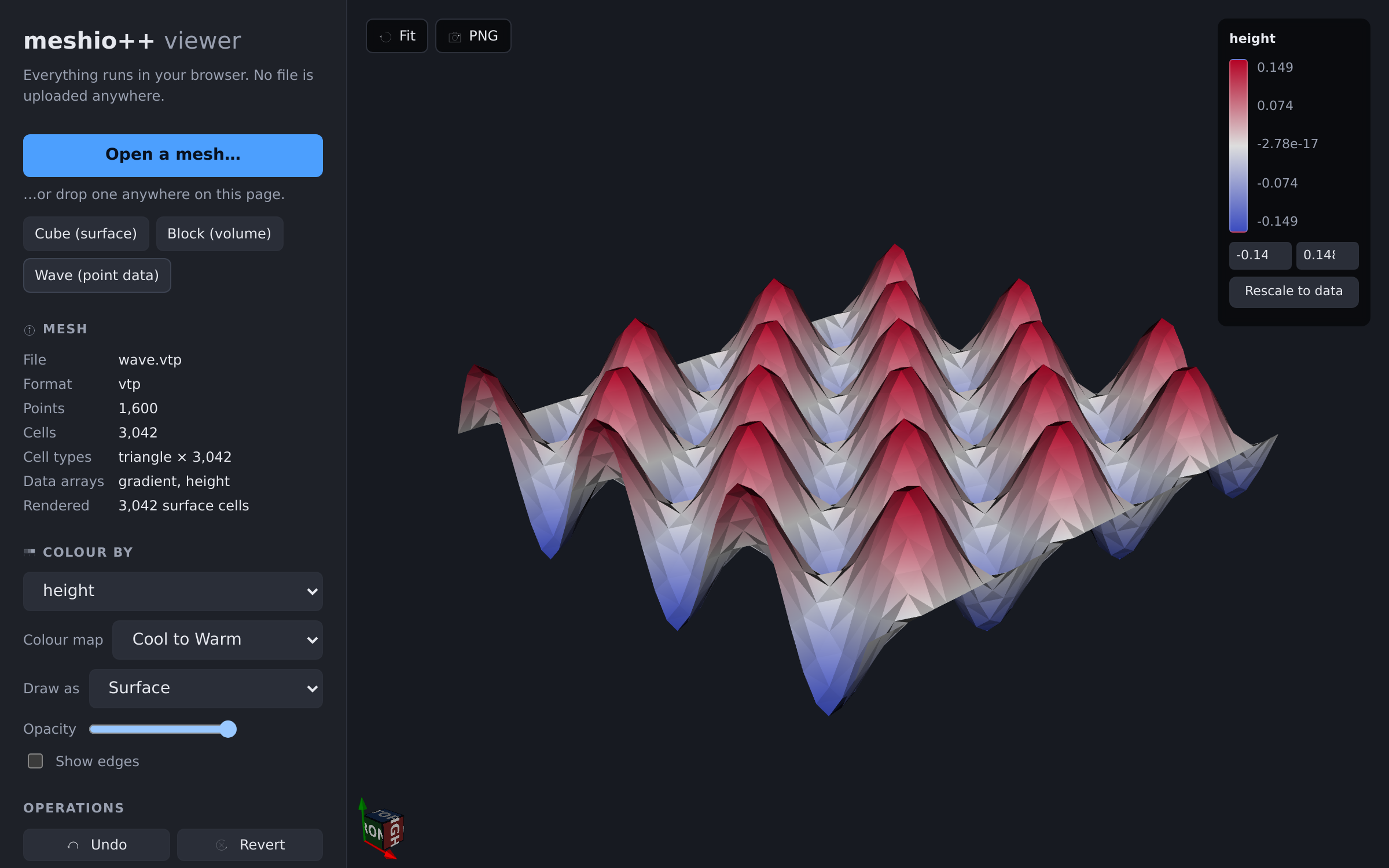
meshio++ can show you a mesh, through one entry point with three backends.
import meshioplusplus

mesh = meshioplusplus.read("part.msh")
meshioplusplus.view(mesh)                      # pick a backend automatically
meshioplusplus.view(mesh, backend="polyscope") # a native desktop window
meshioplusplus.view(mesh, backend="browser")   # vtk.js, in a browser or notebook
meshioplusplus.view(mesh, backend="terminal")  # orbit and zoom inside this terminal
desktop (polyscope) | browser (vtk.js) | terminal (tui) | |
|---|---|---|---|
| install | pip install meshioplusplus[viewer] | nothing extra | nothing extra; in the native release binaries too |
| volume meshes | drawn as solids you can slice | drawn by their boundary | drawn by their boundary |
| headless screenshots | yes | no | yes (PNG, no GPU or EGL) |
| works in a notebook | no | yes, inline | as an image or HTML |
| needs a display | yes | no | no; draws in a terminal over SSH |
| interactive | yes | yes | yes: mouse and keyboard in the terminal; snapshot for a still picture |
backend="auto" (the default) resolves in this order:
- polyscope, when it is installed and a display is available;
- the browser, when a display is available (a window can open, so the page opens in the default browser, or inline in a notebook);
- the terminal, when there is no display but standard input and output are both terminals — an SSH session, a container shell, a text console;
- the browser again otherwise (a notebook, a pipe), which writes an HTML file.
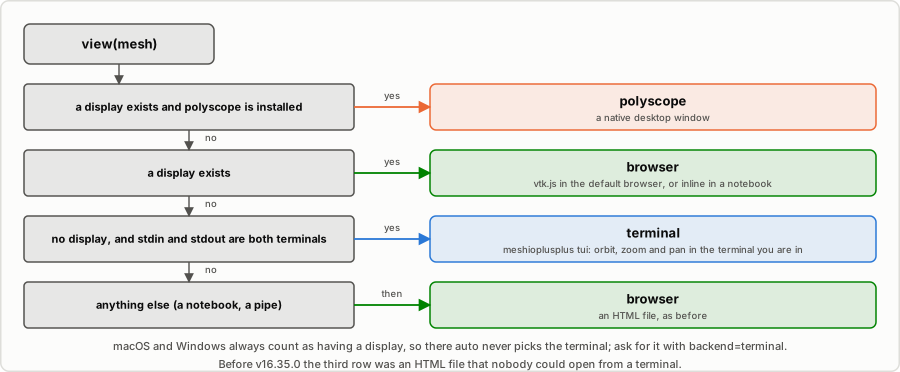
macOS and Windows count as having a display, so there auto never picks the terminal; ask for it with backend="terminal". A notebook cell is not a terminal, so notebooks behave as before.
The terminal rule is a change of behaviour: before v16.35.0 a display-less terminal got step 4's HTML file, which nobody could open from there. Pass backend="browser" to keep that.
Desktop viewer (Polyscope)
Polyscope is an optional, Python-only dependency. It is never imported unless you ask for it, and it is not part of the C++/WASM/C/Fortran core.
pip install meshioplusplus[viewer]Without it, view(backend="polyscope") raises an error naming that command, and screenshot() falls back to the software rasterizer with a warning; everything else, including view(backend="browser"), works unchanged. has_viewer() reports whether the polyscope backend is importable — checking it never opens a window or needs a display, so it is safe to call anywhere before deciding which backend to request.
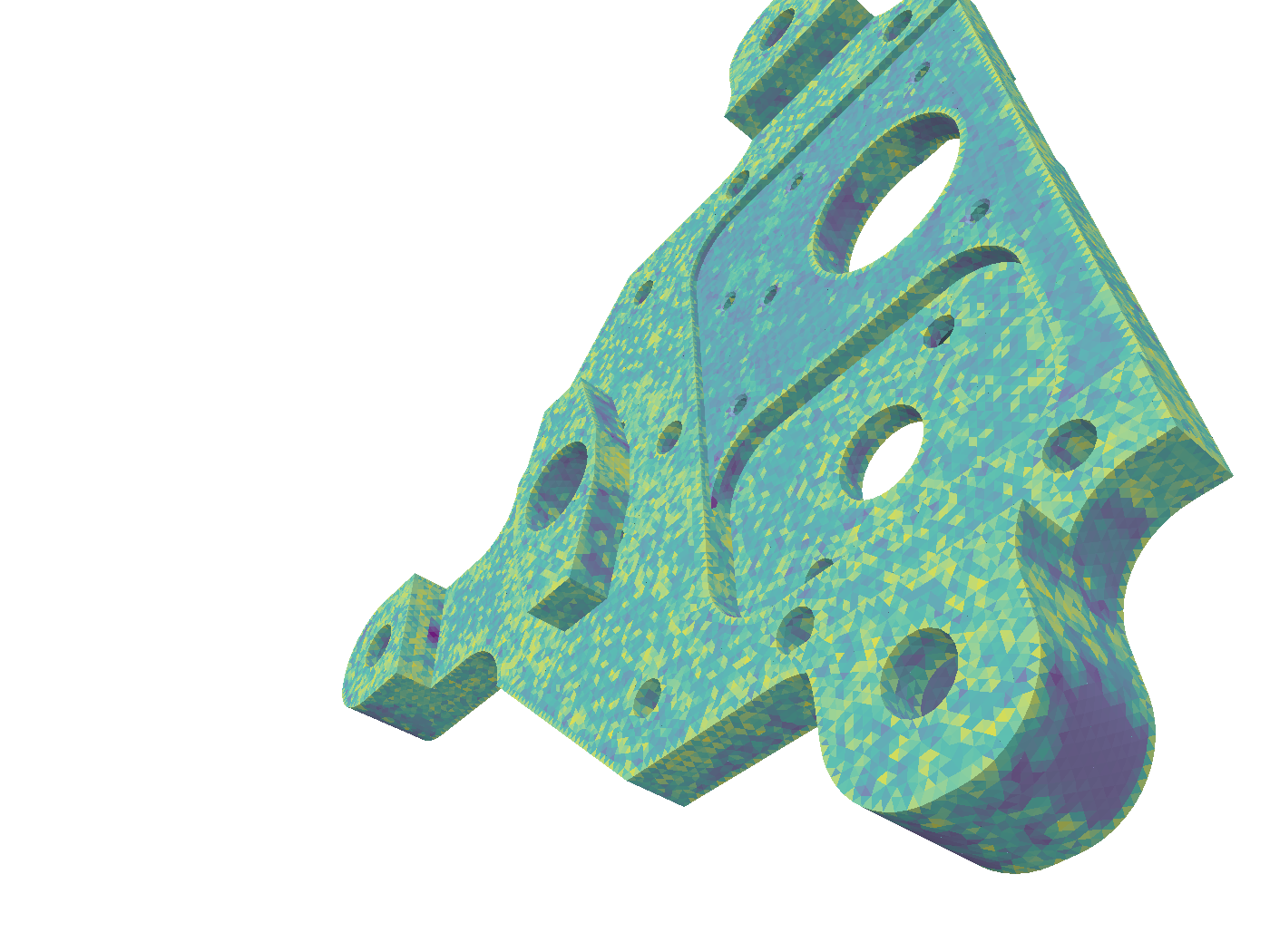
The bundled example.msh bracket, coloured by quality:scaled_jacobian — this image is generated by screenshot() itself.
meshioplusplus.view(mesh, color_by="temperature")
meshioplusplus.view(mesh, kind="surface")     # boundary only: much lighter
meshioplusplus.view(mesh, show=False)         # register without blocking
Screenshots
screenshot() renders without opening a window, so it works over SSH, in CI and in a docs build:
meshioplusplus.screenshot(mesh, "part.png", color_by="quality:scaled_jacobian",
                          size=(1600, 1200))
It needs EGL or a virtual framebuffer. On a headless Linux box either libegl1 or xvfb-run -a python … will do; the error names the backends it tried. Without polyscope at all, screenshot() draws the PNG with the software rasterizer instead — no GPU, EGL or display — and warns that it did.
How a mesh becomes a picture
Polyscope's volume meshes hold tetrahedra and hexahedra only, so:
- tetrahedral and hexahedral meshes are drawn directly, keeping their elements;
- wedges, pyramids and the higher-order family go through
convert_cells(mode="simplexify")first; kind="surface"runsextract_surfaceand draws the boundary — much lighter for a large solid, and the cell data follows each facet's owning cell so a material or tag still colours correctly;- 2D meshes become surface meshes, keeping mixed triangle/quad and polygon blocks exactly as they are (no triangulation);
- 1D meshes become curve networks, and a mesh with no cells a point cloud.
point_data becomes vertex quantities and cell_data cell/face quantities. A 3-component array becomes a vector quantity plus a magnitude scalar; a 6- or 9-component one becomes per-component scalars plus a Frobenius norm. Three components are treated as a colour only when the array is named like one (color, rgb, *_color, *_rgb) — a normalized displacement field in [0, 1] is a vector, not an RGB triple.
Anything lossy is reported as a warning rather than done quietly:
Warning: view: volume cells (wedge) are not renderable directly and were split into tetrahedraBrowser viewer (vtk.js)
The hosted viewer reads any of the formats the WebAssembly build supports, and also works as a client-side format converter. Everything runs in your browser: there is no server and no upload, and a file you open never leaves your machine.
From Python, the same viewer renders a mesh you already have:
meshioplusplus.view(mesh, backend="browser")   # opens your browser
meshioplusplus.view(mesh, backend="browser", inline=True)   # inline in Jupyter
In a Jupyter notebook this displays inline by default; elsewhere it writes a self-contained HTML file and opens it. That file needs no server and no network — the viewer is bundled in the wheel.
It draws surfaces
vtk.js has no unstructured-grid model at all: vtkPolyData is its only mesh type. So the browser backend renders a PolyData surface, and a volume mesh is shown by its boundary. That is not a choice the viewer made; it is what a surface renderer can draw. If you need to see inside a solid, use the desktop backend.
Boundary facets inherit their owning cell's data, so colouring a solid by its per-cell material or tag works — extract_surface alone would drop it.
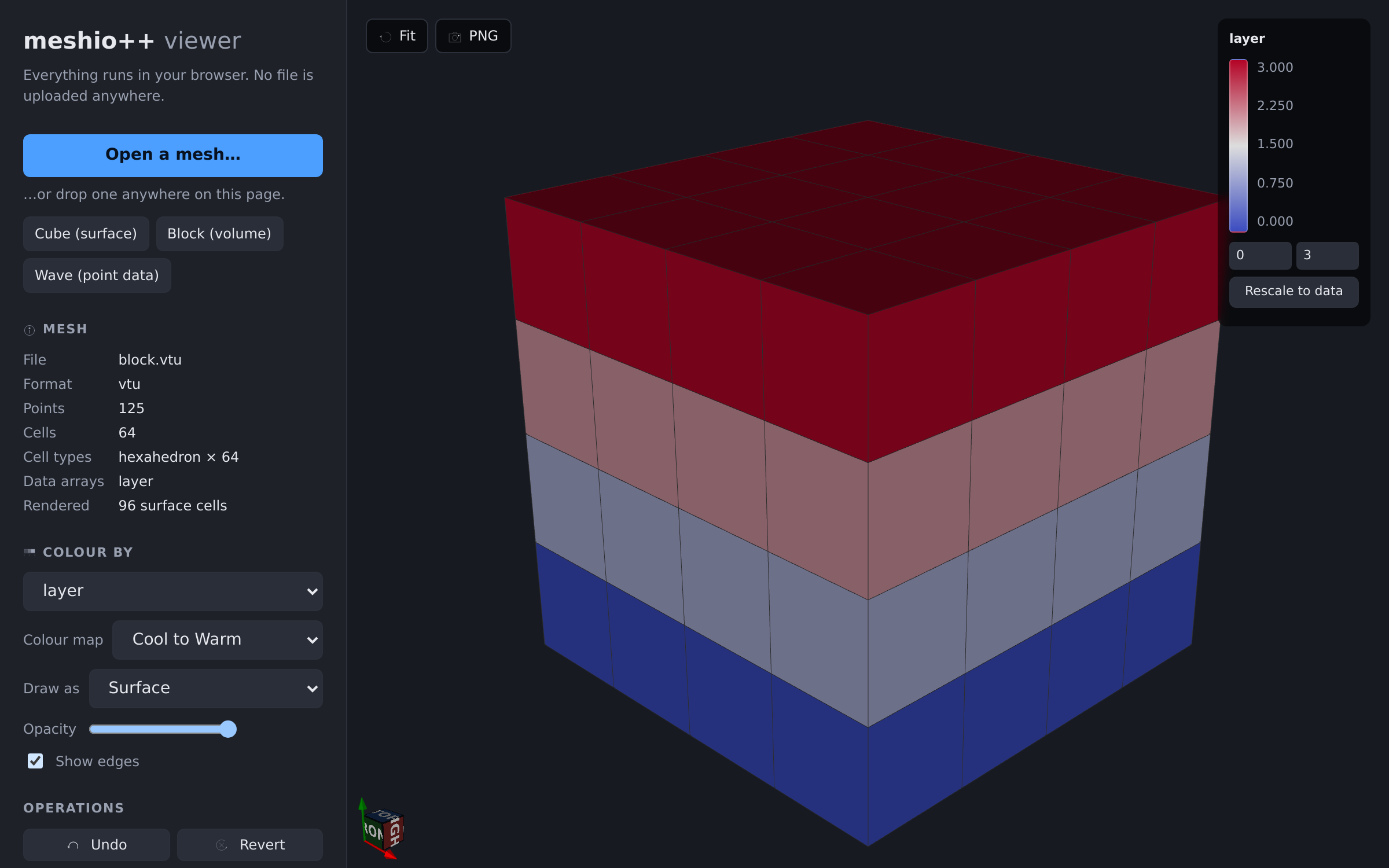
A 4×4×4 hexahedral block: 64 cells in the file, 96 boundary quads on screen, coloured by the per-cell layer tag that the gather brought onto the surface.
Mesh operations, in the browser
The viewer runs meshio++'s own operations on the mesh you opened — no server, no upload, no round trip:
| operation | what it does |
|---|---|
| Quality | attaches per-cell shape metrics (mesh quality) so you can colour by them |
| Clean | welds coincident points, drops degenerate and duplicate cells (clean) |
| Smooth | Laplacian or Taubin relaxation (smoothing) |
| Refine | subdivision (refine) — every cell, or only those satisfying a threshold on a cell array; the closure selector chooses whether the hanging nodes that leaves are resolved (conforming) or kept under 2:1 balance |
| Partition | decomposes into balanced parts and colours by part (partitioning) |
| Section | the planar cross-section — the actual intersection with a plane (slice) |
| Isosurface | the level set of a point_data field (isosurface) |
They compose: apply Refine then Quality and you are looking at the quality of the refined mesh — and the other way round, Quality then Refine with a threshold on quality:*, is adaptive refinement driven by the metric the first chip just computed. (Pick a metric that applies to the cell type: compute_quality reports NaN where one does not, and a non-finite value never matches a threshold, so scaled_jacobian on a quadrilateral surface selects nothing.) Each one appears as a chip you can remove, Undo steps back, and Revert clears everything.
Undo is exact, not approximate. The worker keeps the original file bytes and replays the whole remaining pipeline through a single surfaceBuffersOps call, so nothing needs an inverse and nothing accumulates rounding. Only the surface to draw crosses into JavaScript, with its vector and tensor arrays as they are. Re-reading the file on every apply is the price: an upper bound of 2 to 25% of an apply that smooths, and up to 69% of one that only computes quality on a large surface (benchmarks).
Section and Isosurface are the same cutter
Both run meshio++'s marching-tetrahedra cutter and return a surface one dimension below the cells they cut — Section where the distance to a plane is zero, Isosurface where a scalar field equals the isovalue you type. They go through meshio++ rather than vtk.js's own ClipClosedSurface, which cannot colour a cut correctly: it never interpolates point data onto the cut points.
Isosurface only offers the mesh's point arrays. A cell array is piecewise constant, so it has no level set — convert it first (meshioplusplus data to-point).
Click to inspect
Inspect turns the cursor into a probe: click a cell and it reports the surface cell's id and type, every cell array's value there, the nearest vertex with its coordinates and every point array's value (all components, not just a magnitude), and — for a solid — the original volume cell the facet came from. The picked cell is outlined in the render.
Picking is a CPU ray/cell intersection, so it does not depend on the renderer, but it fires on click only, never on hover: doing it per mouse-move would make a large mesh feel broken. Above two million cells it is disabled rather than made slow.
"Original cell" only means the file when no operations are applied
The provenance array names a cell of whatever mesh the boundary was extracted from. After a refine or a section that is the operated mesh, not the file, so the row is relabelled "Cell (after ops)" rather than pretending otherwise. Chaining ids through every operation is possible but genuinely hard for marginal value.
Design
Everything routes through meshio++, so all supported formats work and neither viewer hand-rolls any rendering:
file ──► Web Worker ─────────────────────────────► main thread
         meshio++ (WASM)                           vtk.js
         readMetadata()   → info panel             vtkPolyData from the arrays
         surfaceBuffersOps() → typed arrays ─ transferred ─►  mapper + DOM legend
         convert()        → any writable format
Parsing and conversion happen in a Web Worker, and the surface moves to the main thread as typed arrays — points, the Verts, Lines and Polys cell arrays and one array per data field — whose buffers are transferred, not copied, so the UI stays responsive on a large file. The arrays are laid out as vtk.js's own VTP reader would lay them out, so building the vtkPolyData from them takes a fraction of a millisecond at every size measured, where parsing a zlib-compressed VTP took up to 1.4 s on the main thread. Earlier releases had the worker write that VTP and read it back out of MEMFS, and vtk.js parse it (XML, base64 and inflate); the offline embedded page still carries a VTP, since it has no WebAssembly to run.
The worker runs one call rather than readMesh → operation → writeMesh because each operation binding takes and returns a JS mesh, so a chain of them would copy the whole volume mesh into JavaScript and back once per step. Staying inside C++ until the surface is ready avoids that, and makes undo a replay rather than an inverse.
Running it locally
cd src/viewer
npm install
npm run dev     # http://localhost:5173/meshioplusplus/viewer/
See src/viewer/README.md for the build layout, and note that after changing bindings/wasm/ or src/cpp/ you must rebuild the WASM package and force npm to refresh its copy.
The dataset-manager page
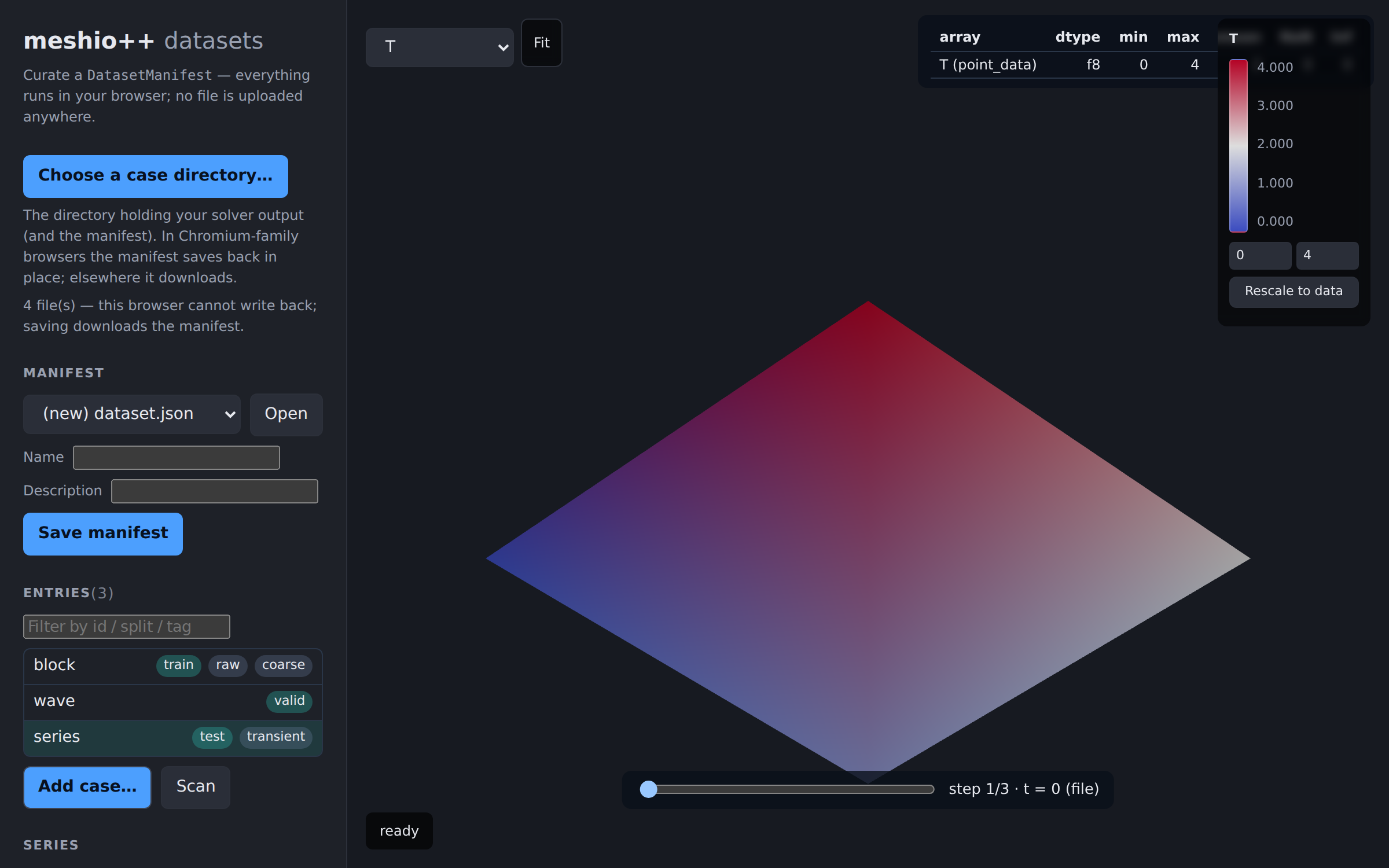
The web build ships a second page, dataset.html (v9.29.0): a curation UI for the dataset manifests used to organize ML training collections. It reuses this viewer's worker, MEMFS staging and render pipeline — previewing any manifest entry (with a step scrubber for time series) and summarizing its data arrays (NaN/Inf badging) — and reads/writes the same hand-editable manifest JSON the CLI and Python API do. Since v10.22.0 it opens on an overview of every manifest in the picked directory (cards with split balance, health badges, thumbnails, a diff view) and drills down into that curation view — see the dashboard page. See the datasets page for capabilities per browser (in-place save is a Chromium-family feature).
The offline page
view(backend="browser") writes a page with no WebAssembly in it — Python already has the C++ core, so the browser only has to render. That page cannot run operations, so anything it should be able to show is computed up front:
meshioplusplus.view(mesh, backend="browser", quality=True, color_by="temperature")quality=True bakes in per-cell metrics (off by default — it can double the page size), and geometric statistics of the volume mesh are always embedded, since the page renders only the boundary and could not derive them itself.
From the native CLI
The Python-free meshioplusplus binary can open the same Polyscope window, but only in a build configured for it:
git submodule update --init --recursive
build/configure.sh --cli --with-polyscope --build
./meshioplusplus view part.msh
The prebuilt release binaries deliberately do not include it. Their whole point is being dependency-free single files, and Polyscope needs OpenGL, GLFW and X11 — so the verbs are listed there but report the build flag instead of opening a window.
Limitations
- The offline page shows precomputed results but cannot run new operations; use the hosted viewer for that.
- Screenshots are polyscope-only. A headless vtk.js equivalent is possible but is not built.
- Polyhedron cells cannot be drawn as a volume; pass
kind="surface". - A very large mesh makes a very large HTML page in the browser backend (base64 is 1.33×).
viewwarns past 64 MB; prefer the desktop backend orcropthere.