
Dataset manifests
A training run is driven off a directory of solution outputs — many cases, each possibly a time series — not one mesh. A dataset manifest is the JSON document that catalogues such a collection: what each case's files are, which split it belongs to, how it is tagged and grouped, and whatever notes or run parameters it needs to carry.
import meshioplusplus as mio

manifest = mio.DatasetManifest.load("dataset_manifest.json")
manifest.entries(split="train")          # the curated view
series = manifest["case_0042"].time_series()   # one case as a TimeSeries
Two rules shape everything here:
- The manifest is the single source of truth, and hand-editing it is a first-class workflow. The
datasetCLI group, the MCP tools and a plain text editor all read and write the same JSON; serialization is stable (entry order preserved, fixed key order,indent=2), so hand edits and tool edits interleave without clobbering each other. - Entries record the plan inputs, never the resolved plan. An entry holds what a
TimeSeriesis constructed from — a pattern, a path list, explicit times — and resolution happens live, onesequence_entriescall away. Caching resolved paths in the file would make it a hidden cache that goes stale the moment a case directory changes.
The document
A settings-family JSON (the pipeline / sequences conventions): PascalCase keys, lowercase enum values, "Version": 1, and strict parsing — an unknown key anywhere is an error naming the offender, never silently ignored.
{
  "Version": 1,
  "Name": "cylinder-campaign",            // optional
  "Description": "Re sweep, coarse",      // optional
  "Metadata": { "solver": "kratos" },     // optional, open object
  "Entries": [
    {
      "Id": "case_0042",                  // required, unique
      "Source": {                         // required: the TimeSeries plan inputs
        "Pattern": "runs/c42/out_*.vtu",  // exactly one of Pattern | Path | Paths
        "Format": "vtu",                  // optional forced input format
        "Times": [0.0, 0.1, 0.2],         // optional explicit times
        "TimeFrom": "auto",               // optional: auto | file | filename | index
        "Sort": false                     // optional, Paths only
      },
      "Split": "train",                   // optional (train/valid/test by convention)
      "Tags": ["re100", "coarse"],        // optional
      "Group": "cylinder/laminar",        // optional organizing path
      "Notes": "restarted at t=0.3",      // optional free text
      "Thumbnail": "thumbs/case_0042.png", // optional picture of the case (v16.37.0)
      "Metadata": { "Re": 100 }           // optional, open object
    }
  ]
}| key | meaning |
|---|---|
Source.Pattern | a glob — the sequence glob language: */? only, directory part literal, expansion natural-numeric sorted |
Source.Path | a single file (possibly multi-step — each step becomes one entry of the case's series) |
Source.Paths | an explicit ordered file list; Sort: true natural-sorts it |
Source.Times / TimeFrom | the time-value precedence, verbatim |
Target | an optional second source of the same shape, for a paired coarse/fine case — see Paired cases below |
Split | free string; exact-match filtering (entries(split=...)) |
Tags | free strings; filtering requires all given tags |
Group | slash-separated path; filtering matches the path or any descendant (path segments, not string prefixes) |
Notes / Metadata | free text / open object for whatever a case needs to carry (provenance, run parameters, known issues) |
Thumbnail | the path of a PNG picture of the case, resolved like a source path (against the manifest's directory when relative); see Thumbnails |
Relative paths resolve against the manifest file's directory — a manifest loaded from campaign/m.json finds cases/out_*.vtu under campaign/, so the whole directory moves as one portable unit. A manifest loaded from a dict or JSON text (no file location) resolves against the CWD; save(path) makes the saved location the new anchor.
Python API
m = mio.DatasetManifest()                       # or .load(dict | JSON text | path)
entry = m.add("runs/c42/out_*.vtu", split="train", tags=["re100"],
              metadata={"Re": 100})             # validates the glob NOW, by name
m.add(["a.vtu", "b.vtu"], id="pair")            # explicit list
m.assign_splits({"train": 0.8, "valid": 0.1, "test": 0.1}, seed=0)
m.tag("all", add=["raw"]); m.set_split("case_7", "test")
m.annotate("case_7", notes="sensor dropout", metadata={"exclude_reason": "…"})
m.save("dataset_manifest.json")

m.entries(split="train", tags=["re100"])        # filtered, in entry order
m.splits()                                      # {"train": 160, "valid": 20, ...}
for entry in m:
    for t, mesh in entry.time_series():         # one mesh alive at a time
...addderives an id from the source stem when none is given; a collision is a named error, never a silent overwrite.validate_source=True(default) expands the plan once so an empty glob fails ataddtime, not at first training access.assign_splitsis deterministic —random.Random(seed)over the sorted ids — so the same manifest and seed always produce the same assignment;by_group=Trueassigns whole groups together (the leakage guard for cases that are variations of one another).entry.time_series(**read_kwargs)mapsSource1:1 ontoTimeSeries;entry.entries()returns the resolved{"path", "step", "time", "time_source"}plan without reading a mesh.
Thumbnails
An entry can carry a picture of itself (v16.37.0), so a manager shows what a case looks like without opening the file. The key is Thumbnail, the path of a PNG, stored relative to the manifest like a source. The manifest does not read or check the file: a thumbnail is a convenience, never a requirement, and a missing one is just a missing picture.
m.render_thumbnail("case_0042", width=256, height=192, color_by="pressure", cmap="coolwarm")
# draws step 0 with the software rasterizer to thumbnails/case_0042.png beside the manifest,
# records it, and returns the path; step=-1 draws the last step instead
m.set_thumbnail("case_7", "pics/seven.png")     # an existing picture (None clears it)
m.add("runs/c43/out_*.vtu", thumbnail="pics/c43.png")
entry.thumbnail_path()                          # resolved against the manifest's directory
render_thumbnail is snapshot over the entry's Source, so it needs the compiled core but no display, GPU or optional extra, and any render option works (view, color_by, streamlines, ...). The command line has dataset thumbnail and dataset add --thumbnail / --render-thumbnail; the MCP dataset_add and dataset_update take thumbnail and render_thumbnail, with every path inside the sandbox.
Compatibility. Parsing is strict, so a release before v16.37.0 refuses a manifest that carries a Thumbnail by name (unknown key 'Thumbnail'), exactly as it refuses any key it does not know; Version stays 1, because a manifest without the key reads and writes identically everywhere. The browser dataset manager accepts, keeps and saves the key but does not display it yet: it draws its own preview of the entry it has open.
Curating in the browser
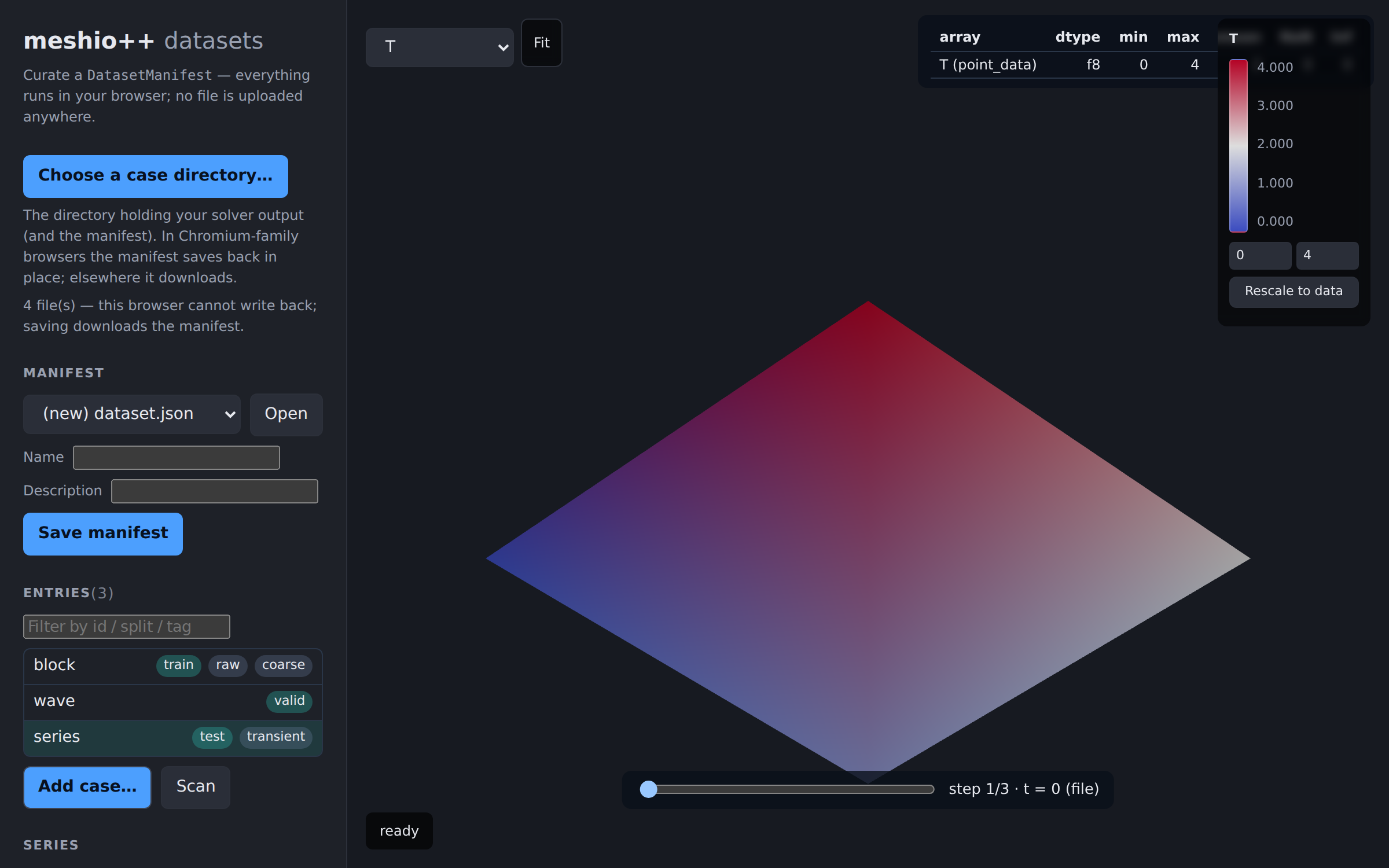
The dataset manager is a second page of the browser viewer (v9.29.0): point it at a local case directory, add cases (single files, explicit lists, or a suggested Pattern verified to match your selection exactly), assign splits/tags/groups, edit notes and metadata, preview any entry through the viewer's own render pipeline — a multi-step case gets a step scrubber — and Scan the whole manifest to badge entries whose data arrays carry NaN/Inf before they corrupt a training split. Everything runs client-side against the same WASM build as the viewer; no file is uploaded anywhere. Since v10.22.0 the page opens on an overview of every manifest in the picked directory — a card per manifest with its split balance, tags, health badges and a thumbnail, sortable by health, plus a manifest diff view — and a card drills down into this curation view; see the dashboard page.
It writes the same JSON this page documents, with the same serialization (so hand edits, CLI edits and UI edits diff cleanly), and refuses to load a document with unknown keys rather than silently dropping what it doesn't understand — the single-source-of-truth rule, enforced in both directions.
| capability | Chromium / Edge | Firefox / Safari |
|---|---|---|
| browse a case directory | File System Access picker | webkitdirectory input |
| save the manifest | in place, back into the picked directory | downloads a copy (the browser cannot write back) |
| reopen after a reload | Reopen button (the handle persists in IndexedDB; one click re-grants access) | re-pick the directory |
Since v9.30.0 the picked directory handle is remembered (best-effort, in IndexedDB — private mode or an unsupported browser silently degrades to re-picking): the next visit shows a Reopen button, whose click re-grants permission — the browser requires that user gesture, so nothing restores automatically — and a denied or stale handle is forgotten and falls back to a fresh pick.
The per-entry summary and the Scan also report quality metrics (v9.30.0): each preview's summary table gains the quality:* rows (worst scaled Jacobian, inverted/degenerate counts, …), and a scan badges entries with inverted cells alongside the NaN/Inf badge. One rule is load-bearing here: a quality metric's NaN means "does not apply to this cell type" by design (compute_quality's own convention), so quality rows are excluded from the NaN/Inf bad-case counts — a quality row flags red only on actual inverted/degenerate cells or a negative scaled Jacobian.
Two knowingly-accepted gaps, stated rather than hidden: fraction-based assign_splits stays in Python/the CLI (its seeded shuffle is random.Random, which a JS reimplementation could only mimic approximately — a "same seed, different assignment" trap worse than absence), and JavaScript has no int/float distinction, so a Python-written 0.0 in Times normalizes to 0 on the first UI save (a one-time diff line; the values are equal).
Relation to write_dataset's manifest
write_dataset emits meshioplusplus_dataset.json — a machine-written output artefact (snake_case, layout-versioned, atomically written at the end of an export run) describing rows already on disk. A dataset manifest is the opposite: a hand-edited input describing sources still in their native formats. They stay separate documents deliberately; the natural composition is directional — iterate a manifest's split and feed each case to write_dataset, or use the PhysicsNeMo adapter, which trains straight off the manifest with no export step at all.
Paired cases
A superresolution model trains on pairs: a coarse field in, a fine field out. An entry describes that with an optional Target, a second source of exactly the same shape as Source:
{
  "Id": "cyl_re100",
  "Source": { "Pattern": "coarse/out_*.vtu" },
  "Target": { "Pattern": "fine/out_*.vtu" },
  "Split": "train"
}
Leave it out for the ordinary case. An entry with no Target is self-supervised: one mesh supplies both sides, sampled onto a coarse grid and a fine one. That is the usual shape of a superresolution dataset, because you normally have only the high-resolution solve and make the coarse input by sampling it less finely — so Target is for the less common case where the coarse data is a genuinely separate run.
Two things are checked when a Target is present, and the second is the one that matters:
- Equal step counts. The obvious mismatch, refused by name.
- Agreeing times. A coarse run written at a different output interval produces two plans of the same length whose steps are at different instants. Pairing by index would then train the model to map one moment onto another — a quiet corruption rather than a crash, so it is refused too. Times are compared only where both sides carry a real one; a plan whose
time_sourceisindexsays nothing about when its steps happened, so there is nothing to disagree with.
An explicit Times list always overrides TimeFrom, so the two cannot be combined to mean "ignore these times": declaring times is taken to mean them. If the instants genuinely carry no information, drop Times and set TimeFrom: index on both sides.
The pairing is checked at dataset add time, again when a training index is built, and reported per entry by dataset_health as target_steps / pairing_error — a broken pair counts as a bad entry.
entry.target                    # the Target source dict, or None
entry.target_time_series()      # time_series()'s twin; raises by name when there is none
entry.target_entries() # entries()'s twinmeshioplusplus dataset add m.json 'coarse/*.vtu' --target 'fine/*.vtu' --id cyl_re100See mesh and regular grids for what the two sides become, and the PhysicsNeMo adapter for grid_sample_pair / iter_grid_samples / grid_stats.
Per-surface entry points
| surface | entry point |
|---|---|
| Python | DatasetManifest / DatasetEntry |
| CLI | meshioplusplus dataset add / list / split / tag / annotate / thumbnail |
| MCP | dataset_add / dataset_list / dataset_update (sandboxed like sequence), plus dataset_find / dataset_health — the dashboard's server-side manifest discovery and health producer |
| PhysicsNeMo | iter_samples / field_stats / make_dataset / make_reader, grid_sample_pair / iter_grid_samples / grid_stats for paired grids, and run_training / predict over a manifest's splits |
The manifest is Python-only (like data export): it never reaches the C++/WASM/C/Fortran core, and there is no native-CLI counterpart.