Time-series Playback
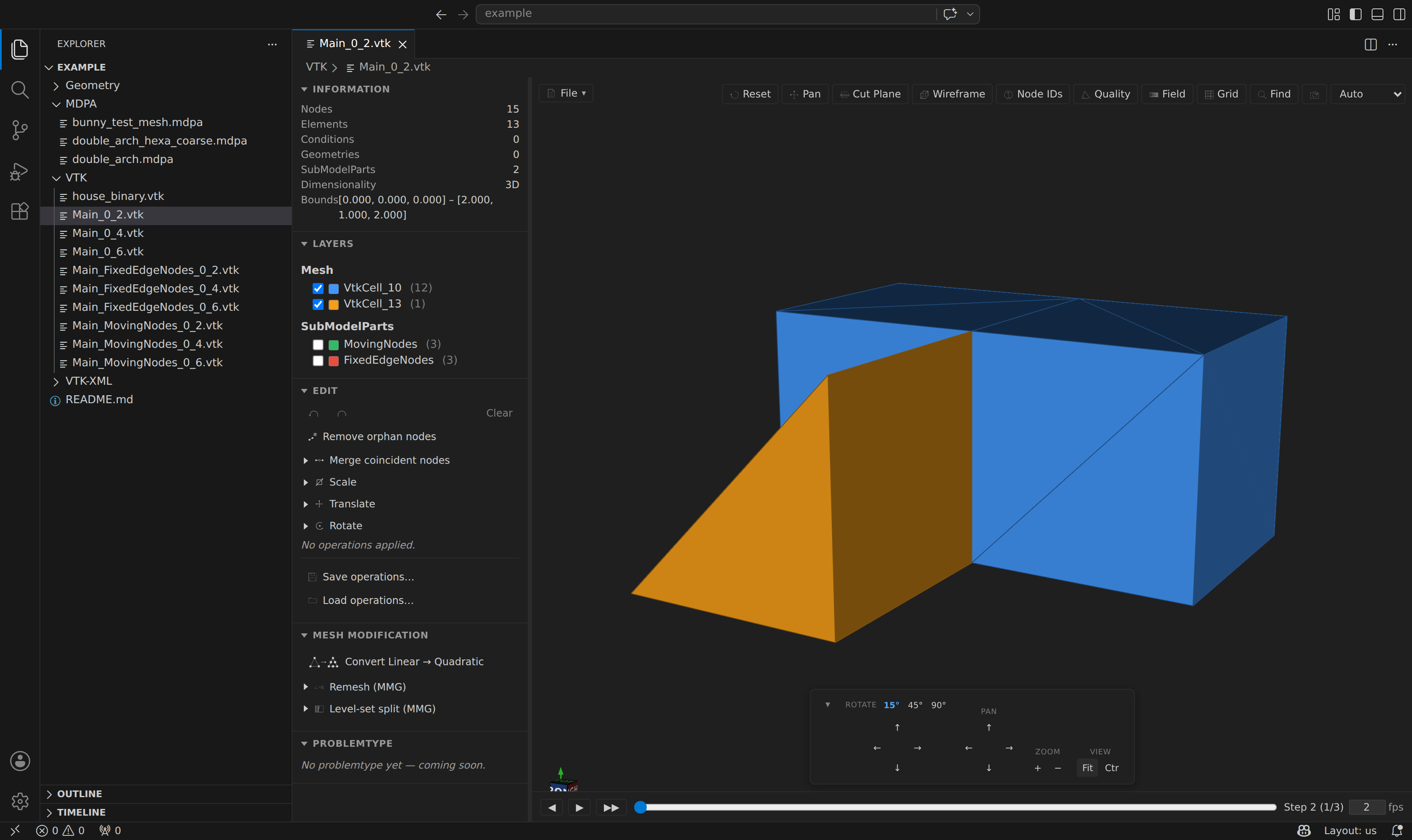
Kratos writes one file per model-part per time step. Open any file in such a series (VTK, STL, OBJ, PLY or an extended meshio format without an in-file timeline) and the extension detects the naming pattern, groups the sibling files, and loads the whole series as an animation.
Filename grammar
Kratos names files as <prefix>_<rank>_<step>.<ext>. The extension parses this pattern — anchored from the right so part names may contain underscores — infers the parent / child prefix tree, and groups the sibling files in the same directory into a single time-series model. Grouping is per extension: a .vtk and a .ply series with the same prefix never mix. Each frame uses its normal parser, including companion files for formats such as TetGen and EnSight. Discovery lists filenames; it does not parse every frame in advance.
In-file series
Some meshes carry their steps inside one path rather than across sibling files: Exodus, GiD postprocess, XDMF, MED, CGNS, Tecplot and VTKHDF hold every step in the file, a ParaView .pvd collection lists one .vtu/.vtp per step in its index, and an OpenFOAM case holds one step per numeric time directory beside the .foam marker. These drive the same timeline bar — sized with readMeshTimeSteps and selected with a step index — and a growing series extends it live, including a solver appending OpenFOAM time directories while the preview is open.
Gmsh, H5M and CalculiX .frd do not qualify. Gmsh can select a step but cannot list untagged sections, H5M time-indexed tags are not a time axis, and .frd can only list its steps by reading the whole file. EnSight transient wildcard geometry is rejected. These formats can still use separate files that follow the filename grammar.
The timeline bar
When multiple time steps are found, a bar appears along the bottom of the viewport:
◀ ▶ ▶▶ ══════●══════════ Step 4 (2/3) 2 fps- ◀ / ▶▶ — step backward / forward one frame.
- ▶ / ⏸ — play / pause at the configured rate.
- Scrubber — drag to jump to any step instantly.
- fps input — playback speed (1–30 fps).
A single file with no timestep siblings opens as a static preview with no timeline bar.
State is preserved across frames
Camera position, layer visibility, the active field variable, mode, and colormap are all preserved when switching frames — so a field animates cleanly across the series, and toggled layers stay toggled.
SubModelparts across the series
Each submodelpart file in the series (e.g. Main_FixedEdgeNodes_0_*, Main_MovingNodes_0_*) is merged into the frame as an overlay layer by coordinate matching, so the submodelpart tree stays consistent as you scrub. Groups already present inside the root file are preserved.
TIP
The directory is watched for new files, so time steps written while the preview is open automatically extend the timeline — handy for watching a running simulation.
Packing a series
A finished solve is a directory of hundreds of files that have to be kept, copied and opened together. Pack turns them into one openable timeline, in whichever of two containers fits the run.
Two ways in:
- Kratos Runs ▸ right-click a finished run ▸ Pack Results Into One File…
- The palette's Kratos MDPA: Pack Time Series Into One File…, which packs the series the open preview is showing.
Either way you are asked which container, because the choice is about the run rather than the filename:
| XDMF (the default) | ParaView collection (.pvd) | |
|---|---|---|
| What you get | one .xdmf plus its .h5 | one .pvd plus a directory of one file per step |
| Needs the same mesh every step | yes | no |
| Good for | a run that never remeshes | a remeshed, adaptive or moving-mesh run |
XDMF is the tidier result: a single small file naming the steps, with the arrays in a sibling .h5 (both are part of the output — an .xdmf without its .h5 is unreadable).
.pvd is a light index of ordinary VTK files, so every step may carry its own mesh — which is the only way to pack a run that changes size. A step that is already a VTK XML file is copied byte for byte rather than re-encoded, so a Kratos run's .vtu steps cost no conversion at all; anything else (a legacy .vtk, any meshio++ format) is re-written as .vtu by the same writer the export menu uses. It needs no mesh-format kernel at all. The result re-opens here as a timeline, and mesh_field_series / the Plot over time panel report topologyChangedAt — the step where the mesh changed size — exactly as they do for a directory of files.
Not the same as Export ▸ XDMF
The File menu's Export as ▸ XDMF writes the frame you are looking at. Packing writes every step.
The step numbers from the filenames become the time axis, so a series written as _0_2, _0_4, _0_6 packs to times 2, 4 and 6 rather than 0, 1, 2. Either container re-opens here as a timeline, so you can scrub the packed result exactly as you scrubbed the directory.
Two things are refused rather than half-done:
- A single file — there is nothing to combine. (A format that already carries its own steps, such as Exodus or GiD postprocess, can still be repacked as
.pvd, one file per step; XDMF has nothing to combine and says so.) - A changing series packed as XDMF. A time series carries one grid for every step, so a remeshed run cannot become one file. The message names the step where the size changed and points at
.pvd, rather than just refusing.
A .pvd pack owns its step directory, so it will not overwrite an existing <name>.pvd or <name>/ — pick another name or remove it first. Both containers publish atomically: the pieces are written and only then the index, so a cancelled pack leaves nothing rather than an index pointing at files that are not there. Packing streams one step at a time, so a 200-step run costs one step of memory rather than all of them, and it can be cancelled from the progress notification.
Agents reach the same thing through the mesh_pack_series MCP tool, whose target argument picks the container ("xdmf" by default).