
Data Table & CSV Export
Advanced ▸ Data table… shows every node, element, condition or geometry as a row of plain values, and exports the whole thing as CSV or XLSX.
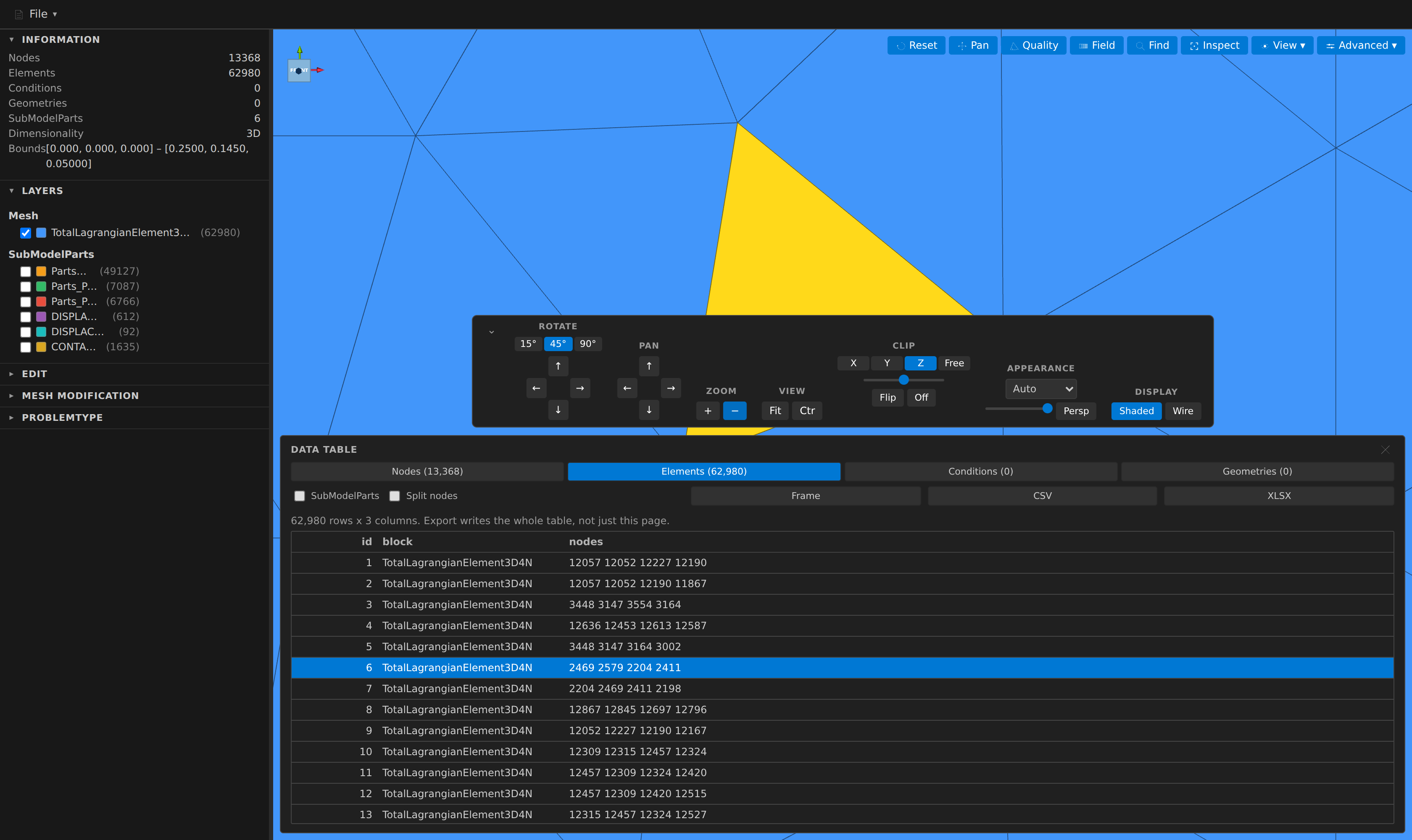
It is the bulk counterpart of Inspect: Inspect answers "what is the value at this entity" for one thing you clicked, and the data table answers it for all of them at once.
What the columns are
| Kind | Columns |
|---|---|
| Nodes | id, x, y, z, then one column per Nodal field |
| Elements / Conditions / Geometries | id, block, nodes (the connectivity), then the fields defined there |
Two checkboxes change the shape:
- SubModelParts adds a column listing every part each row belongs to, separated by
;(a part path already contains/). - Split nodes turns the single joined
nodescell inton1,n2, … one column per connectivity slot. A block with a shorter stride pads with blanks rather than shifting later columns.
A vector field splits into components: a 3-component field becomes NAME_X, NAME_Y, NAME_Z, and a wider one — a Hessian, say — becomes NAME_0 … NAME_8.
A field that does not cover a row leaves the cell blank. That is deliberate: a 0 would be a number the mesh does not actually carry.
A field's columns follow the data, not the label
A field appears as a column only when a row of the chosen kind really has a value for it. That matters because "geometries have no fields" is not true — a partition writes one Elemental PARTITION_INDEX whose ids cover elements, conditions and geometries alike, and it shows up on all three tables. The same rule keeps a table free of permanently empty columns belonging to some other entity kind.
Finding a row in the mesh
Click a row and that entity is highlighted in yellow in the 3D view. Frame zooms to it. Those are two actions rather than one on purpose: scanning down a column of rows would otherwise throw the camera at a different element every time you moved.
The panel is docked to the lower half of the viewport for the same reason — a table covering the whole canvas would hide the thing it just highlighted — and framing lifts the entity into the visible half rather than centring it behind the panel.
Large meshes
The table paginates at 100 000 rows and only ever builds the rows you can see, so it opens on a multi-million-entity mesh as quickly as on a small one. Use the « ‹ › » buttons or type a row number to jump.
The page size is not a display preference. A single scroll region tall enough for several million rows exceeds the browser's maximum layout height, past which the scrollbar quietly stops mapping to rows and the end of the mesh becomes unreachable — a failure that looks exactly like success. Paging keeps every row reachable at any mesh size.
Export
CSV and XLSX always write the whole table, never just the page you are looking at.
| CSV | XLSX | |
|---|---|---|
| Size limit | none (streamed to disk) | 1 048 576 rows — Excel's own worksheet limit |
| Too many rows | — | writes what fits and tells you how many were left out |
| Best for | anything large, or piping into a script | opening straight in a spreadsheet |
Numbers are written at full precision, not at the six digits the panel displays. Coordinates get particular care: they are stored as 32-bit floats, so a naive conversion prints a stored 0.1 as 0.10000000149011612 — fabricated digits in every coordinate of the file. The export writes the shortest decimal that reads back as the same float instead.
The export is also on the Command Palette as Kratos Mesh: Export Data Table (CSV / XLSX)….
Headless
The same table is available to agents and scripts through the mesh_export_table MCP tool, which either writes a .csv/.xlsx file or returns a bounded page of rows as JSON. It is the only MCP tool that reports field values — mesh_info reports field metadata, and mesh_find_entity answers for a single id.
One caveat worth knowing
Kratos gives each entity kind its own id space, so element 1, condition 1 and geometry 1 are three different entities. A single field whose ids span several kinds therefore resolves to one of them for a colliding id. The table behaves exactly as the field panel and Inspect already do here, which is the point — a table that disagreed with the panel beside it would be worse than the shared quirk.