Running Kratos Simulations
The Problemtype sidebar section turns any mesh preview into a case builder: pick a physics problemtype, fill in the solver settings, assign boundary conditions and materials to SubModelParts, and the extension generates everything a Kratos Multiphysics run needs — then launches it in an integrated terminal. The mesh need not be an .mdpa: a mesh in any other format is converted to a <name>_case.mdpa case mesh on Generate, since the solver reads .mdpa.
What gets generated
Clicking Generate case files writes three files next to the mesh:
| File | Contents |
|---|---|
ProjectParameters.json | The full Kratos parameters document: analysis_stage, problem_data, solver_settings (pointing at your mdpa), processes (your condition assignments) and output_processes |
<Problemtype>Materials.json | One properties entry per material assignment (model_part_name, constitutive law, variables) |
MainKratos.py | The generic launcher: reads the JSON, imports the analysis_stage module and runs the simulation |
Output is always configured through Kratos' vtk_output_process, so results land in a vtk_output/ folder that this extension can preview directly — including time-series playback that extends live while the solver is still writing steps.
Your form choices are auto-saved to <name>.kratoscase.json next to the mdpa and restored the next time you open the preview. The file is plain JSON — commit it to version control to share the case setup.
Configure the Kratos location
Open Settings → Extensions → Kratos MDPA Preview (or search kratos. in settings):
| Setting | Meaning |
|---|---|
kratos.pythonPath | Python executable used to run cases. Empty = python3 (python on Windows) |
kratos.installPath | Root of a compiled Kratos build (the folder containing KratosMultiphysics/ and libs/, or a source checkout — see below). Leave empty for a pip-installed Kratos |
kratos.extraEnv | Extra environment variables for the run terminal, e.g. {"OMP_NUM_THREADS": "4"} |
kratos.problemtypes.extraPaths | Directories scanned for user problemtypes (default .kratos/problemtypes) |
Two common setups:
- pip-installed Kratos (recommended):
pip install KratosMultiphysics-allinto any Python, pointkratos.pythonPathat that interpreter, leavekratos.installPathempty. - Custom-compiled Kratos: run Kratos Case: Select Kratos Installation Folder… from the Command Palette and pick either the install root (the directory holding
KratosMultiphysics/andlibs/) or your Kratos source checkout — an in-tree build underbin/Release(orRelWithDebInfo/Debug/FullDebug) is detected automatically. The command validates the layout and writeskratos.installPath(workspace settings when a workspace is open). The run terminal then getsPYTHONPATHplus the platform's shared-library path (LD_LIBRARY_PATHon Linux,DYLD_LIBRARY_PATHon macOS,PATHon Windows). Note macOS System Integrity Protection stripsDYLD_*variables for protected binaries — a pip install avoids the issue entirely.
Build a case
- Open the mesh in its preview (
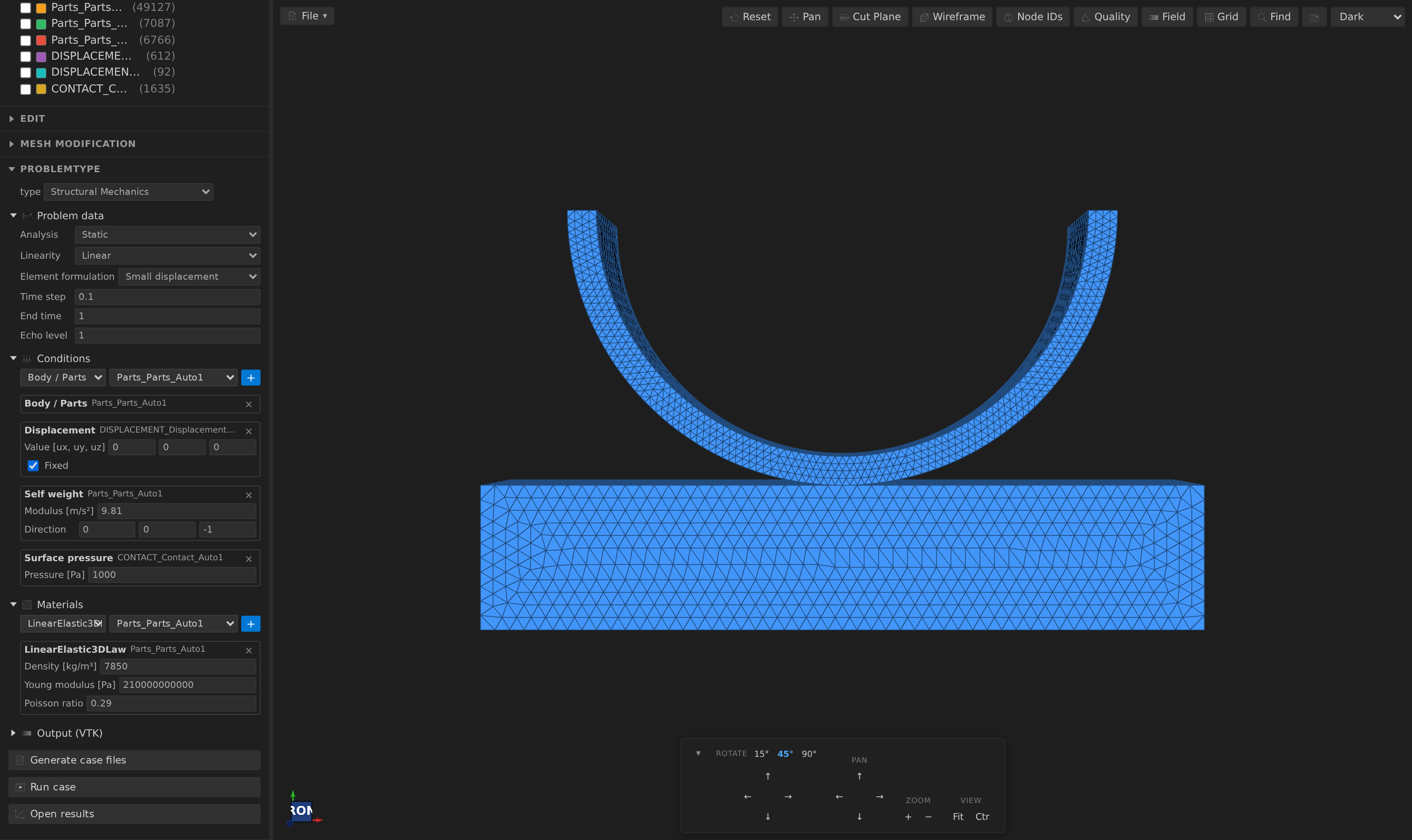
.mdpaor any other mesh format) and expand the Problemtype section. - Pick a problemtype from the dropdown, which is grouped by family (see Built-in problemtypes).
- Fill the solver cards: the Problem data section is split into collapsible groups (Time, Formulation, Solver, Convergence, Parallelism…), advanced options are folded under Advanced, and a card keeps its open/closed state while you edit.
- Under Conditions, pick a condition and a SubModelPart and press +:
- Assign the Body / Parts pseudo-condition to your domain SubModelPart(s) — it marks the computing domain and emits no process.
- Assign boundary conditions (displacement, inlet, temperature…) and loads to boundary SubModelParts. Each assignment shows its parameter fields inline; × removes it.
- Under Materials, assign a constitutive law to each Parts SubModelPart and adjust its variables — or pick a material preset and let it fill the row (see below).
The panel follows the order of GiD's data tree, with a separator and an icon for each stage: header (problemtype, description, summary chips), Parts, Materials, Initial conditions, Boundary conditions, Loads, the solution cards, Output (VTK) and the Generate / Run / Results actions. Conditions are listed under their branch with a count, and the condition picker offers them grouped the same way.
Built-in problemtypes
The built-ins track GiDInterface (baseline 36c552f, see Syncing with GiDInterface).
| Family | Problemtypes |
|---|---|
| Solids & structures | Structural Mechanics — small/large displacement, mixed, shell, beam, truss and cable formulations; static, dynamic (Newmark/Bossak) and eigenvalue analysis |
| Fluids | Fluid Dynamics (monolithic QSVMS/DVMS/FIC/legacy VMS/weakly compressible/axisymmetric/P2-P1, Stokes and fractional step; wall law, periodic boundaries, non-Newtonian Bingham and Herschel-Bulkley fluids; force, aerodynamic-coefficient, pressure-coefficient and y+ monitors), Compressible Fluid, Embedded Fluid, Turbulent Flow (RANS) (k-epsilon, k-omega or k-omega SST with the wall function), Two Fluids (a level-set interface between two fluids), Free Surface (edge-based level set), Potential Flow, Shallow Water (three solvers) |
| Thermal | Convection-Diffusion |
| Coupled physics | Buoyancy (Boussinesq natural convection), Conjugate Heat Transfer (fluid + solid), Fluid-Structure Interaction (partitioned Dirichlet-Neumann over an ALE mesh), Generic Coupling (CoSimulation) (weak or strong coupling of the fluid and structural solvers, optional ALE) — see Coupled Simulations |
| Reduced-order models | ROM · Structural Mechanics, ROM · Convection-diffusion, ROM · Fluid Dynamics, ROM · Potential Flow (RomApplication's RomManager: POD basis and HROM over a sampled parameter space) — see Reduced-Order Models |
| Optimization | Structural Optimization (OptimizationApplication: material, shell thickness, vertex-morphing shape and SIMP topology controls; gradient and projection algorithms) — see Structural Optimization |
| Workflow | Flowgraph node editor |
Coupled problemtypes
A coupled problemtype has several domains (for example Fluid and Structure). Each domain has its own Parts condition, conditions, materials and mesh: Generate writes one ProjectParameters.json plus <name>_Fluid.mdpa, <name>_Structural.mdpa… sliced from the mesh you have open by the SubModelParts you assigned to each domain, and one materials file per domain. The interface between the physics is marked with an interface condition on each side (FSI: FSI fluid interface / FSI structure interface; Conjugate Heat Transfer: Fluid thermal interface / Solid thermal interface); Generate refuses a case missing a domain's parts or either interface half, naming what to fix, and writes nothing. For FSI and CoSimulation the interface sides must also pair one-to-one, carry boundary cells of the right dimension and overlap in space; Coupled Simulations lists every check, the CoSimulation options and how coupling iterations reach the convergence history.
Not solver-verified
The new problemtypes follow GiDInterface's writers, but this repository has no Kratos to run them against. Treat the first run of Compressible Fluid, Embedded Fluid, Free Surface, Buoyancy, Conjugate Heat Transfer, FSI and CoSimulation as a check of the generated files. Every generated driver checks that the Kratos applications the case needs can be imported before it starts, and Run asks the configured Python first, refusing with the missing applications named. MPM and DEM are not provided, nor are GiD's Dam, GeoMechanics, PFEM and Stent apps.
Material presets
A material preset is a set of parameter values with a source, not a constitutive law. The law still decides which variables exist and in which units; the preset supplies the numbers and says where they came from, at what reference conditions.
The Materials form carries a searchable catalog, filtered to the constitutive law of the row you are adding. About sixty-five rows ship with the extension, each with its units, reference conditions and a citation:
| Family | Fits | Rows |
|---|---|---|
| Fluids | Newtonian3DLaw / 2DLaw | water at 20/40/60/80 °C, seawater, glycerol, ethanol, mercury, dry air at 0/20/40 °C |
| Structural solids | LinearElastic3DLaw, plane strain, plane stress | structural steel, reinforcing steel and stainless steel (Eurocodes), ductile iron, aluminium (EN 1999, 6061-T6, 7075-T6, 2024-T3), Ti-6Al-4V, Inconel 718, copper, magnesium AZ31B, concrete C25/30 · C30/37 · C40/50, softwood C24 and glulam GL24h, soda-lime glass, PMMA |
| Thermal | convection-diffusion material | water, air, aluminium, copper, iron, carbon and stainless steel, titanium, nickel, brass, concrete, glass |
| Roughness | shallow-water Manning | concrete finishes, excavated earth, natural streams, floodplain grass and crops (Chow, Open-Channel Hydraulics) |
| Kratos GiD defaults | all of the above | the materials the Kratos GiD interface offers (steel, aluminium, dam concrete and soil, sand, water, air, gold, grass…), for cases moving over from GiD |
Structural rows are quoted the way their source prints them (E = 210 GPa) and converted to the law's Pa on apply. A structural row carries density, Young's modulus and Poisson's ratio only: the thickness of a plane law belongs to the model and is left alone, and yield stress, hardening or thermal expansion are not part of a linear-elastic law, so they are not carried. Two caveats are written into the rows themselves: timber is orthotropic and is offered only as an isotropic approximation, and the GiD defaults are the Kratos team's tutorial numbers, not handbook values (steel there is 206.9 GPa, against 210 GPa in EN 1993-1-1). Two GiD rows are left out on purpose — rubber, whose Poisson ratio of 0.5 is singular for a linear-elastic law, and the GeoMechanics "Dirt"/"Sand" entries, which are copies of steel and aluminium.
Choose a preset, choose a law and a SubModelPart, and press +. The water and air rows at 20 °C quote kinematic viscosity rather than dynamic, so the extension derives μ = ρ·ν — the status line shows the multiplication, and the material row then reads with the preset's name, source and reference conditions. This happens exactly once per application: applying the same preset again replaces the value rather than compounding it, and a preset that quotes μ directly is used as given.
- A preset names the laws it fits. It is refused — not partly applied — on a law it does not declare, so a fluid density can never half-fill a structural material.
- Units convert, or the preset does not apply.
g/cm³,kg/L,cP,mPa·s,cSt,mm²/s,GPa,MPa,psi,mmand more are recognised in both directions. A pair that is not the same physical quantity (a density into a viscosity field) is refused with a reason rather than passed through, and a value whose unit cannot be established on either side is only accepted as an exact match. - Your own rows live as JSON in the workspace —
.kratos/materials/*.jsonby default, or whereverkratos.materials.extraPathspoints. A file holds one preset or{"version": 1, "presets": [ … ]}. import presets… copies a file in; save as preset on a material row writes one out from the values on screen; and a row can be exported to share. A file that cannot be read is reported in the form rather than silently ignored, and a row with nosourceis rejected — a catalog entry that cannot cite anything is not an entry.
{
  "version": 1,
  "presets": [
    {
      "id": "engine-oil-40c",
      "name": "Engine oil (40 °C)",
      "laws": ["newtonian_3d"],
      "values": { "DENSITY": 876, "KINEMATIC_VISCOSITY": 1e-4 },
      "units": { "DENSITY": "kg/m³", "KINEMATIC_VISCOSITY": "m²/s" },
      "reference": { "temperature": 40, "temperatureUnit": "C" },
      "source": { "name": "ISO 3448 VG 100", "version": "1992" }
    }
  ]
}- Each case keeps a snapshot. Applying a preset copies the resolved values plus the source, version and reference conditions into
<mesh>.kratoscase.json. Editing the material afterwards changes the case, never the snapshot; editing or deleting the library file never rewrites a case that already used it. When the library row has since changed, the material says which variables differ and offers an explicit re-apply — it never happens on its own.Save problem…and the MCPproblem_packcarry the snapshot with the case, so a shared problem arrives with its provenance intact. - A material that cannot mean anything will not generate. An undeclared law, a preset paired with a law it does not fit, and a non-positive density, viscosity or Young's modulus are reported in the row and refused by Generate (and by
case_validateheadlessly), instead of being written out for Kratos to fail on. A physically impossible Poisson ratio stays a warning.
- Under Output (VTK), choose the file format, output cadence and the nodal variables to write.
- Generate case files — the generated
ProjectParameters.jsonopens for inspection. Warnings (e.g. an assignment referencing a SubModelPart that no longer exists) surface as notifications.
Preflight. Under the Run buttons, a Preflight card re-checks the case as you edit it or as the mesh changes. A dry run of Generate supplies its errors (so a case with no error generates), and on top it lists, most severe first:
- Errors — a SubModelPart that is not in the mesh, a condition the problemtype does not declare, and everything Generate refuses on (unusable material values, bad time stepping, a missing coupled-domain interface).
- Warnings — a computing part with no material, a material that sits off the computing parts, an assigned SubModelPart that is empty or has none of the entities its condition acts on, Properties ids the mesh does not define, and mesh-wide quality problems (bad-band metrics, inconsistently wound or zero-area surface faces).
- Notes — empty or unused SubModelParts, isolated nodes, defined-but-unused Properties.
A row that names a SubModelPart is clickable and frames that part in the viewport. Quality checks are skipped above 50 000 cells in the sidebar (the Quality panel still gives the full report). Headlessly, case_validate returns the same findings.
Material tables: plot, drag to edit, preview
A law variable that holds a table (the temperature-dependent viscosity's T,mu; … text) edits as a grid and as a plot beneath it, with the table's own variables on the axes. The two are one table: typing in the grid moves the points, and dragging a point rewrites the grid and the saved case.
- Drag a point to move it. The input column must increase (Kratos interpolates the table in order), so a point stops before its neighbours; the output is free. The axes are held still while you drag and re-fit when you let go.
- Keyboard: tab to a point, then the arrow keys nudge it (Shift for ten times the step) and Delete removes it. The readout under the plot names the values.
- Double-click empty space inside the plot to add a point at that position, in input order. A second point at an input that already has one is refused, because a table cannot give two outputs for one input.
- A row that does not parse stays in the grid, flagged, but is not drawn; with fewer than two drawable rows the plot shows a hint instead of an empty frame. Values written back are rounded to six significant digits so a drag leaves tidy text.
Preview tables (on the Materials form, when a material has a table) plots every table of the case on screen in the Scientific plots workspace, before anything is generated — zoom, hover and PNG/CSV export included. The command Kratos MDPA: Preview Material Tables does the same for any Kratos materials JSON file: run it from the palette on the open file (or pick one), or right-click a *material*.json file in the Explorer or editor. Tables that share an input and output variable share a chart, one line per table; a file with several variable pairs opens one chart each (it asks which when there are more than four). A malformed table or row is skipped with a note and never stops the others, a table whose inputs do not increase is drawn as written and flagged, and no unit is claimed because a materials file declares none.
Element types and the case mesh
Kratos solvers expect specific element/condition block names in the mdpa, and your mesh may be named for different physics (or come from a generic mesher). Each problemtype declares what its solver needs, and Generate checks the mesh: when any block name differs, a renamed copy <name>_case.mdpa is written next to the original (which stays untouched) and model_import_settings.input_filename points at it. A notification lists the renames; Properties blocks are preserved verbatim.
- Structural has no solver-side element replacement, so concrete names are required: the Element formulation field picks one of the solid (small/total/updated Lagrangian, mixed, OSS, Q1P0, SPRISM, axisymmetric), beam, truss and cable, shell and membrane, or discrete point/line/surface-mass, spring and bushing formulations, and each names exactly the block shapes Kratos registers for it. The material law picker only offers the laws written for the chosen formulation: linear elastic (2D/3D solid, axisymmetric, beam, truss and cable, shell, membrane, point mass, spring, bushing, line and surface mass) plus the
ConstitutiveLawsApplicationhyperelastic, plasticity (isotropic, kinematic, finite-strain, J2), damage and viscous laws for solids and shells — factory laws write theirlaw_type/yield_surface/plastic_potentialkeys and pull the application into the driver's requirements. Generate refuses a mesh block the formulation has no element for instead of inventing a Kratos type. Surface/line condition blocks becomeSurfaceLoadCondition3D3N/LineLoadCondition2D2N. Point, moment and moving loads need no condition blocks in the mesh: assigning them re-emits the part's nodes (or line entities) asPointLoadCondition/MovingLoadConditionblocks in a sibling SubModelPart that the process targets — a moving load travels along the part's lines at its velocity from its origin. Analyses cover static, implicit and explicit dynamics (central-differences or multi-stage, no system solve), eigenvalues (choosable eigensolver, optional modal decomposition and mass normalization — all needingLinearSolversApplication) and harmonic response: modal superposition for the regular loads, or a direct complex solve over the assigned real (Point load) and imaginary (Imaginary point load) load parts (needsLinearSolversApplicationforpardiso_lu_complex). - Fluid (and its variants), Convection-Diffusion, Potential Flow and Shallow Water solvers replace elements internally, so their meshes get generic names (
Element3D4N,WallCondition3D3N,SurfaceCondition3D3N,LineCondition2D2N). - Point (single-node) condition blocks are never renamed — their names are load-specific (e.g.
PointLoadCondition3D1N).
If the mesh already matches, no copy is made and the case points at the original mdpa. (That conditional applies to .mdpa sources only: any other format is always converted, so a .vtu or .msh source gets a <name>_case.mdpa even when no block needed renaming. A converted mesh carries no verbatim Properties — like every other foreign-format export — and a source with no SubModelParts produces a case with nothing to attach conditions or materials to, which Generate reports as a warning.)
Run and watch results
Run case re-generates the files and opens a terminal named Kratos: <case> with the configured environment, running python MainKratos.py in the case directory. The solver's output streams in the terminal; Ctrl+C interrupts it.
Open results opens the first file in vtk_output/ with the VTK preview. Because the preview watches its folder, the timeline grows automatically as the solver writes more steps — you can watch the solution evolve while it runs.
All three actions are also available from the Command Palette: Kratos Case: Generate Case Files, Kratos Case: Run Case, Kratos Case: Open Results.
Verifying the fluid cases against a solver
scripts/verify-fluid/run.mjs runs one small case per fluid family through the same caseRun path the sidebar uses — generate, launch, case_status — and reports pass/fail/skip per family:
node scripts/verify-fluid/run.mjs --list
node scripts/verify-fluid/run.mjs --install ~/src/Kratos/bin/Release --timeout 180
The families are the monolithic, fractional-step, Stokes and weakly compressible Fluid formulations, the embedded and two-fluids cases, the three RANS turbulence models on a channel, and the wind-tunnel sphere on the wizard's mesh. Each uses a tiny mesh and a few steps: a smoke run proving the generated ProjectParameters.json, materials and MainKratos.py are accepted and run to completion, not a physics benchmark. A family whose Kratos applications are not installed is skipped with the missing names (exit 0); a family that fails exits 1 with the log; no Kratos at all exits 2. The report is written to verify-fluid.json in the output directory.
Two upstream Kratos bugs surfaced through the harness. Monolithic BDF2 with a classic element (plain QSVMS/DVMS/VMS/FIC) segfaults stock Kratos, so the Fluid default time scheme is Bossak (Kratos' own solver default); the monolithic family runs plain QSVMS with Bossak, and the weakly compressible family (whose element integrates in time) keeps BDF2. The serial two-fluids wrapper used to name a module Kratos does not ship (navier_stokes_two_fluid_solver; only the plural exists), so the build this repository was tested against carries a one-file alias re-exporting the plural module — local to the build, documented here, to be removed when upstream fixes the wrapper. As of Kratos 10.4.2 the wrapper is fixed: the two-fluids family runs without the alias, so the alias is no longer needed and the family now reports that the bug it watched did not occur. Both are reported instead of worked around in the generator: solver_type: "TwoFluids" and the BDF2 option stay exactly what Kratos' own tests use.
The wall y+ needs the solver's reactions. The wall y+ monitor is computed from the wall's REACTION, so a case that assigns it turns compute_reactions on for the solver — without them the y+ process reads a variable nobody wrote and the run dies in the first time step. The y+ itself is a condition variable in Kratos (it is computed per wall face, from that face's parent element), so it is written by a second, condition-typed VTK output on the wall's own part — a file beside the volume output, holding the wall's faces. Asking the volume output for the y+ as nodal data writes a column of zeros, because the nodes never carry it. A SubModelPart whose node list does not cover the nodes its conditions use makes that condition output crash Kratos, so a wall part must list every node its conditions touch.
Notes
- Process
model_part_names are derived as<RootModelPart>.<SubModelPart.Path.With.Dots>— e.g. assigning toParts/Solidin the Structural problemtype producesStructure.Parts.Solid. - Materials use Kratos'
ReadMaterialsUtility, which assigns properties per SubModelPart — theproperties_ids in the materials file do not need to match the property ids inside the mdpa. - Solver settings mirror what the GiD interface writes for the same problems, so cases behave the same either way.
- Need physics the built-ins don't cover? Author your own problemtype in JavaScript or Python. Faithful Python ports of all five built-ins ship as copyable examples in
example/problemtypes/.
Fluid formulations, monitors and periodic boundaries
The Fluid Dynamics problemtype exposes every formulation FluidDynamicsApplication's solvers build, each writing only the keys that formulation validates:
- Monolithic elements: Quasi-static VMS (optionally integrating in time inside the element), Dynamic VMS, FIC (with its beta), the legacy VMS (with Herschel-Bulkley power-law parameters for non-Newtonian fluids), weakly compressible (with the speed of sound), axisymmetric (2D only) and P2-P1 continuous (quadratic meshes). Bossak takes its alpha; Kratos' defaults (alpha −0.3, FIC beta 0.8) are not written.
- Stokes (monolithic, linear, optionally forced steady) and Fractional step (time order, slip conditions on the skin).
- Non-Newtonian laws in the material form —
Bingham3DLaw/Bingham2DLawandHerschelBulkley3DLaw— offered to the monolithic strategy. - Periodic boundary: assign it to the slave boundary, name the master and the translation, and turn on Periodic boundaries; Generate refuses a pair left half set up. The translation runs from the master to the slave (master + translation = slave), for the Fluid and the RANS process alike. Generate checks it on the mesh: every slave node must have a master node at that distance, and a pair that does not match is refused naming the part, with a note when reversing the direction would match. This matters because Kratos does not complain: a mismatched pair creates zero constraints and the run finishes as an ordinary, unperiodic solve.
- Monitors (category Other): Forces and moments on a body, Aerodynamic coefficients (reference area, chord and dynamic pressure), Pressure coefficient and Wall y+. They are processes on the wall part and stay out of
skin_parts; the pressure coefficient (a nodal variable) is added to the volume output automatically, while the wall y+ (a condition variable, computed per wall face) gets its own condition-typed output on the wall's part — a file beside the volume output — and turnscompute_reactionson. - Integration-point statistics (category Other, on the fluid volume): samples an Average, Variance or Third-order moment of a variable at the integration points over time and writes it to a file, with the exact keys
IntegrationPointStatisticsProcessvalidates (model_part_name,output_file_name,dimension,start_time,statistics). Entries on one part merge into a single process; a variance or third-order moment needs its average on the same part (a component needs the vector's average), a vector average needs one tag per component (VELOCITYtags itself), and one file and start time hold per part — anything else is refused at Generate with the reason. There is deliberately no CFL monitor: Kratos'ComputeCFLProcessonly implementsExecute(), which the analysis stage never calls, so such an entry would silently do nothing; the adaptive controller and the time-step estimate above cover the Courant number. - Temperature-dependent viscosity (monolithic only): the Temperature dependent 2D/3D laws read the viscosity from a
TEMPERATURE–DYNAMIC_VISCOSITYtable in the materials file (oneT,mupair per;, at least two; the table text is not written as a variable). The Materials form edits the table as a grid — one row per pair, malformed rows flagged in place — and a bad table is refused at Generate with the reason. Set the nodalTEMPERATUREwith an Initial temperature (the law reads the frozen field — no energy equation is solved, so the temperature does not advect).
Embedded Fluid offers all four embedded elements (continuous, weakly compressible, Ausas and discontinuous weakly compressible) through the Embedded solver, with the speed-of-sound property only where the element reads it. Kratos has no dynamic-Smagorinsky switch in the solver settings (the utility is called from scripts), so large-eddy simulation here means the Dynamic VMS element's dynamic subscales.
Turbulent flow (RANS)
Turbulent Flow (RANS) runs the RANSApplication's CoupledRANS solver: the incompressible flow solver (monolithic VMS/QSVMS or fractional step) coupled with a two-equation turbulence model — k-epsilon, k-omega or k-omega SST — and the logarithmic wall function. The Problem data adds a Turbulence group: the model, the stabilization, how the wall friction velocity is found, and the free-stream speed, intensity and length scale. From those the case derives the initial turbulent kinetic energy k = 1.5 (I U)², the dissipation (epsilon = Cmu^0.75 k^1.5 / l, omega = √k / (Cmu^0.25 l)) and the eddy viscosity, and gives every Inlet the matching intensity and mixing-length processes.
- The wall. Assign Wall (wall function) to ONE SubModelPart that holds every wall (the RANS wall function is applied once), and give that part the Wall function material, which carries the smoothness constant the function reads. Generation refuses a case with no wall, with more than one, or without the material. Keep the first node row at y+ 30–100.
- Time. Steady (the default) iterates pseudo-time steps until the solver reports convergence; BDF2 and Bossak are transient.
- Periodic boundaries use RANS's exact nodal periodic process, which pairs the nodes of the two boundaries one for one. Both parts join the solver's computing model part. The formulation numbers the periodic conditions it creates
k+1 … k+m(k the conditions of the skin parts, m the slave nodes), so the mesh's own condition ids must not use that range and the largest id must reachk+m; otherwise the run stops with "a condition with the same Id already exists". Preflight warns with the exact range (periodic-condition-ids); numbering the skin conditions first and the pair's facets above them is enough. - Time schemes follow the flow solver: monolithic takes Steady or Bossak, fractional step takes Steady or BDF2; the other pairing is refused at Generate (Kratos rejects it at start).
- The Fluid problemtype's body monitors (forces, coefficients, y+) and gravity carry over.
Two fluids
Two Fluids runs FluidDynamicsApplication's two-fluids solver: an interface that moves with the flow is the zero of the nodal DISTANCE field (negative is fluid 1, positive is fluid 2). The mesh must carry that field, or the distance is read from a .post.res file. The materials are fixed by the solver: the first two material assignments are fluid 1 and fluid 2, in that order, both on the fluid part (generation refuses anything else). The Interface group sets the level-set convection (CFL, sub-steps), the re-initialization, the smoothing and the distance modification; the formulation group adds surface tension (the coefficient is a material property), the mass source and the momentum correction. The Two-fluids inlet gives each fluid its own velocity on one inlet, and the Mass conservation check reports the volume each fluid gains or loses and can correct the interface.
Time stepping guidance (fluid)
The Fluid problemtype's Time stepping choice is Fixed step (the default) or Adaptive (CFL), which writes automatic_time_step: true with the target Courant number and the minimum and maximum step (no time_step: Kratos' step estimator rejects keys outside its defaults and starts from the minimum). The monolithic time scheme is Bossak by default; BDF2 is offered but stock Kratos segfaults on BDF2 with a classic (non-time-integrated) element — its BDF2 scheme reads BDF coefficients the solver only computes for time-integrated elements — so prefer Bossak or the time-integrated QSVMS there (upstream Kratos bug, verified against Kratos master). The emitted keys match Kratos FluidDynamicsApplication's NavierStokesMonolithicSolver defaults (CFL_number, minimum_delta_time, maximum_delta_time); a non-positive step, Courant number or bound, or a minimum above the maximum is refused by Generate and reported by case_validate, and a step outside the adaptive interval warns that Kratos starts at the minimum and clamps the CFL estimate into it. Under the form, a guidance line shows a convective estimate dt ≈ safety × Courant × h / |U| from the mesh and the Reference velocity field, with the length basis used, the flow-through time and, when an end time and time-based output interval are set, the step count, output-frame count and a rough storage range. When the smallest element is thin, its shortest edge is used and the line says so; a mesh with no measurable elements falls back to bounding-box volume (or diagonal) per node and says so, rather than inventing a cell size. The estimate is guidance only: your entered step is compared with it, never replaced, and it is not a stability guarantee for implicit or diffusive solvers. The reference velocity is used only for the estimate and is not written to ProjectParameters.json. Headlessly, use case_estimate_timestep.