Sphere / Particle Elements
Peridynamics and DEM meshes are not made of the usual triangles and tetrahedra — they are clouds of one-node elements, each standing for a particle with a radius. Exodus writes them as element type SPHERE; Kratos DEM writes spherical particles.
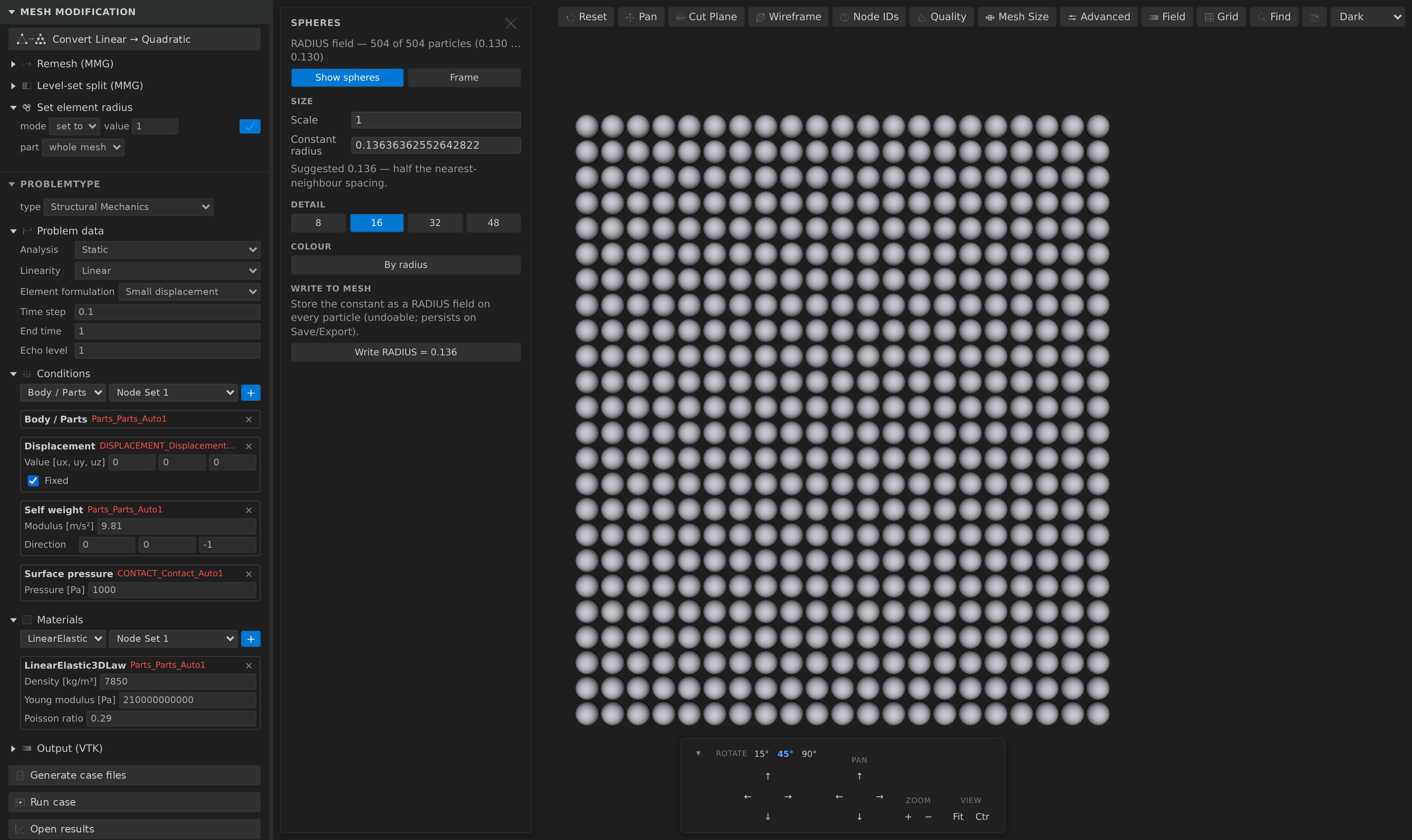
Advanced ▸ Spheres… renders them as real spheres instead of points.
Why a dedicated rendering
A one-node cell has no extent. Left to the ordinary path it becomes a vertex and draws as a fixed-size screen point — the same handful of pixels whether the particle is a millimetre or a metre across, and the same size however far you zoom out. That tells you nothing about the discretization.
Sphere glyphs are scaled in model space, so they behave like geometry: they grow as you zoom in, neighbouring particles visibly touch or do not, and a mesh with varying radii looks like what it is.
Where the radius comes from
From the mesh, when it has one. Exodus stores a fixed number of floating-point attributes per element — the standard home for a SPHERE's radius — and the extension surfaces one named RADIUS as an ordinary Elemental field. When such a field is present the sphere rendering turns on automatically: that geometry is the mesh, not an analysis overlay.
From a constant, when it does not. This is the common case — a real peridynamics file routinely declares its particles and no radius whatsoever. The panel suggests one and draws every particle at it: half the median nearest-neighbour spacing, so a regular particle lattice renders as spheres that just touch. You can override it.
A mesh with no radius field is not switched to spheres on its own — otherwise every ordinary point cloud would silently become a ball pit. Open the panel and turn it on.
The panel
- Show spheres — toggle the glyphs. Frame zooms to them.
- Scale — a multiplier on top of every particle's own radius. Useful for making a sparse cloud legible without editing the data.
- Constant radius — used for particles the
RADIUSfield does not cover (and for all of them when there is no field). Prefilled with the suggestion. - Detail — sphere tessellation (8 / 16 / 32 / 48), shown only on the experimental VTK-wasm renderer; above ~50 000 particles the panel warns you off the finer settings. The default renderer draws the particles as ray-cast spheres, which are exact at any zoom, so there is nothing to tune. Under Clip a particle is kept or dropped whole according to its centre.
- Colour — By radius maps the radii through the usual colormaps and legend, so a graded discretization is readable at a glance. Only offered when the mesh actually has a radius field.
While the glyphs are shown, the underlying one-node layers are hidden — they would otherwise draw as points inside every sphere. Their visibility is restored when you turn the rendering off.
Making the radius part of the mesh
Write to mesh turns the panel's constant into a real RADIUS field. This is a normal mesh operation: it is undoable, it appears in the history list, it is saved into a recipe, and it persists on Save / Export.
The same operation has a fuller form in the Mesh Modification sidebar, as Set element radius:
- set to — assign an absolute radius, creating the field if the mesh has none.
- scale × — multiply the existing radii, which preserves per-particle variation. With no radii to scale it does nothing rather than inventing a base, since that would flatten every particle to one size.
- part — limit the change to one SubModelPart and its subtree. This matters more than it looks: a multi-block Exodus file merges all its
SPHEREblocks into a single drawable layer, so the SubModelParts (block_1,block_2, …) are the only handle left for giving bulk and boundary particles different radii.
It is also reachable from the mesh_transform MCP tool:
{ "op": "setElementRadius", "value": 0.136, "mode": "absolute", "target": "block_1" }and mesh_info reports a spheres section (how many particles, whether they carry a radius, and the suggested value if not).
Export
.exo/.e/.ex2— the radius is written back as a genuine Exodus per-element attribute, so it round-trips. Note the export is otherwise lossy: block names and node sets come back as SubModelParts, but an element SubModelPart that does not match a whole block and a time series do not survive it..mdpa— written asBegin ElementalData RADIUS.RADIUSis a real Kratos variable, so this is what Kratos DEM expects to read..vtu/.vtk— carried as ordinary cell data..stl/.ply— one-node cells have no surface, so they are dropped.
A note on Kratos DEM
The rendering is decided by the data, not by a format or a name: any mesh with one-node elements and an Elemental RADIUS field renders as spheres. A .mdpa with a point element block and a Begin ElementalData RADIUS block therefore works too. There is no DEM-specific handling beyond that.