Cantilever eigenmodes
The static tutorial loads this cantilever and asks how far it bends. Here the load is removed, and the questions become: at which frequencies does the beam vibrate freely, and what shape does it take at each one? The first two bending frequencies are checked against Euler–Bernoulli beam theory. That check is a sanity check rather than a reference, because the beam is too stubby for the formula to be exact.
At a glance
| Mesh | 1048 nodes, 3896 cells |
| Run | no VTK time series |
| Kratos packages | KratosStructuralMechanicsApplication==10.4.3, KratosLinearSolversApplication==10.4.3 |
| Download | eigen case with its verification record |
What you will learn
- Why a free-vibration problem has no load, only a clamp, and what it returns: natural frequencies and mode shapes instead of one deflection.
- How to set the Problemtype for an eigenvalue solve, and why its time fields do not describe physical time.
- How to read the eigenvalues from the solver log and convert them to hertz.
- How far a comparison with beam theory can be trusted for a beam this stubby.
The physical model
With no load, the structure vibrates freely, and its natural frequencies come from the eigenvalue problem K φ = ω² M φ. Here K is the stiffness matrix, M the mass matrix, φ a mode shape and ω the angular frequency. Each eigenvalue is ω², and the frequency in hertz is f = √λ / 2π, where λ is the eigenvalue.
For a slender cantilever, Euler–Bernoulli beam theory gives the bending frequencies in closed form: f = (β₁² / 2πL²) √(EI / ρA), with β₁ = 1.875 for the first mode. The beam is 18 mm long, and its cross-section is 4 mm in Y by 5 mm in Z. Bending in Y uses I = 26.67 mm⁴, and bending in Z uses I = 41.67 mm⁴. The Y bending mode is the softer one: the formula gives 10 313.87 Hz for it, the lateral mode, and 12 892.34 Hz for the Z bending mode, the vertical one.
The beam is stubby, with a slenderness L/h of 4.5 for bending in Y and 3.6 for bending in Z. Euler–Bernoulli ignores shear deformation and rotary inertia, which lower real frequencies more as a beam gets stubbier, so the formula is a sanity check rather than a target. The solver's lateral frequency is 3.7 percent above the formula. Linear tetrahedra at this mesh size are one likely cause, but no refinement study in the records shows how much. The third eigenvalue, 44 923.75 Hz, is recorded but not compared, and this page does not name its shape.
Create the geometry
- In CAD mode, open the block fixture
cad/examples/STP/block.stp. It is 3 mm along X, 4 mm along Y and 5 mm along Z. - Choose the Scale edit operation on
solid-0, with the centre at (0, 0, 0) and factors [6, 1, 1]. The factor applies along X only, so the block becomes 18 mm long and keeps its 4 by 5 mm section. The static cantilever uses the same operation, so both tutorials share one geometry.
Centred on the origin, the clamped end sits at x = −9 mm.
Name the Parts
Under Parts, name two parts:
solid-0becomes Solid. It is the only volume, and it carries the material.face-3, the face at the −X end, becomes Support. This is the clamp, and its 61 nodes all sit at x = −9 mm.
Add no load and no other boundary. A free vibration has none, so the clamp is the only constraint.
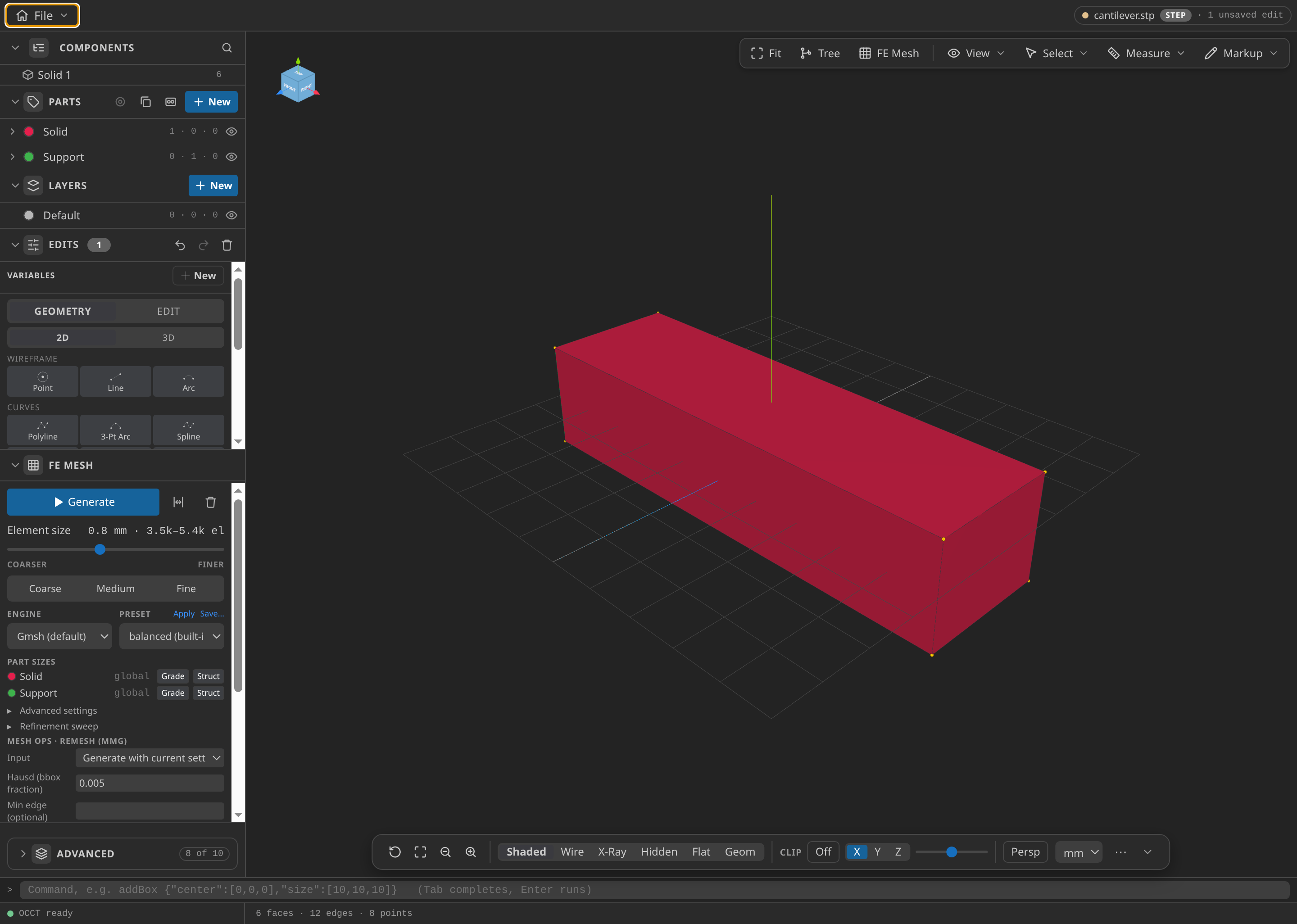
The cantilever in CAD. The Parts list shows Solid (one volume) and Support (one face), and the Edits list shows the scale.
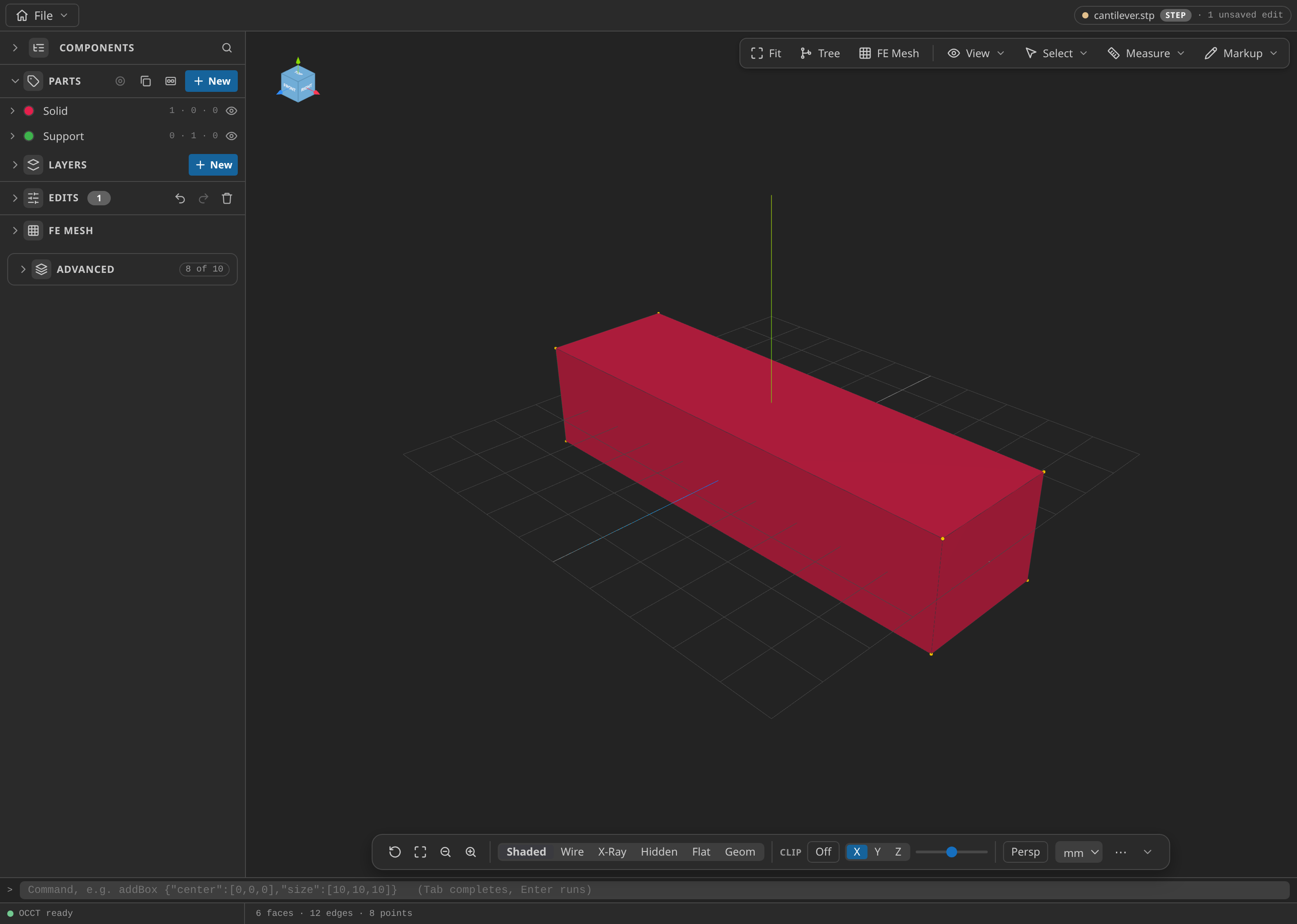
The CAD window with the Parts panel open, showing the named Parts: Solid and Support.
Mesh
- Under FE Mesh, choose Gmsh, 3D and first-order tetrahedra, and set the global size minimum and maximum to 0.8 mm.
- Choose MDPA Elements, set the export units to m, and export as
mesh.mdpa.
The mesh has 1048 nodes, 3896 linear tetrahedra and 1520 surface triangles. At 0.8 mm the 4 by 5 mm section holds only five or six elements across, which is coarse for bending and one reason the check tolerance is generous. The materials are in SI, so the export must be in metres.
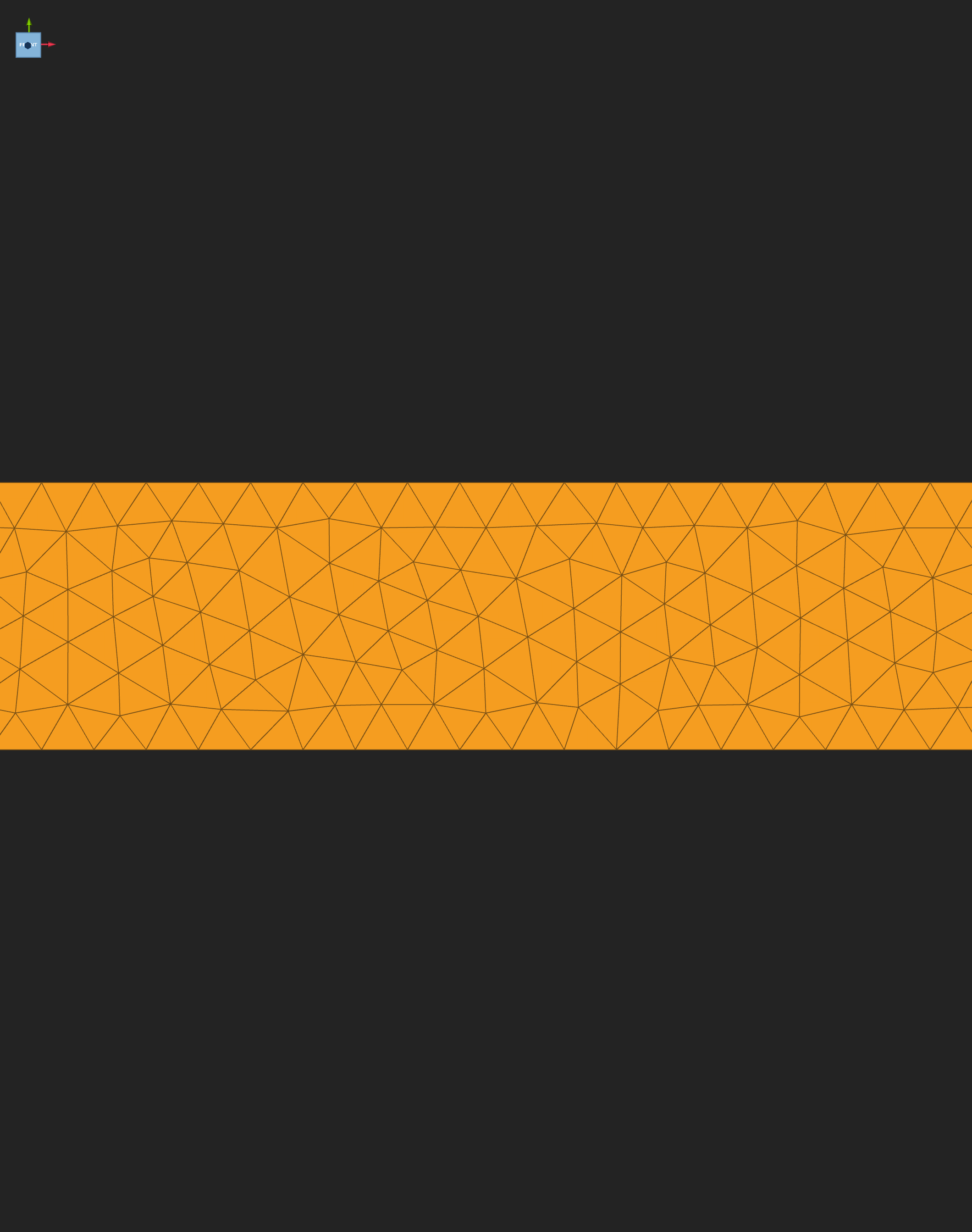
The exported mesh seen from the front. The viewer draws the outer skin of the tetrahedra, so the triangles are the boundary of the beam.
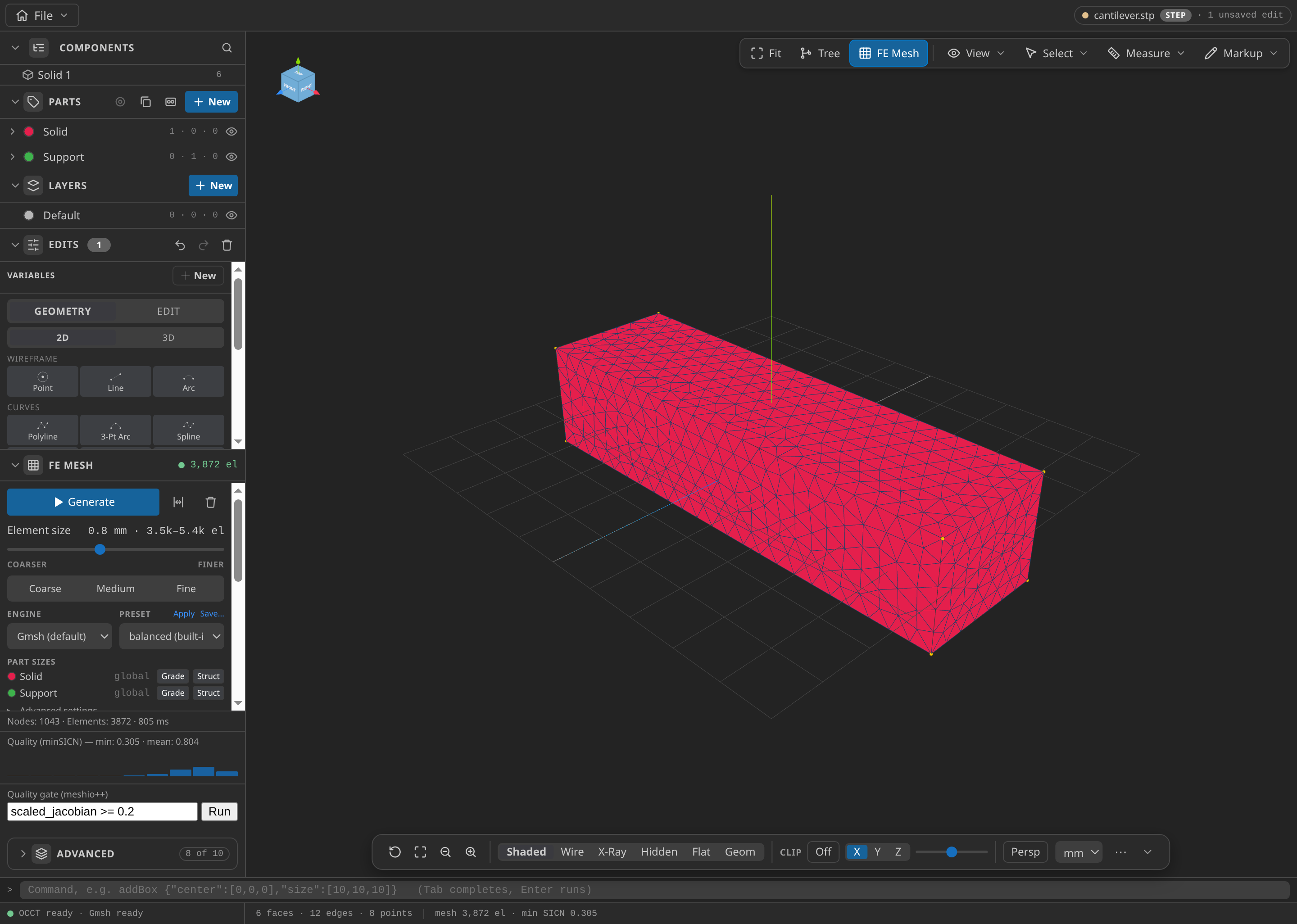
The CAD window after FE Mesh ▸ Generate: 1,043 nodes and 3,872 elements in this run, with the Parts panel open.
Configure the problemtype
Select Structural mechanics in the Problemtype section. The Domain and Materials cards hold the solid and its material.
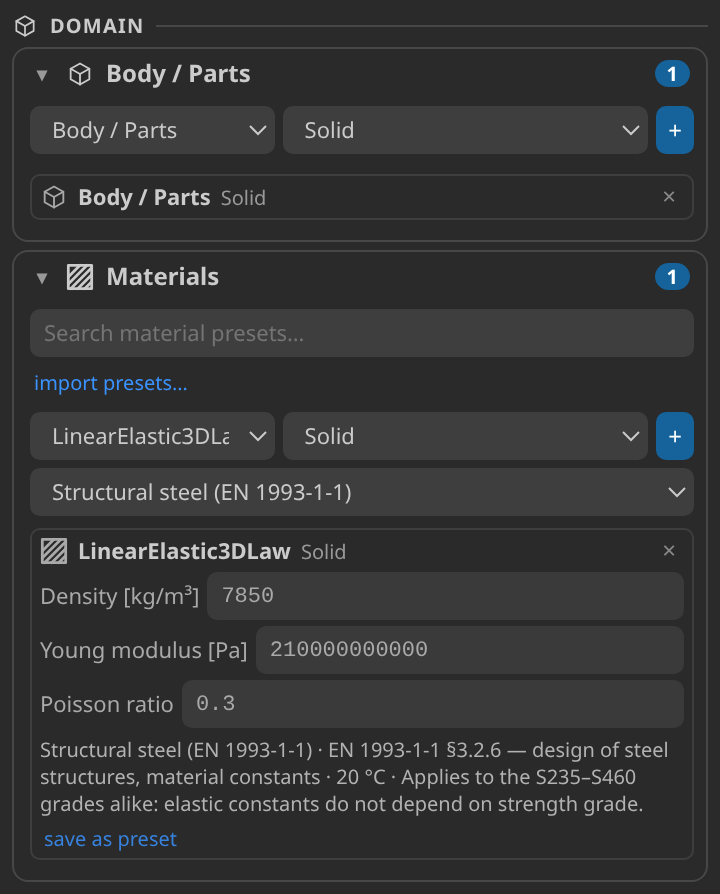
The Domain and Materials cards: the Solid part, and the structural steel preset, with density 7850 kg/m³, Young's modulus 210 GPa and Poisson ratio 0.3.
The Solution cards hold the solve itself. These are the values the published case uses:
| Setting | Value | Why |
|---|---|---|
| Analysis | Eigenvalues (eigen_value) | A free vibration asks for natural frequencies, not a solution under load |
| Element formulation | Solid small displacements | Modes are linearised about the unloaded beam |
| Number of eigenvalues | 3 | The two bending modes are checked; the third is recorded |
| Max iterations, tolerance | 1000, 0.000001 | Limits for the eigensolver |
| Eigensolver | Eigensystem (Spectra shift-invert), written as eigen_eigensystem | The form's option for this solve |
| Normalize eigenvectors with mass matrix | Off | The modes are compared by shape, not by size |
| Support | Clamp on Support, constrained in X, Y and Z | The root, and the only constraint |
| Loads | None | A free vibration has no load |
| Material | Linear elastic 3D: 7850 kg/m³, E = 210 GPa, ν = 0.3 | Structural steel |
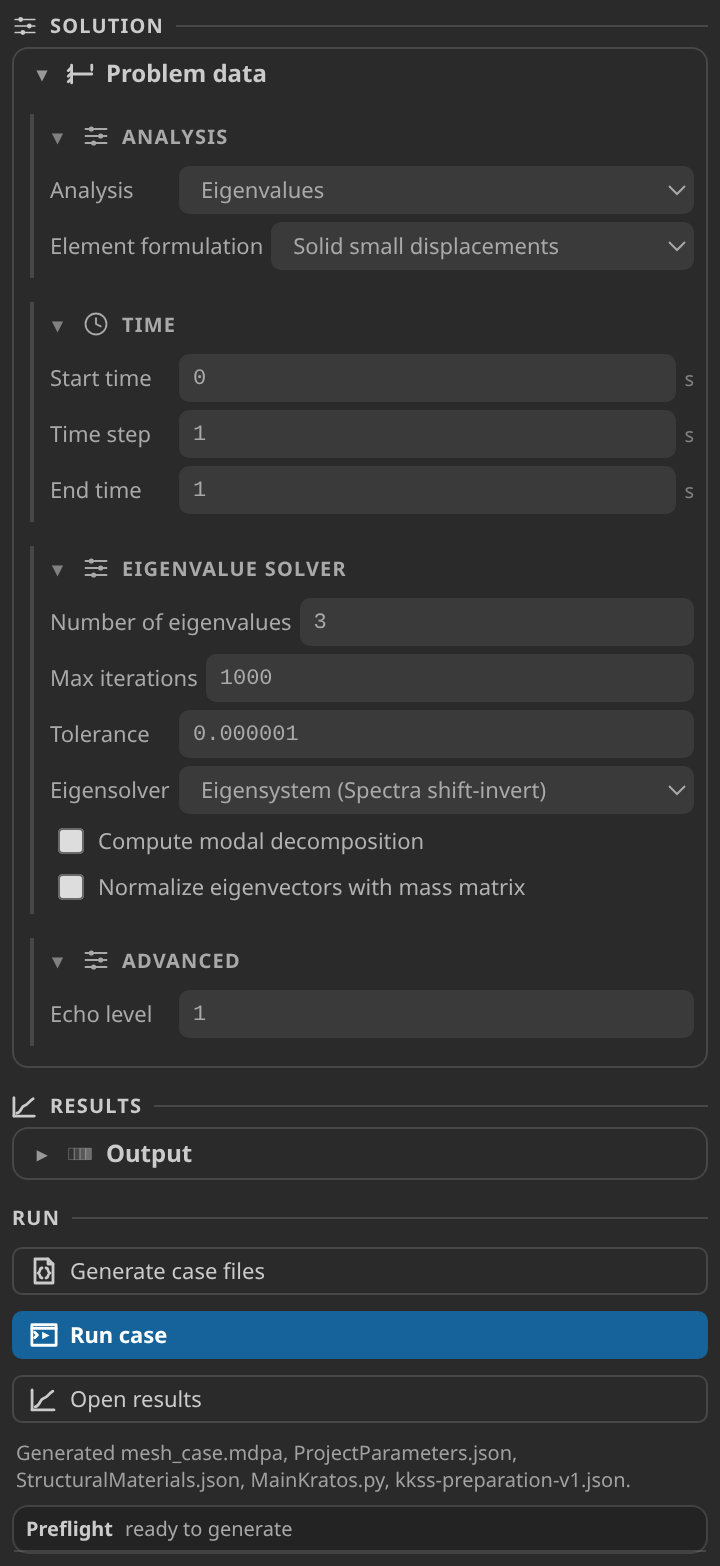
The Solution cards: analysis set to Eigenvalues, three eigenvalues, a tolerance of 1e-6, and one time step of 1 s, so the run solves once.
The eigen solver has no time loop, so the Time group has no physical meaning. The published case sets one time step of 1 s with an end time of 1 s, so the driver solves once. An earlier version used a step of 0.1 s to an end time of 1 s, which ran the identical solve eleven times and wrote eleven result files.
Generate and inspect the case files
Click Generate case files. It writes ProjectParameters.json, StructuralMaterials.json and MainKratos.py beside the mesh, and a copy of the mesh named mesh_case.mdpa. The copy renames the volume elements SmallDisplacementElement3D4N and the boundary faces SurfaceLoadCondition3D3N, the names the structural solver expects. The mesh you exported is left as it was.
Open ProjectParameters.json and check three things:
solver_typeiseigen_value, and the eigensolver is asked for three eigenvalues.- The only constraint is the clamp on
Structure.Support, and no load is applied. - There is no VTK output. The eigenvalue run replaces it with a GiD postprocess,
PostProcessEigenvaluesProcess, which writes the modes toEigenResults/.
Run
Click Run case. The log shows one EigensystemSolver block: convergence after nine iterations at a relative tolerance of 1e-6, the solve time (about 0.06 s in the recorded run), and an Eigenvalues = [...] line with the three values. The values are the eigenvalues ω². The verifier reads that log line.
If the run stops at an import error, the selected Python environment lacks one of this case's Kratos applications. Point kratos.pythonPath at an environment that has both StructuralMechanicsApplication and LinearSolversApplication.
Inspect the results
The eigenvalue run writes no VTK timeline. Its results go to EigenResults/ beside the case: the published case writes one file, mesh_case_EigenResults_1.post.bin, a gzip-compressed GiD result that carries the three modes.
Open results looks only in vtk_output/, which an eigenvalue run never writes, so it finds nothing.
Opening the GiD file in this build misreads the modes. Each mode is stored as a vector per node, with a fourth value per node: the displacement magnitude. The viewer's GiD binary reader does not read those records correctly, so most nodes come back as zero or as another node's displacement, and the mode looks like noise. The records themselves are sound. Their magnitudes equal the norms of the three components, and across the mesh they vary smoothly, the way a bending shape does. tools/tutorials/eigenModes.py reads the raw records, checks that layout on every block, and writes the same three modes as a VTK file, eigen-modes.vtu, which the viewer reads correctly. The figures on this page come from that file.
To read a mode yourself, run the script on the case folder, open the VTK file and choose MODE1_DISPLACEMENT, MODE2_DISPLACEMENT or MODE3_DISPLACEMENT in the Field panel. Turn on Deformed so the beam is drawn in its shape, and colour it by displacement magnitude. The amplitude is arbitrary, because the case does not normalize the modes, so compare shapes and frequencies rather than displacement values. Mode 1 bends in y, with the displacement growing from the clamp to the free end and close to zero in x and z. Mode 2 is the same in z. Mode 3 is a torsional shape: the section twists about the beam axis, so at the tip its displacements in y and z follow z and y with opposite signs. The check takes mode 1 as the Y bending mode and mode 2 as the Z bending mode, and the frequencies agree with that assignment. The third mode is not checked by the verification. The shared guide Reading a Kratos result in KKSS explains the Field panel controls.
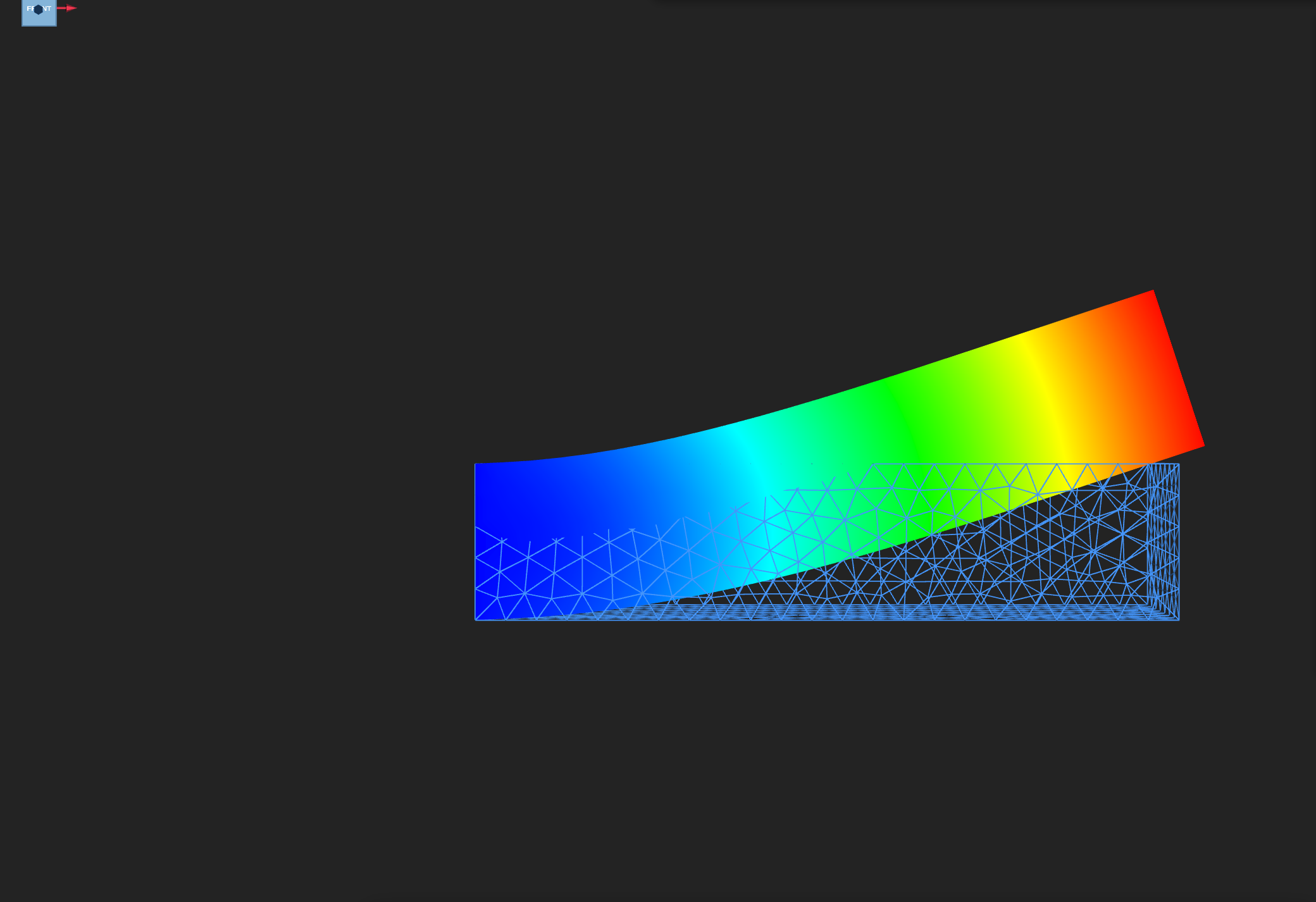
Mode 1, 10,699 Hz: the first lateral bending mode, bending in y. Seen looking along z, with colour showing the displacement magnitude in arbitrary units. The tip is drawn 4.5 mm from its rest position, a display scale, not the mode's amplitude.
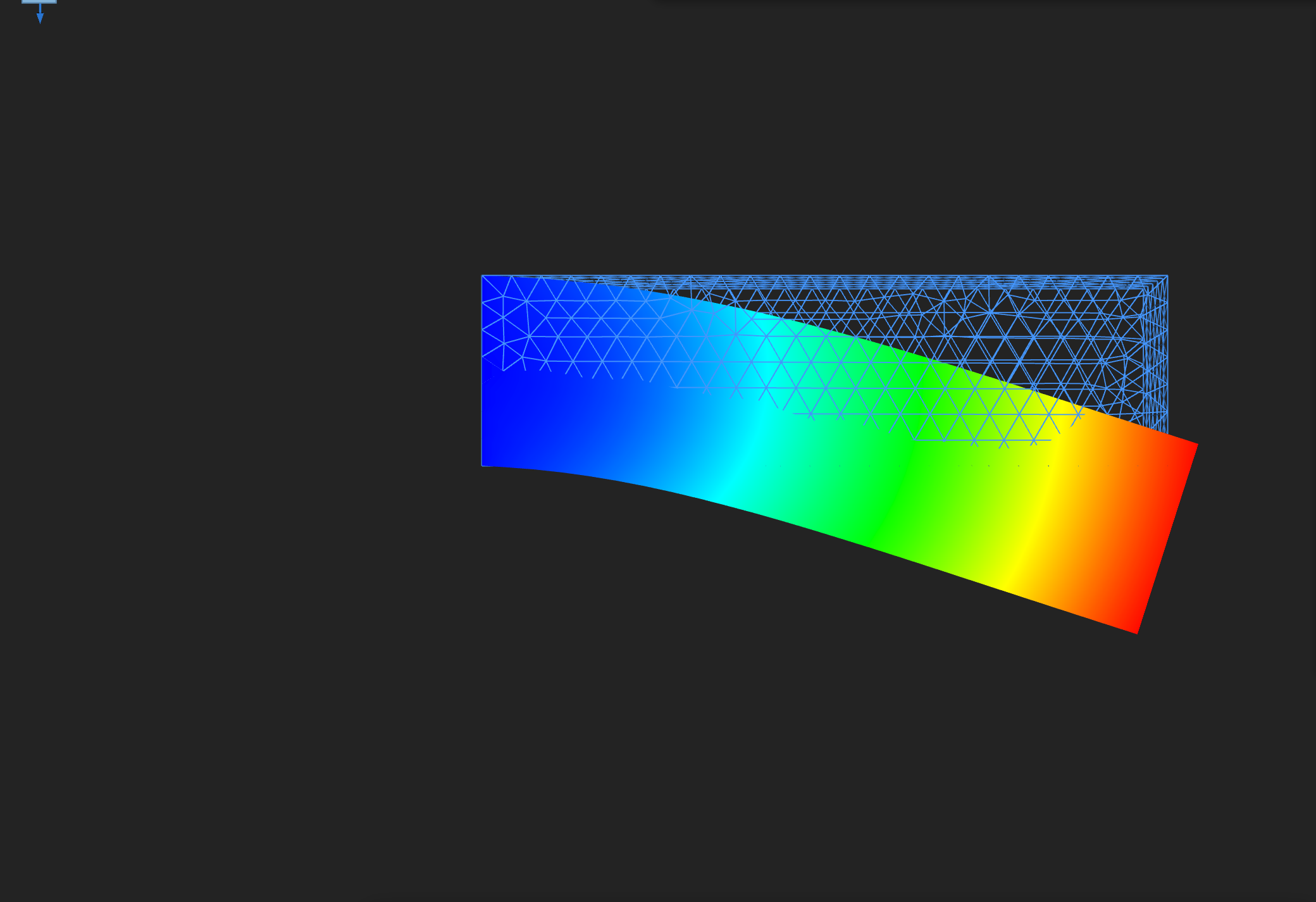
Mode 2, 12,831 Hz: the vertical bending mode, bending in z. Seen looking along y, with the tip drawn 4.5 mm from its rest position.
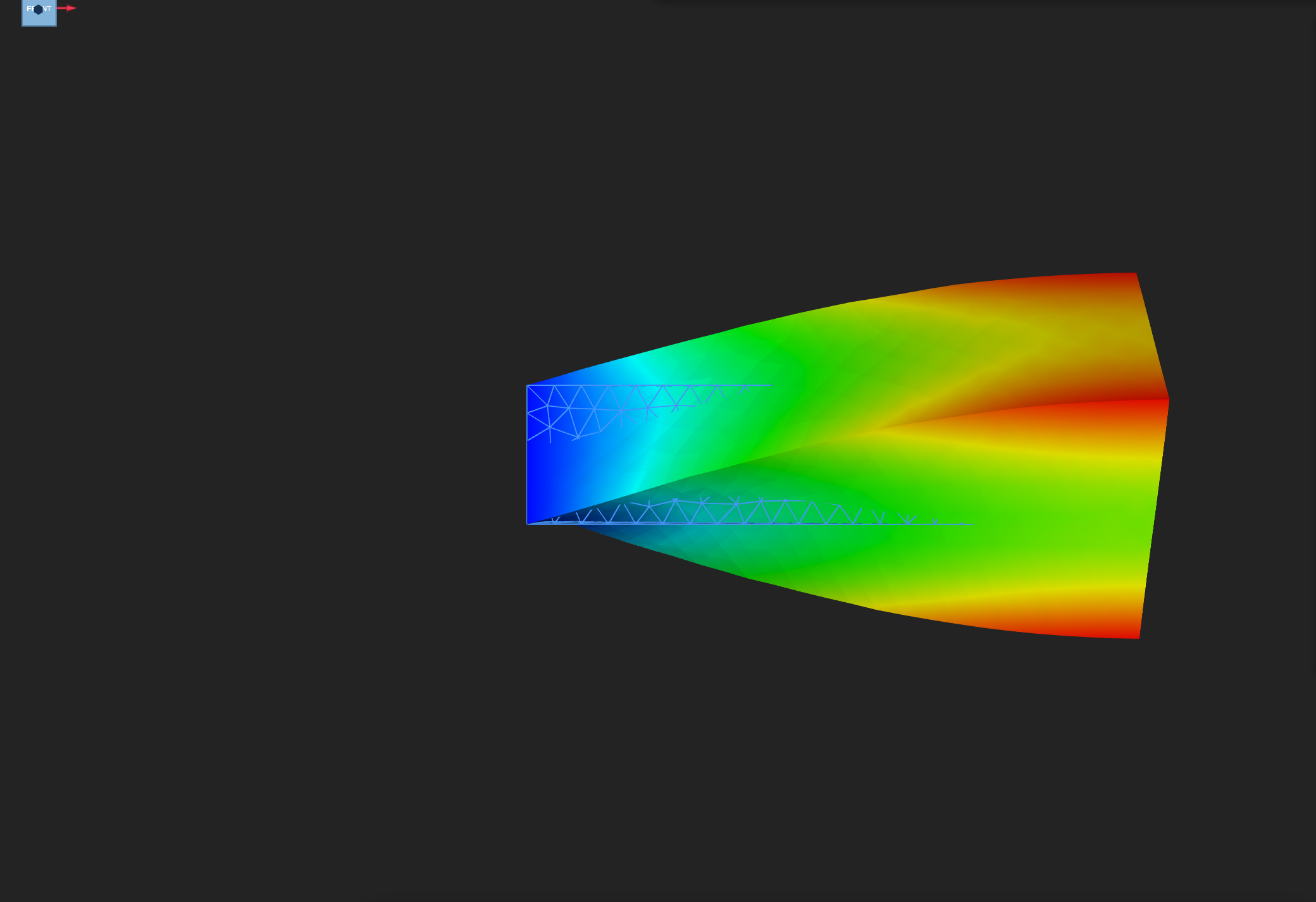
Mode 3, 44,924 Hz: a torsional shape, the section twisting about the beam axis. Seen looking along z, the tip section fans apart at its top and bottom edges. The tip is drawn 4.5 mm out of place, and the shape is not checked by the verification.
Verify
The check reads the eigenvalues from the solver log. It converts each to a frequency, f = √λ / 2π, and compares the first two with the Euler–Bernoulli values above, with a tolerance of 10 percent. The solver's errors are 3.7 percent for the lateral mode and 0.5 percent for the vertical one, both inside the tolerance. The third frequency is recorded and not compared.
Verified with Python 3.12.14, Kratos 10.4.3, 2 OpenMP threads: 1048 nodes and 3896 cells, no VTK time series.
| Check | Measured | Limit |
|---|---|---|
eigenfrequency_1_Hz | 10699.37 | |
eigenfrequency_2_Hz | 12831.11 | |
eigenfrequency_3_Hz | 44923.75 | |
first_lateral_frequency_relative_error | 0.03737617 | ≤ 0.1 |
first_lateral_frequency_Hz | 10699.37 | |
first_lateral_reference_Hz | 10313.87 | |
second_vertical_frequency_relative_error | 0.004749856 | ≤ 0.1 |
second_vertical_frequency_Hz | 12831.11 | |
second_vertical_reference_Hz | 12892.34 | |
eigenvalue_count | 3 |
These are tutorial checks with the tolerances shown, not formal solver certification.
Troubleshooting
- The frequencies come out about a thousand times too low. The mesh was exported in millimetres. Frequency falls with the inverse of length, and the materials are SI, so millimetre coordinates describe a beam a thousand times longer than intended. Re-export in metres.
- The run stops at an import error. The Python environment lacks one of the two Kratos applications this case uses. Point
kratos.pythonPathat an environment with both. The Home screen's Check environment action confirms whether the required applications are available. - Open results finds nothing. It looks only in
vtk_output/, which an eigenvalue run never writes. Use the VTK copy fromeigenModes.py, as above. - The modes look like noise in the viewer. This build's GiD binary reader misreads the vector records of
EigenResults/. The frequencies in the log are correct; the figures use the VTK copy. - The modes look the wrong size. The amplitudes are arbitrary. Compare shapes, and use a deformation scale that makes the shape visible.
Variations to try
- Lengthen the beam. Change the scale factor from 6 to 12, which gives a 36 mm beam. Beam theory says the bending frequencies fall with the square of the length, so the lateral mode should drop to about a quarter of the solver's 10 699 Hz. Check the result against that, and note whether the gap is larger or smaller than 3.7 percent.
- Refine the mesh. Set the element size to 0.4 mm and watch how far the lateral frequency moves. If it keeps moving, part of the 3.7 percent is mesh error. If it settles, the rest is the difference between beam theory and the solid model.
- Ask for more modes. Set the number of eigenvalues to 5 and inspect modes 4 and 5, which the check does not cover.
Reproduce and download
Download this runnable case. The archive holds the CAD source with its edit, parts and mesh sidecars, the generated case, verification.json (which lists the SHA-256 hash of each file) and a README. The README gives the run command: MainKratos.py under Kratos 10.4.3 with OMP_NUM_THREADS=2. A downloaded case is a starting point, and running it overwrites its generated outputs.