Scientific plots and FEM analysis
Mesh Preview 5.1 brings a Plots workspace into KKSS. Plot point histories, compare quantities, sample spatial profiles and analyze named regions without writing a plotting script. Extraction and numerical analysis run off the main thread; the chart does not sample pixels from the viewport.
Open a plot
- In Post-Processing, click Plots, or Advanced → Plot builder…. The pane belongs to that mesh tab. Dock below / Dock beside, the keyboard-resizable separator, and Hide / Plots adjust the split without discarding curves. Plots and Flowgraph share the auxiliary space.
- Use Inspect → Plot beside a field, Plot over time, or Add points from mesh to overlay histories. Choose quantity and scalar/component/magnitude explicitly.
- Analyze / plot this SubModelPart in Layers opens regional controls. Node IDs and element/condition IDs remain separate associations.
- File → Scientific Plot Builder… opens a separate workspace, available even without a mesh. Use Add source → Browse… → Inspect source for CSV/TSV, or Load recipe for a saved recipe JSON.
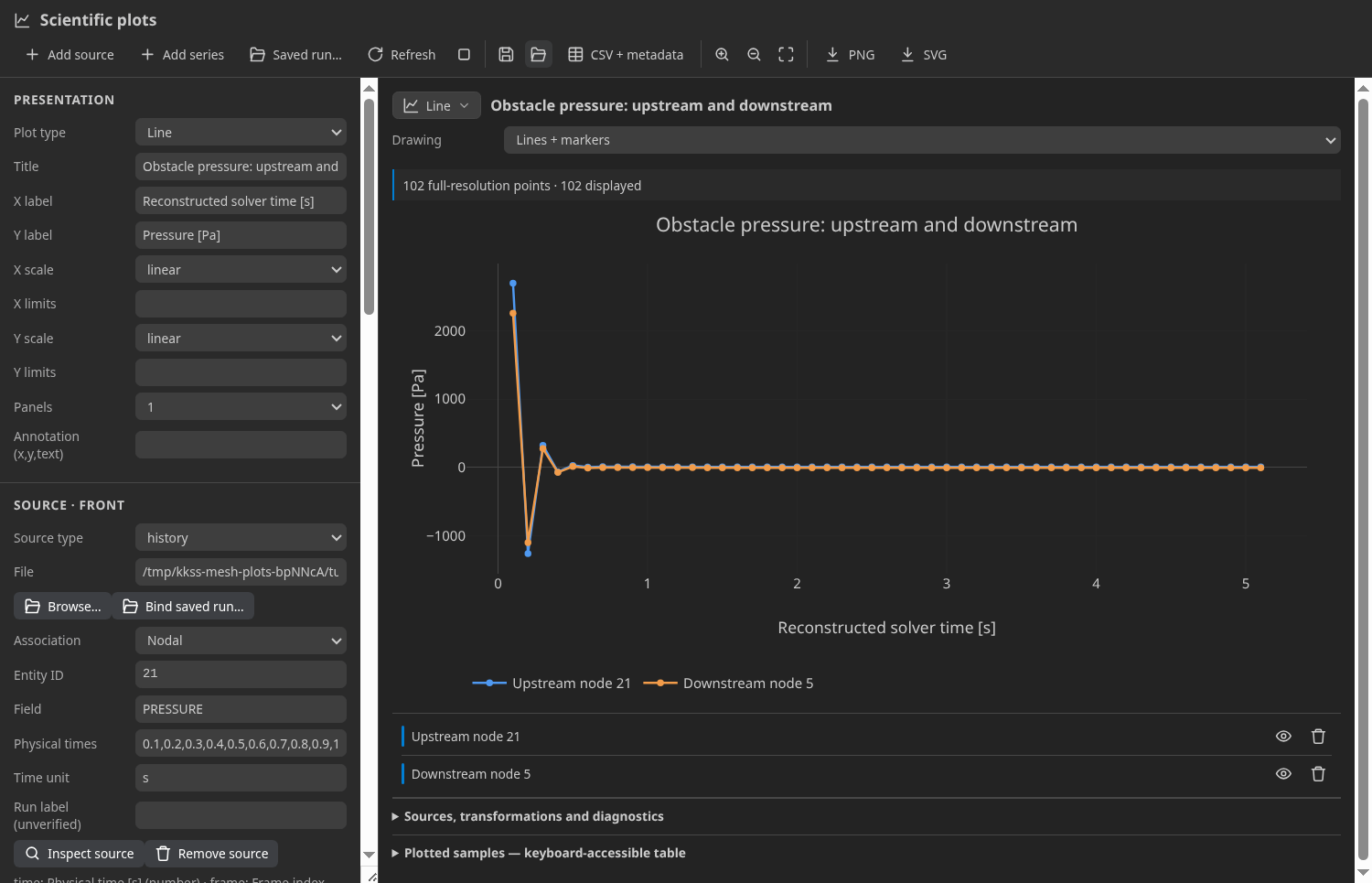
Both workspaces use the same upstream controller. Chart styling does not change source files or dirty mesh geometry.
Worked examples
Run a tutorial case first — Generate writes the solver input beside the mesh, Run executes it in the embedded terminal, and Open results loads the VTK timeline into the viewer. Then build plots from your own output: histories over the saved steps, spatial profiles along a probe line, regional quantities over a SubModelPart. Recipes are saved from the builder (Save recipe) and reload later against the same result files; the tutorial archives carry the case files, not prebuilt plot recipes or result frames.
Time, units and correspondence
A filename step is not a timestamp. Histories show step labels unless the reader supplies time or you enter one Physical times value per frame and a Time unit. For fixed-step Kratos runs, a recipe can reconstruct start_time + STEP × time_step from the case settings and the Kratos VTK step suffix — these are not recorded solver timestamps, and a settling chart is not proof of solver convergence. Adaptive-step results require actual saved times.
Legacy VTK outputs here do not record field/coordinate units. A recipe you build for a tutorial result must supply its SI field units explicitly with Convert transformations (no tutorial archive ships a prebuilt plot recipe); displacement additionally multiplies metres by 1000 for mm. Original export columns retain unknown units. Probe distance labels state metres from the case setup, while extraction metadata retains unknown coordinate units. Changing a label alone never converts numbers.
Histories read disk values, not replayed geometry edits. Current mesh/region/probe sources can use the owning preview's edited model. Missing fields, absent entities and uncovered samples remain gaps, not zeros. Topology changes do not establish correspondence between different meshes or runs.
Regions and boundary quantities
Choose Target: SubModelPart / whole mesh, field/association, Current frame / Over time, and operation. Current-frame quantities use bars; histories use lines. Simple controls refuse mixed domains rather than silently changing existing curves.
| Operation | Physical meaning |
|---|---|
| Minimum / maximum / entity mean | Unique members; mean is unweighted, not a volume/area mean |
| Sum / support reactions | Sum supplied force components with their signs; vector components sum before magnitude |
| Boundary mean / scalar integral | Measure-weighted values over Conditions, with an explicitly selected Nodal or Conditional scalar field |
| Pressure force / moment | Integrate −(p − pressureOffset)n; choose outward/winding normals, offset and, for moments, origin |
| Flow / heat flux | Integrate a supplied vector dotted with the chosen normal; temperature alone does not supply heat flux |
Boundary operations require actual Conditions and field coverage. Node-only parts and volume-only VTK results are insufficient. KKSS does not infer exterior facets or transfer input MDPA regions by matching result IDs. Outward normals need exactly one adjacent element; excluded facets and uncovered measure are disclosed. XY line boundaries give per-unit-depth loads unless a positive thickness in coordinate units is supplied. Known kinematic-pressure fields additionally need explicit density for physical pressure loads.
Spatial profiles that follow the timeline
Use Inspect → Probe line → Plot builder…, or load a probe recipe in its owning result tab. Profiles start fixed at a captured frame. Follow timeline resamples the same spatial coordinates when you step or play; Fix frame retains a comparison curve. This is an Eulerian profile, not a material-point trajectory; it uses source coordinates, not visually warped geometry.
Other curves retain their extraction snapshots. Timeline/rank/resampling changes pause following until explicitly resumed; Cancel also pauses it. Saving a live profile embeds the captured table rather than promising a live link after reload.
Charts and numerical analysis
The visual Chart type picker offers twelve families: line, step, area, scatter, bubble, bar, pie, doughnut, histogram, box, heatmap and contour. Compatible changes retain curves and profile bindings. Missing intervals stay broken. Bubble sizes need an explicit column; pie/doughnut require an explicit statistic, nonnegative contributions and a positive total. Shares of overlapping regions are not a physical partition.
Advanced exposes mappings, filters, supplied unit conversions, normalization, smoothing, regression, derivatives/integrals, reference alignment and explicit grids. Calculus requires increasing numeric X within covered segments; integration restarts after gaps. Fits/smoothing do not invent uncertainty propagation. Comparison requires compatible units and explicit tolerance; no extrapolation or cross-mesh mapping occurs. Nearest gridding is not finite-element interpolation or guaranteed hole detection. Statistics use every sample even when chart delivery is reduced; diagnostics disclose sampling and coverage.
Recipes, exports and saved runs
- Save / Load recipe uses version-1 JSON. Disk paths are relative; captured live snapshots become inline tables.
- CSV + metadata exports every derived and original selected sample, including units, association/ID, frame/time and provenance—not just displayed samples.
- PNG / SVG exports the current chart view, including visibility/zoom, plus provenance. Sources and bound run artifacts cannot be overwritten.
- Saved run… discovers tracked receipts or an explicitly selected directory. Only recorded terminal isolated runs with unchanged inputs, outputs and companions can be bound. Legacy/shared-output or uncertain ownership remains unresolved; a label is not ownership.
- Open owning result, sample navigation and time cursors verify the exact source/rank/frame. Another result opens in a separate tab; an existing owning tab is revealed without replacing it. Edited/resampled/busy previews can refuse navigation. Time matching never picks an equal-distance tie or converts units silently.
Tutorial archives are unbound disk sources; no isolated-run receipt is fabricated. Show in mesh requires the owning source; standalone unbound charts have no active-preview fallback.
Assistant and limits
The assistant has mesh__plot_table_read, mesh__plot_dataset, mesh__plot_preset, mesh__plot_runs, mesh__plot_run_bind, mesh__plot_run_resolve, mesh__plot_time_cursor and mesh__plot_run_target. UI and MCP share numerical recipes. Dataset and preset calls require normal write approval because they can export CSV/provenance; the other six are read-only. MCP target resolution does not manipulate a preview.
mesh__plot_preset builds one of the named recipes from a handful of parameters — section comparison, volume total (an Elemental scalar times the element measure), tensor components and invariants, heat-flux balance (positive is out of the domain; no conductivity or gradient is inferred) and table relationship — and can threshold-check the curves (equality is never a violation; gaps are counted, not passed) or diff two series at exactly matching x. Region operations can take the region's conditions or its exterior faces. mesh__plot_run_resolve answers which run owns this result? from the recorded receipt and reports verified, unverified or unresolved; only a verified answer can stand in for a run binding.
Plot distribution (in the Plots pane) opens a field's histogram; entities the field does not cover are excluded and reported, never counted as zero. Show on mesh colours the 3D view by a plot quantity or component. Large tables are imported as a stream so a big CSV does not freeze the window, and Settings ▸ Mesh Viewer ▸ Plot Extraction Cache (off by default) keeps a bounded on-disk cache of disk-backed extractions, so reopening a plot after a restart does not reread its files.
Collection runs in a cancellable worker; partial results are labelled. Refresh explicitly rereads files; plots are not file watchers. Limits include 1,000,000 table rows, 256 columns, 128 MiB per table/source, 5,000 history frames and bounded nearest grids. Companion-aware caches (the persistent cache above is not yet aware of a result's companion files), automatic remeshing correspondence, broader exterior-boundary integration and additional FEM presets remain upstream work, not features claimed here.