Pre-Processing (CAD) Mode
To continue from CAD into a real Kratos solve, see Geometry to results, including the named-part and mesh-export steps of each of its eleven cases.
Pre-Processing mode embeds the full CAD-Preview viewer. Everything documented for the extension applies inside KKSS too — this page summarizes the highlights; see the CAD-Preview documentation for the complete feature guide.
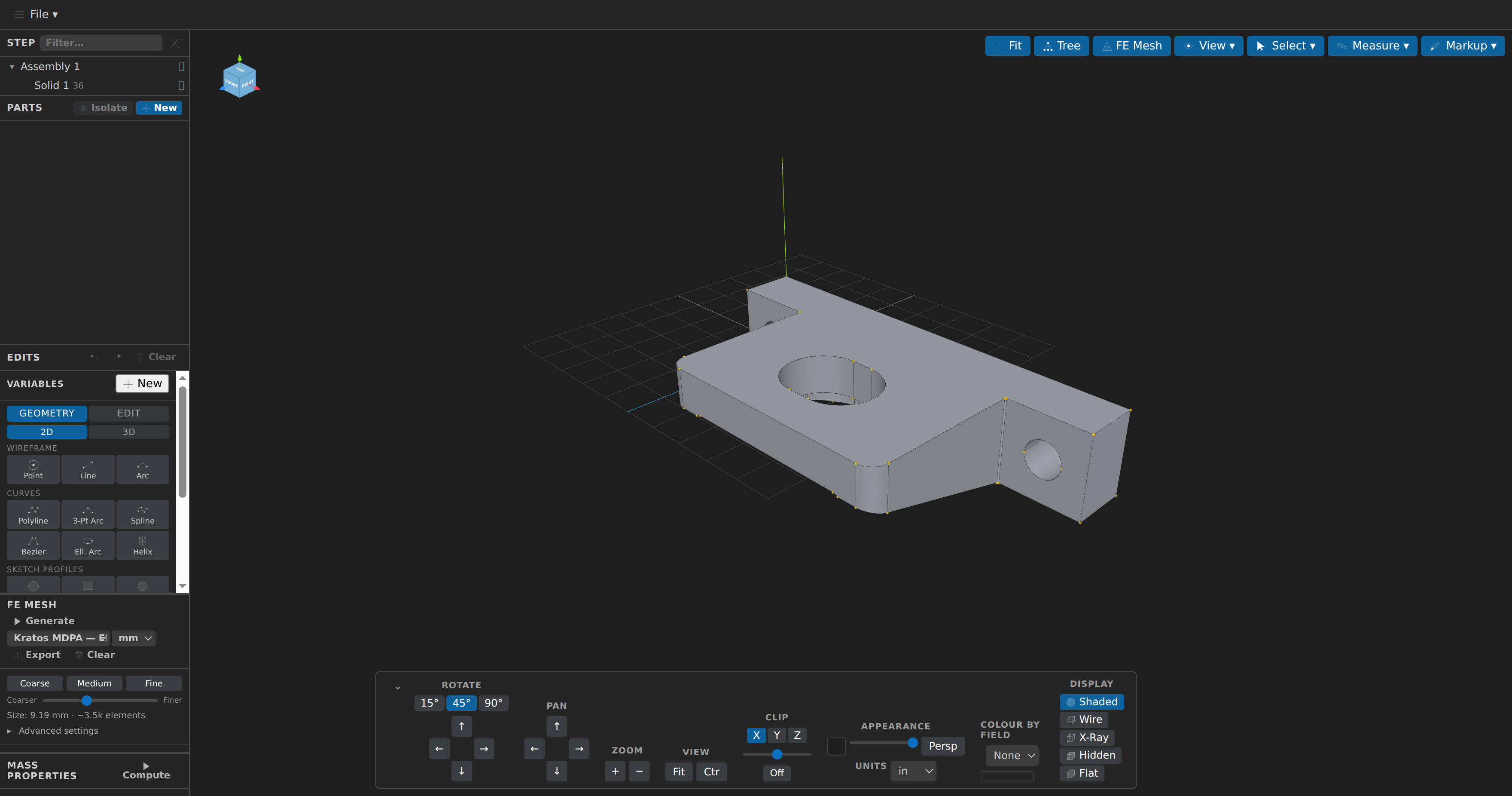
What you can do
- View STEP, IGES, and BREP models (tessellated by OpenCascade in a background worker) and STL, OBJ, PLY, glTF/GLB meshes (loaded natively by Three.js — glTF with Draco/meshopt compression, OBJ with
.mtlmaterials, PLY with vertex colours), with orbit/pan/zoom, an orientation cube, six display modes (Shaded, Wireframe, X-Ray, Hidden Lines, Flat and Geometry — a per-entity-type presentation that dims nothing: points, edges, faces and solids each at their own colour and the legend swatches at the display-mode row), a capped clipping plane, an exploded-view slider, background/opacity controls, an orthographic/perspective toggle, and a searchable component tree with per-part isolate/hide. A STEP or IGES file's declared length unit is detected and preselected. Geometry posts first; a STEP file's nested XCAF assembly tree upgrades the flat list a moment later without losing selection. Trycad/examples/GLTF/cube-draco.glbandcube-meshopt.glb: both open as a 12-triangle boundary surface. - Open display-only scene formats: 3MF, Collada (
.dae, import-only), AMF (plain XML or zipped), USD (.usd,.usda,.usdc,.usdz), VRML (.wrl) and FBX are loaded by the viewer's Three.js and shown with their own colours and materials (a Part colour still wins; a declared unit seeds the Units dropdown). 3MF and AMF export on to STL/OBJ/PLY/glTF/3MF. Because the kernel has no triangle parser for them, every operation that needs source triangles — meshing, measuring, region fit, Mesh Health, promote, silhouette and drawing exports — refuses them by name (".fbxis display-only") rather than guessing. - Import mesh-only formats: VTK/VTU, MED, CGNS, Exodus, XDMF and Kratos MDPA open as a boundary surface through meshio++, with named regions turned into Parts and any scalar point/cell field usable to colour the model. Mass properties, measurement and model comparison read the same boundary surface for these formats (marked surface-derived, with a region count and a watertight flag; volume is withheld when the boundary is open) — inspect, mesh health, promote-to-B-rep, repair and silhouette export still need the source's own triangles and refuse them. meshio++ 17.3.0 widens this bridge twice: Kratos CAD JSON (
.cad.json, a trimmed NURBS B-rep whose cells are its faces), libMesh.xda/.xdr(plus gzip and bzip2 pairings), and the solver-result families the release taught meshio++ to read — Tecplot binary.plt, FEBio.xplt, binary Medit.meshb, Marc.t19, Abaqus results.fil, MAPDL results.rst, LS-DYNA.d3plotand Nastran results.op2(meshio++ 17.4.0's writer, adopted with the 17.7.0 bump). Geometry only — for fields, blocks and SubModelParts, open the file in Post-Processing instead (which is where a double-click lands it, for every shared format above except.plt, which only CAD mode reads). The same release also feeds the FE Mesh panel new export targets for those formats, so a generated mesh can round-trip into any of them. - Define parts: pick volumes, surfaces, lines, or points and group them into named parts (Kratos sub-model-parts). Assignments persist to a
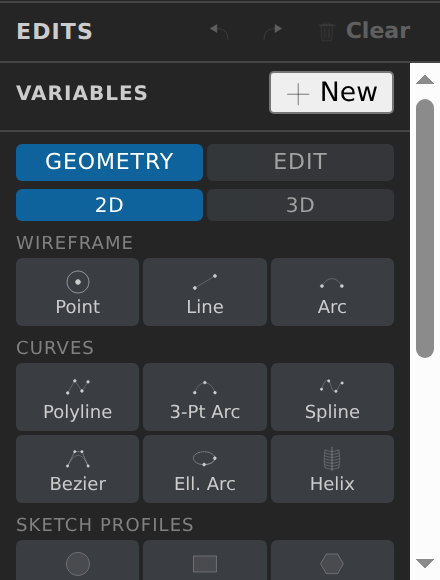
<model>.parts.jsonsidecar — the CAD file is never modified. A part may carry an optional material density (g/cm³) — steel 7.85, aluminium 2.7 — which drives the BOM's mass column and the solid's mass in mass properties (a volumetric part without one reports no mass rather than guessing a density). After a topology-changing edit, part assignments are geometrically rebound to the renumbered entities instead of being silently lost. - Edit geometry parametrically: transforms, booleans, fillets/chamfers (a fillet edge can take a second, end radius, so one edge or a connected chain interpolates from one radius to the other), feature modeling (extrude/revolve/sweep/loft — loft optionally steered by a guide rail, a resampling fallback rather than the kernel's own rail wiring, on exactly two closed sections), wrap (develops a flat sketch face onto a cylinder/cone target — Standalone appends the wrapped shell, Emboss fuses it into the target volumes, Engrave cuts it out), primitives, 2D sketches, bottom-up wireframe modeling, splitFace (splits one B-rep face into two regions along connected edges or a straight segment, so each half is a face a Part can name for boundary conditions), and named variables with expressions. Curve ops (lines, arcs, polylines, splines) can also start from picked model points (
point-Nreferences, re-anchored by position with a warning if the point moved), and the command bar under the viewport types any op by name with Tab completion. The ordered op-list persists to<model>.edits.jsonand replays on every open; an op the kernel skipped is flagged in the Edits panel rather than silently leaving the model unchanged, andguideconstruction geometry is drawn dimmed. - Measure and inspect: distance, edge length, angle and radius as a live overlay, each with an ⟟ Exact button that recomputes against the true OCCT geometry instead of the triangulation; pinned measurements and free-text notes persist with the model. The Parts panel can copy a B-rep hole table grouped by diameter and axis. Plus a Mass Properties panel (volume, surface area, centre of mass, moments of inertia) for the whole model or one entity.
- Check printability: the Advanced ▸ Analysis Printability panel reports facts against numbers you set, never a verdict: an overhang limit and build direction, a process (FDM, SLA, SLS or MJF — each preset names its source) and build plate, per-body sampled wall thickness, per-direction overhang area, plate contact and an upper bound on support volume, with the overhang faces coloured in the view. Every rule it cannot measure is listed under Not checked instead of being silently passed. The assistant's
check_printabilityis the same analysis; display-only formats are reported as unsupported. - Check draft and undercuts: the Advanced ▸ Analysis Draft panel reports, along a pull direction, every wall below
minDraftDeg, the walls tilted away from the pull (or, with Two-sided, each face judged against its own release side) and the faces shadowed by an undercut — sampled, with the sample count reported. Cap faces perpendicular to the pull are parting faces, not draft facts. It colours the view by draft angle and returns the projected area. The same facts are available headlessly ascheck_draft, namingface-Non B-rep sources andfacet-Non mesh sources. It reports facts, never a pass/fail; a curved face's minimum/maximum come from its tessellated normals. - Keep your place: the camera, display mode, projection and clip plane are saved per document, and the components tree reads a STEP file's real XCAF assembly structure. Edits replay from a cached parse, so an interactive change re-tessellates in a fraction of the original load time. KKSS has no file watcher for the source or its sidecars: after an external tool changes them (including the assistant's
cad__save_modelon a file you have open), reopen the tab to see the change. - Annotate: freehand, line, arrow, rectangle and circle markup drawn over the 3D view, with undo/redo and an eraser, baked into screenshots.
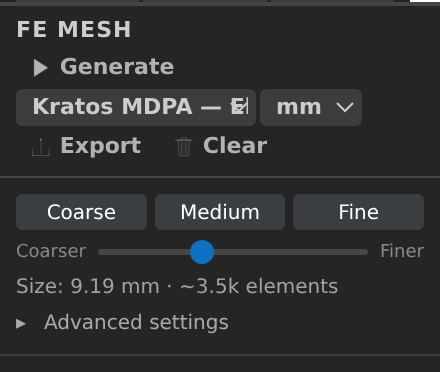
- Generate FE meshes with Gmsh or octree (WASM): size controls, element shape (tets/hexes/hex-dominant) and order (linear/quadratic), per-part mesh sizes, physical groups from your parts, a live mesh overlay, and a quality summary with the worst elements highlighted through the model. The octree engine turns a 3D skin into a conforming hex-dominant volume (hexahedra + pyramids + tetrahedra), with a 1–6 max level and optional snapping; it does not preserve Parts or physical groups and refuses Gmsh-only options by name. The quality gate row grades the last generated mesh against meshio++ thresholds you type (
scaled_jacobian >= 0.2; aspect_ratio <= 8…), reporting each clause's violations, worst value and cell — facts against your numbers, never a verdict. The Refinement sweep compares up to eight sizes, can write each.mshto a chosen folder, and copies results as TSV; mesh-density trends describe cost and element shape, not solver convergence. Wall Parts on a 2-D mesh can carry a boundary layer (rows along the wall edges); the generate reports the achieved rows per wall — planned rows plus the minimum/median over sampled wall stations and the wall coverage fraction, with a warning on a shortfall — shown on the Part's Layer row and recorded in export manifests. The Mesh ops Remesh (MMG) section re-adapts an existing triangle/tetra mesh — the open file or a freshly generated one — and always writes a new.medplus a rebound Parts sidecar (named regions survive, fields are dropped with a warning), never the source. The assistant'sgenerate_meshalso takes view-drivensizeFieldsamples — a point and a target edge length each, up to 20 000, in the model's own unit — that steer element size locally (a target, not a certified bound). - Export: STEP/IGES/BREP (via OCCT), STL/OBJ/PLY/glTF (via Three.js), and FE meshes to Kratos MDPA, Gmsh
.msh, VTK, UNV, Abaqus, Nastran, SU2, MED, CGNS, XDMF, and more — each optionally unit-converted (mm/cm/m/in/ft) on the way out. File ▸ Screenshot… (Ctrl+Alt+P) saves the current view as a PNG. - Split the view and link cameras: 1, 2 or 4 panes each with their own camera (persisted to
<model>.view.json), plus a Link cameras toggle that keeps every open CAD tab looking the same way. - Preview an edit before applying it: the drafted operation is replayed and drawn tinted by intent (green additive, red subtractive) without ever entering the op stack.
- Explain what's under the cursor: a hover tooltip names the entity and which ops mention it; the inspector card reports the analytic surface type and its parameters, and right-click builds selection groups from a query vocabulary (by direction, planarity, area, length, largest/smallest N).
- Save and re-run macros: named, parameterized scripts in a folder-level library — a macro's ops land on the normal undo stack exactly like hand-applied edits.
- Name construction planes: save the current clip plane, enter one numerically, derive one from a picked face or three points, or build a midplane between two — persisted to
<model>.planes.json. - Repair, promote and fit meshes: the Mesh Health panel checks whether an STL/OBJ/PLY/glTF skin is healable, Repair (robust) makes it watertight with fTetWild, and Promote to B-rep turns a clean one into a STEP/IGES/BREP solid. Fit to CAD… (meshio++'s
fitCad) goes one better than sewing: it segments the skin and replaces each patch with an exact analytic face — planes, spheres, cylinders, cones and tori, plus rolling-ball fillets and blends, chamfers, vertex blends and threads (tapered and variable-pitch included), and freeform B-spline faces where no primitive fits — sewn and validity-checked by OpenCASCADE and saved as a brand-new AP214 STEP file. The status line reports the fit's own numbers (N faces (…), volume ratio, deviation) and flags a solid that failed OpenCASCADE's check even though it was written. Since mesh 5.18.0 a fitted STEP also reports the skin deviation — the largest distance between a face and the skin it was fitted from, with its RMS — and whether the solid came out closed, separately from the fit tolerance. Region fit grows a region from a picked point and fits a plane, cylinder or sphere to it, each with its own residual. - Pick up where a mesh or B-rep edit left off: Copy reference on a face produced by a topology-changing edit appends a stored query, so a pasted reference survives renumbering; curve operations take a
coincidentchoice (reuseshares the vertex,independentkeeps a new one) when an endpoint lands on an existing point; Clash takes a clearance (a minimum distance in mm, reported beside the intersection); and theunifySameDomainedit merges coplanar faces. Deviation maps add a Hausdorff cross-check, Mesh Health reports inconsistent winding, and exports can be made byte-for-byte reproducible with the opt-in deterministic mode. - Export 2D drawings: silhouette SVG or DXF from any named or current view, or a full technical drawing with hidden-line removal — with pinned tolerance bands rendered as real dimensions. Drawing sheets also take section views: each names its parent view and is drawn looking along the cutting-plane normal with 45°-hatched cut loops on a
SECTIONlayer, cutting-plane arrows and the label in the parent (or cuts the view in place). Hole callouts add a centre cross and one group leader (4× Ø5 THRU,2× Ø5 ↧6, plus the nearest standard designation) per hole facing the view on B-rep sources; SVG gets aCENTERgroup and DXF aCENTERlayer, and the result reports how many holes were marked. The native sheet export offers hole callouts as a quick-pick after the layer filter. The assistant can start from the bundled drawing-sheet templates (list_sheet_templates) instead of laying a sheet out from scratch. - Import 2D: SVG paths and DXF entities trace into B-rep sketch polylines.
- Start from nothing: File ▸ New Blank Model… creates an empty
.brepand opens it, so the Edits panel's whole creation vocabulary — primitives, 2D sketch profiles, bottom-up wireframe modeling, booleans, fillets, patterns — works from scratch rather than only on top of an existing model. The file itself stays an empty compound; everything you author lives in the.edits.jsonsidecar exactly as it does for an edited STEP, so File ▸ Export… or Save Preprocess… is what produces a standalone file. It refuses to overwrite an existing model rather than leaving its edit history replaying against nothing. - Open OpenSCAD models:
.csg(OpenSCAD's fully evaluated form) is parsed and built into a solid like any other imported source. A.scadsource is evaluated by the bundled OpenSCAD build (WebAssembly, Manifold backend) — no install needed. A user-installed binary remains as the fallback for constructs the bundled build declines (import()/surface()of a local mesh, a missing include, more than 20 staged files or 1 MB of staged source): point Settings ▸ Open Settings… ▸ CAD Viewer ▸ OpenSCAD Binary at it, or leave it unset to resolveopenscadonPATH. OpenSCAD Backend (auto/CGAL/Manifold;autois Manifold in the bundled build) and OpenSCAD Library Folders tune the conversion (ause <BOSL2/std.scad>resolves without copying libraries beside every model). Both are import-only: export goes to STEP/IGES/BREP or any mesh target, never back to.csg. Anything the importer has to approximate or skip (ahull(), a faceted cylinder) is reported on the status line rather than silently dropped. The assistant can also list a.scadfile's Customizer parameters and re-evaluate it at other values into a new.csgwithout touching the source — likewise with no install. See the OpenSCAD walkthrough. - Organize with layers: the Layers panel holds named presentation groups — visibility, lock and a colour per layer, plus which entities belong where. A hidden layer is still meshed and reaches no solver output; a locked entity stays measurable but refuses as an edit operand. Drawing exports (SVG/DXF, sheet) can restrict to all, visible, or one named layer, with one SVG group / DXF
LAYER-table entry per layer. Layer structure (names, colours, visibility, lock — never membership) syncs bidirectionally with the post mode's view layers: on mesh export, and when a shared.stl/.obj/.plyfile is opened or focused (last-writer-wins, union-only so repeats converge).- Pin an operand as a query: instead of baking a positional face id into an edit, the extrude/revolve/shell/draft forms' Pin query row records a re-executable query for the selected face — re-matched geometrically on every replay, so the op keeps naming the right surface after the op list is spliced. A query that can no longer be derived freezes on its cached ids with a status line rather than silently resolving to the wrong entity. Parts carry the same mechanism and are re-resolved on open. - Collapse what you're not using: every sidebar section — Components, Parts, Layers, Edits, FE Mesh, Mass Properties, Mesh Health, Region fit, Macros, Standard Parts — has a chevron that collapses it to just its header, independently. The layout is remembered per document in
<model>.view.json. - Resize the sidebar: drag its edge (or focus the handle and press
←/→,Home/End) between 176 and 420 px; the width is remembered per document. Dropdown menus navigate with the arrow keys and close onEsc. - Bookmark views: View ▾ ▸ Save current view… names the camera orientation, projection, display mode and clip plane, and lists it in the same menu to restore, replace, rename or delete. Bookmarks live per document in
<model>.view.json; a restore reframes from the model's current extents, so it stays meaningful after an edit. - Reuse meshing presets: the FE Mesh panel's Saved presets section applies or saves a named bundle of mesh options (stored in mm, with a pinned engine). Four starters —
coarse-preview,balanced,fine-detail,robust-repair— ship read-only; your own live in a folder-levelcad-preview-mesh-presets.jsonshared by every model beside it, and the assistant reads and writes the same file. The assistant can also compare refinement using the panel's shared sweep calculation, and remesh an existing triangle/tetra FE mesh with MMG into a new.medfile (named regions survive, fields are dropped with warnings). - Sketch on a named plane: a circle, rectangle or polygon profile can be placed from a construction plane plus in-plane offsets (and a rotation), so moving the plane moves everything authored on it.
- Select by volume or point, and zoom to it: Select ▾ filters also cover volumes (size, centre, largest/smallest N) and points (near a plane, near or inside the selection), and Zoom to selection frames the current selection. Clash ▸ Check all takes a pair/boolean budget; pairs past it are reported as unchecked, never as clash-free.
- Find standard parts faster: search results show a thumbnail beside each part; the text row stays if an image can't be fetched.
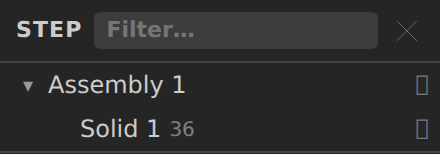
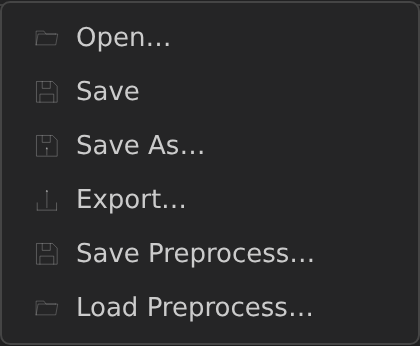
| Components tree | File menu | FE Mesh panel |
|---|---|---|
 |  |  |
The toolbar is Fit · Tree · FE Mesh plus four dropdowns — View ▾ (Grid, Edges, Screenshot), Select ▾ (selection mode + Point/Vol/Surf/Line), Measure ▾ and Markup ▾ — with the display modes, clip, appearance and unit controls in the view-controls panel.
- CAD-Preview 3.30.0 additions: Fill Surface (smooth face over a closed loop of picked edges) and Round Corner (sketch-segment fillet) under Build from selection, open profiles that extrude/revolve into surface sheets,
splitFacealong a curve projected onto the face, B-rep Health free-boundary wires and signed volume, theoctreemeshFE engine (tet or hex output, with its own statistics in the FE Mesh panel), keyboard view snaps (1–6for the six faces,iisometric) and the renamed Cut Plane / REAR labels. Fit to CAD can reportvolume ratio n/awhen the native backend (no OpenCASCADE) builds the solid. The assistant'smesh_cad_surfacetool meshes a STEP/IGES/.cad.jsonB-rep into a watertight surface mesh with no CAD kernel.
Reading the window at a glance
A CAD tab is laid out the same way in every version of the viewer:
- Menubar — the File menu, and on the right a document chip with the open file's name, a format badge (
STEP,STL, …) and, when it has edits the source file does not yet contain, a dot and a count (3 unsaved edits) — see Saving edits into the source file. Hover the chip for the full path. - Sidebar — the five sections that edit the document (Components, Parts, Layers, Edits, FE Mesh) sit at the top, each with an icon. The read-only analysis sections (Mass Properties, Clash, Mesh Health, Region fit, Primitives) and the two libraries (Macros, Standard Parts) are folded into one collapsed Advanced group, with a count of how many it holds.
- Toolbar and dock — the toolbar floats at the top right; the dock along the bottom holds navigation, display mode, the clip plane and perspective, with less-used controls behind its ⋯ button.
- Status bar — along the bottom: which kernels have loaded (
OCCT ready · Gmsh ready), the entity counts (36 faces · 98 edges · 64 points), the generated FE mesh (mesh 10,000 el · min SICN 0.412) and the live cursor position on the model, in the units chosen in the dock.
Saving edits into the source file
CAD-Preview keeps your edits in the <model>.edits.json sidecar (autosaved) and writes them into the source file only when you bake them. File ▸ Save (Ctrl+S) does both: it flushes every sidecar and then, for a STEP, IGES, BREP, STL, OBJ or PLY source with an unbaked edit tail, rewrites the file itself. The chip's dot and count (3 unsaved edits) mean exactly that — the source file does not yet contain what is on screen — and the same dot appears on the tab. Saving clears both.
- The first save of a session asks. A STEP/IGES/BREP file is re-emitted, not patched: entity numbering and authoring metadata are not preserved, per-part colour is not carried over, and assembly structure and part names survive. An STL/OBJ/PLY file is re-emitted from the edited model. Confirm with Save in place, or cancel and nothing is written. The file's own declared unit is kept (an inch STEP stays an inch STEP).
- A one-deep
<file>.bakis made on that first save and then left alone, so it always holds the bytes from before this session's first bake. The new file is written to a temp sibling and renamed over the source, so a crash mid-write cannot truncate it. Every save — mesh or B-rep — runs inside a recoverable transaction: if the app dies between the file write and the edit history's save marker, the next open repairs it instead of replaying the edits twice (after a recovered B-rep save, re-check Part/annotation/layer highlights, which the save-time rebind does not repeat). - You cannot undo past a save. The saved edits are part of the file now, so they show as locked rows in the Edits history and Undo stops at the save point. Reverting means reopening the
.bak. - Part, annotation and layer assignments follow the re-emit. A B-rep save renumbers faces and edges, so the assignments are re-matched geometrically against the new file; if that cannot be done the save still stands and a message tells you to check them.
- Closing a dirty tab, replacing its document, or quitting asks Save / Don't Save / Cancel. Don't Save is harmless — your edits stay in the sidecar and come back on reopen — it only skips writing them into the file. Cancel (or declining the first-save confirmation) leaves the tab open and untouched.
- STL, OBJ and PLY only among mesh sources, and STEP, IGES and BREP among B-rep ones.
.gltf/.glb(the exporter would change the container), the meshio formats and OpenSCAD.csg/.scadsources have no same-format writer, so Save only flushes their sidecars and they never read as unsaved. File ▸ Export… writes a standalone file in any other format, and the assistant'scad__save_modelwrites the same file as this action. STEP/IGES/BREP saves go through the same recovery journal as STL/OBJ/PLY: if KKSS is interrupted mid-save, the next open repairs the file instead of replaying the edits twice, and a recovered B-rep save warns that highlights may need re-checking.
Kernels idle is also normal: the OCCT and Gmsh engines load lazily and the line only reports one after a call that needed it has succeeded, so a plain STL open, which uses neither, honestly reads idle.
Viewer defaults
Settings ▸ Open Settings… ▸ CAD Viewer seeds a newly opened document: Up Axis (Y or Z), Default Mesh Size (Coarse/Medium/Fine), Tessellation Quality (Draft/Standard/Fine — how finely a B-rep is triangulated, traded against load time), OpenSCAD Backend and OpenSCAD Library Folders (which geometry engine and library paths .scad conversion uses; OpenSCAD Binary is only the fallback for models the bundled build declines) and Show Grid & Axes on Open. They are only the starting point — a per-document <model>.mesh.json or <model>.view.json value, or a runtime toggle in the view controls, always wins once set. Tessellation quality is re-read on every B-rep load, so a change applies at the next edit or reopen.
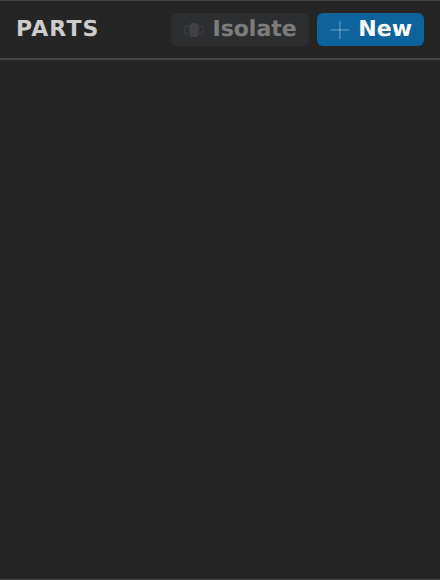
| Edits panel | Parts panel | View controls |
|---|---|---|
 |  |  |
Sidecar files
Pre-Processing mode never writes your CAD file. State lives beside it:
| File | Contents |
|---|---|
<model>.parts.json | Part definitions (entity ids, colors, mesh sizes) |
<model>.layers.json | Presentation layers (names, colours, visibility, lock, entity membership) — synced structurally with the post mode's view layers, never solver data |
<model>.edits.json | Replayable edit operations + parametric variables |
<model>.annotations.json | Pinned measurements and free-text notes |
<model>.view.json | Camera, display mode, projection, clip plane, split layout, sidebar width, view bookmarks |
<model>.mesh.json | Gmsh meshing options |
<model>.planes.json | Named construction planes (resolved point + normal, never a face reference) |
<model>.geo | Generated Gmsh script (one-way; regenerated on change) |
<dir>/cad-preview-macros.json | The macro library — per folder, shared by every model beside it |
<dir>/cad-preview-mesh-presets.json | Your saved meshing presets — per folder, like the macro library (the four bundled starters ship inside the app and are not written here) |
Save (Ctrl+S) flushes all sidecars immediately; otherwise they autosave half a second after each change. Every sidecar write is atomic — a temp file, then a rename — so a reader can never see a half-written one. That matters most when the model lives in a folder a desktop sync client is watching (Drive, Dropbox, OneDrive): it can no longer upload a truncated sidecar or raise a spurious "conflicted copy".
File ▸ Save Preprocess… bundles the CAD source and whichever sidecars exist into a single .zip, and Load Preprocess… restores one next to a destination you pick and opens it. The archive carries a manifest with a SHA-256 per entry, so a tampered or truncated file is rejected rather than half-restored; the reader also refuses entries that decompress far beyond their stored size. The .geo script is deliberately not packed — it is regenerated from the restored mesh options.