AI companion: run the structural cantilever
This walkthrough drives the same cantilever as the manual structural tutorial through KKSS's chat panel. CAD and mesh calls go to the bundled MCP servers. Every path sent to a tool must be absolute; set a project folder in File → Open Folder… and ask the assistant to confirm destinations before it writes. The local solver interpreter must import Kratos 10.4.3 and StructuralMechanicsApplication; configure it in Settings → Simulation → kratos.pythonPath and use Check environment before starting.
The transcript below is labelled as a scripted capture. Its local OpenAI-compatible provider returns fixed responses so the chat is reproducible; KKSS still executes the real CAD/mesh tools and the real Kratos solver. The capture uses a temporary workspace, contains no API key, and is reopened through the app's normal conversation history.
Prepare a workspace
Download the structural case, extract it in a project folder, and make a working copy of cantilever.stp. Keep that copy and its sidecars together. In the prompts below, replace /absolute/path/to/cantilever.stp and /absolute/path/to/mesh.mdpa with the full paths on your computer. Do not type $WORK literally: tools do not expand shell variables.
The copied STEP starts from the shipped 3 × 4 × 5 mm block. The case is 18 × 4 × 5 mm after the sixfold X scale. Its named parts are Solid (body), Support (face-3, fixed) and Load (face-1, loaded). The mesh export uses metres. The structural properties are E = 210 GPa and ν = 0.3; the fixed displacement is zero and the pressure is 100 kPa in −Z. The state uses a 1 s end time and 0.125 s step.
Prompts to copy
- Inspect the absolute STEP path. Ask the assistant to use
cad__load_model, report the bounding box and face ids, and make no changes. - Ask it to preview scaling
solid-0by[6, 1, 1]about the origin usingcad__apply_edit_ops. In the approval card, choose Validate (dry run). Read the validation report, then choose Deny. A dry run validates the requested operation without writing; denying leaves the source and sidecars unchanged. - Repeat the same scale prompt. Review the arguments and choose Allow. Ask it to create the three named parts using
cad__set_part, then requestcad__render_snapshotso the four labelled model views appear in chat. - Ask it to export
/absolute/path/to/mesh.mdpafrom the CAD file usingcad__export_mesh,mdpaElements, first-order 3D Gmsh elements at 0.8 mm, and unitm. Approve the export. Then askmesh__problemtype_describefor the structural defaults andmesh__case_write_stateto save the case values above on the exported mesh. - Ask it to call
mesh__case_generateand show the generated inputs. Review and approve the write. Before running, usemesh__case_validateif the generated sidecar or material assignments need a check. - Ask it to run
mesh__case_runwith the absolute Python interpreter path,extraEnv: {"OMP_NUM_THREADS":"2"}, andwaitSeconds: 0. This returns promptly while the solver runs. Ask it to pollmesh__case_statusuntil the run finishes; the returnedlogFilepath can be opened in a terminal or editor to inspect the solver output. A process launch by itself does not establish a successful solve. - Ask it to use
mesh__case_evaluate_quantityon the final VTK file with the run id frommesh.kratosrun.json, fieldDISPLACEMENT, kindNodal, componentz, reductionmax, time 1 s and unitmm. The published result is about +0.000589 mm under this pressure/normal convention. Compare its magnitude with the 0.000600 mm beam reference and the 25% tolerance in the structural result check. Open results, selectDISPLACEMENTin Field, enable Deformed, keep Deform by onDISPLACEMENT, and use Warp scale 1000× to see the scaled shape. SelectVON_MISES_STRESSto inspect stress. For histories and signed support reactions, build a plot from your own run in the scientific plots builder. - Follow up with the new review tools. Ask it to run
mesh__case_validateon the mesh and report the structured error/warning/info findings (a fresh generation with physical density is clean; the published structural archive already carries the physical steel density of 7850 kg/m³, so only a non-positiveDENSITYproduces theDENSITY must be greater than zeroerror). Ask it to readmesh__case_convergence(finished runs carrykkss-convergence-v2.jsonlwith a conservative verdict; older archives answerstatus:"none"as unavailable) and to listmesh__case_monitorswithaction:"list"(older archives list empty until a monitor is set). For batch work, ask it to planmesh__mesh_batch_transformwithdryRun:trueover the mesh — the plan names the output and manifest without writing anything. For compressed geometry, ask it tocad__load_modeloncad/examples/GLTF/cube-draco.glborcube-meshopt.glb: both open as a 12-triangle boundary surface.
The real tool names are cad__load_model, cad__apply_edit_ops, cad__set_part, cad__render_snapshot, cad__export_mesh, mesh__problemtype_describe, mesh__case_write_state, mesh__case_generate, mesh__case_validate, mesh__case_run, mesh__case_status, mesh__case_evaluate_quantity, mesh__case_convergence, mesh__case_monitors and mesh__mesh_batch_transform. CAD mesh generation and Kratos runs can take time; use the Jobs panel for Kratos MCP server jobs, or the mesh case sidecar and log for mesh__case_run. They are separate run systems.
To use a different local model, replace the geometry path and ask the assistant to inspect its current entity inventory before making Parts or operations. For a fluid, thermal, potential-flow or shallow-water case, use the corresponding manual tutorial as the source of truth for boundary conditions and values.
Scripted local-provider capture
The following conversation is produced by the reproducible local fixture and checked against a real solve. Paths are shortened to $WORK here; the provider itself uses a temporary absolute directory. Tool-call cards include the actual arguments in KKSS, and the approval decisions are persisted in the conversation.
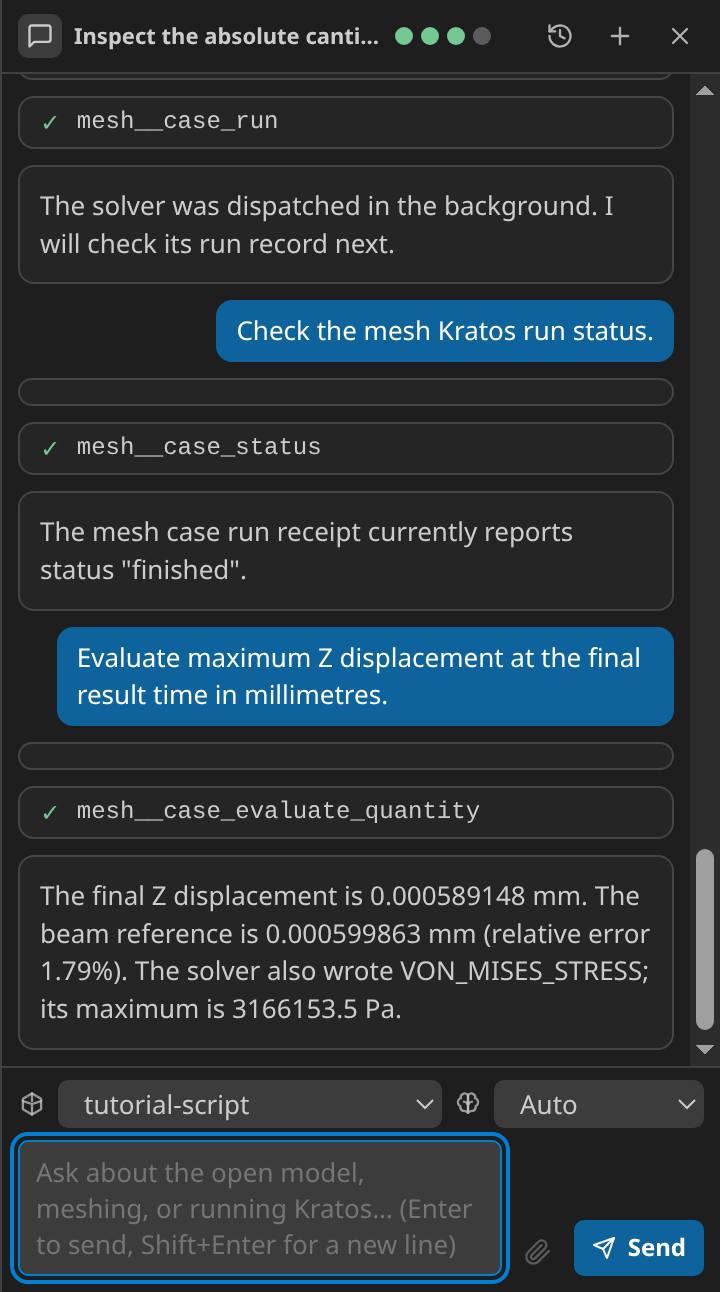
Read the full scripted transcript, including the recorded checks and measured result.
User: Inspect
$WORK/cantilever.stp, preview the sixfold X scale, then let me decide.Assistant: The model is 3 × 4 × 5 mm. The scale operation validates without writing. You denied the proposed call, so the geometry and sidecars are unchanged.
User: Apply that scale, make
Solid,SupportandLoad, and show me a snapshot.Assistant: The 18 × 4 × 5 mm cantilever and three named parts are ready. The snapshot shows the model from four labelled views.
User: Export a 0.8 mm first-order tetrahedral mesh to metres, write the structural case, generate it and start the solver in the background.
Assistant: The MDPA mesh and generated case are ready. The run was started with two OpenMP threads; I am checking the run receipt and log.
User: Evaluate the maximum Z displacement at the final time.
Assistant: The published solver result is +0.000589 mm, versus a 0.000600 mm beam reference magnitude (1.79% relative error).
VON_MISES_STRESSis also present in the solver output.
The scripted provider does not import a chat transcript. To reopen the saved conversation, use the chat header's Conversations button; after an app restart, select the saved entry from the same history list. Restoring it displays the prior tool cards and decisions without rerunning them.